On this page
Event Loop
Last reviewed 14 Sept 2026
We are already aware of the execution context and call stack, and we know JavaScript is single-threaded and synchronous. First, the global execution context (GEC) is created and pushed into the call stack. If a function is called in the global scope, an execution context is created for it (EC1) and pushed on top of the GEC. After EC1 finishes, it is removed from the call stack. Then the GEC continues, and when all code is done it is also removed from the call stack.
But what if we need to wait for something?
We can’t do that in the call stack, because the call stack doesn’t have a timer. This is where the browser comes into the picture. Browsers have a timer, local storage, the DOM, network access and much more, which our code can use through Web APIs (like setTimeout, fetch, document, localStorage, console).
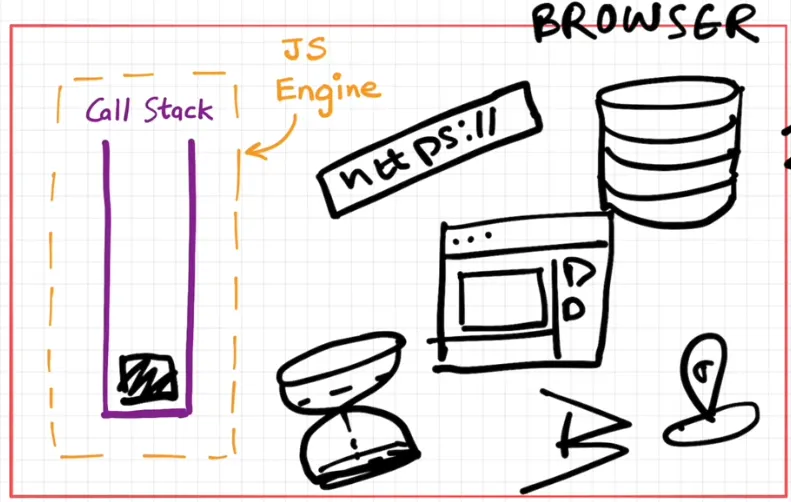
We can use these Web APIs in our code through the global window object. Since window is the global object and our code runs in the global scope, we can call them directly (setTimeout() is the same as window.setTimeout()).
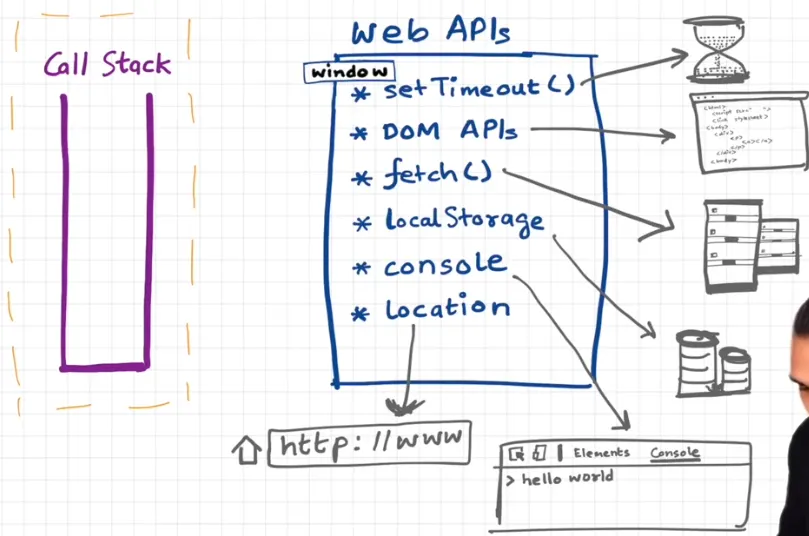
setTimeout()
setTimeout calls the Web API timer, which gives access to the browser’s timer. It takes a callback function and a delay. When you pass a callback to setTimeout, it registers the callback and starts the timer, then JavaScript moves on to the next line immediately.
After all the code has executed, the global execution context is removed from the call stack, but the timer is still running in the browser. When the timer expires, the callback needs to run — but everything runs inside the call stack only, so the callback must get there somehow. When the timer expires, the callback goes into the callback queue (task queue). Now the event loop comes into the picture: its job is to check whether the call stack is empty, and if so, push the functions from the callback queue into the call stack.
console.log("Start");
setTimeout(function cb() {  console.log("Callback");}, 5000);
console.log("End");
Output:
StartEndCallback (after 5 seconds)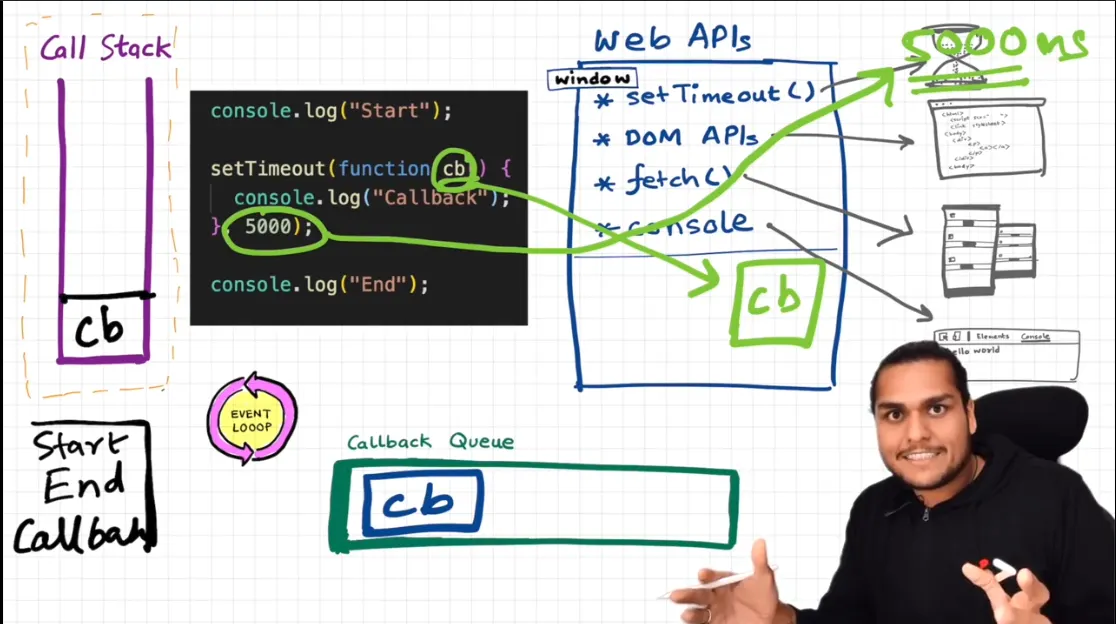
What happens when we pass 0 as the time in setTimeout? The output remains the same. The callback still goes through the callback queue, so it runs only after our main code has completely finished.
console.log("Start");setTimeout(() => console.log("Callback"), 0);console.log("End");
// Start// End// Callback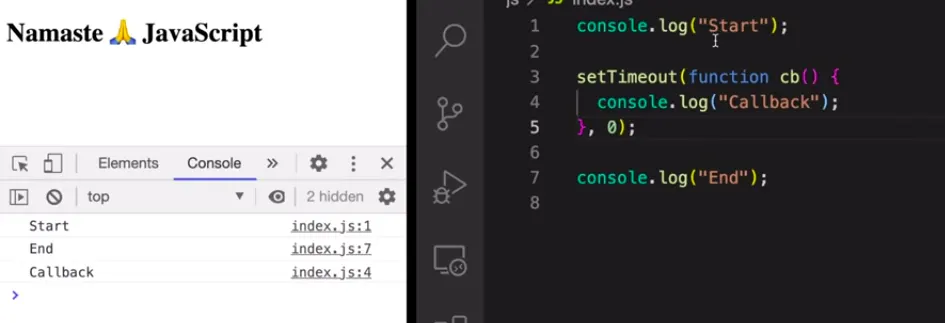
Event handlers
console.log("Start");
document.getElementById("btn").addEventListener("click", function cb() {  console.log("Callback");});
console.log("End");
When the above code executes, a global execution context is created and pushed into the call stack. It sees console.log(), calls the console Web API, and prints Start. Then it moves to document.getElementById. (Here comes another Web API: the DOM — Document Object Model — a tree representation of the HTML.) addEventListener uses the DOM API to register the callback for click events in the Web API environment. Then it moves to the next line and logs End. After all lines are executed, the global execution context is removed from the call stack.
But the event handler stays in the Web API environment until we explicitly remove the event listener or close the page. The callback sits there waiting for the user to click the button with id="btn".
When the user clicks the button, the callback is pushed into the callback queue and waits for its turn. The event loop checks the callback queue and, when the call stack is empty, pushes the callback into the call stack. The callback executes line by line and prints Callback. It is then removed from the call stack.
Why do we need a callback queue (task queue)?
Say the user clicks the button 4–5 times quickly. Then 4–5 callbacks are waiting in the callback queue. The event loop takes them one by one and pushes each into the call stack. In real life there are many event listeners, timers and other things happening inside the browser. JavaScript has only one call stack, so we need a queue so that each callback gets its chance, one after another, in order.
fetch API and the microtask queue
console.log("Start");
setTimeout(function cbT() {  console.log("CB setTimeout");}, 5000);
fetch("https://api.netflix.com").then(function cbF() {  console.log("CB fetch API");});
console.log("End");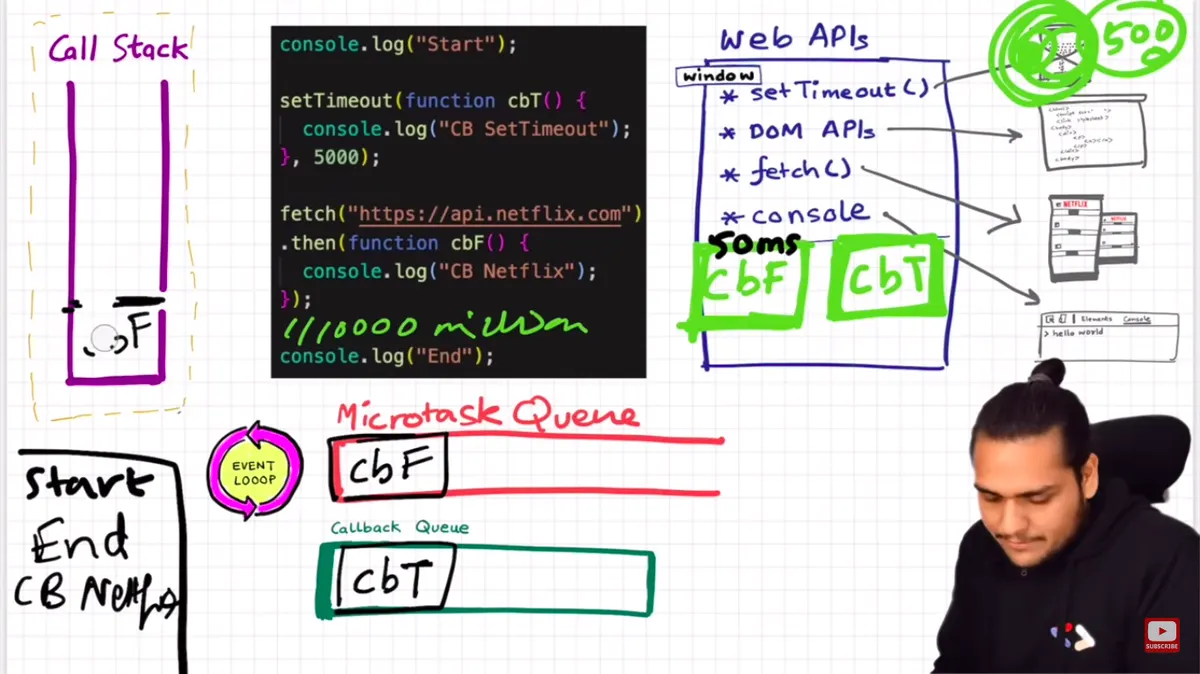
As usual, the global execution context is created and code runs line by line. The console Web API prints Start. setTimeout registers cbT() in the Web API environment and starts a 5000 ms timer. fetch() registers cbF() in the Web API environment and makes a network request to the Netflix server. Then End is printed.
Let’s say the Netflix server returns data after 50 ms. cbF() will not go to the callback queue — it goes to the microtask queue (similar to the callback queue, but with higher priority).
Even after the response arrives, cbF() cannot run until the call stack is empty. Say we have a million lines of code, and during that time both the fetch response has arrived and the 5 s timer has expired. Then cbF() waits in the microtask queue and cbT() waits in the callback queue. Meanwhile, the event loop keeps checking whether the call stack is empty. Once the global execution context finishes and the call stack is empty:
- All callbacks in the microtask queue run first (including any new microtasks they add).
- Then one callback from the callback queue runs.
- After that task, the microtask queue is emptied again, then the next callback, and so on.
Output:
StartEndCB fetch APICB setTimeoutWhat comes under the microtask queue?
- Callbacks from Promises (
.then,.catch,.finally) and code afterawait queueMicrotask()callbacks- MutationObserver callbacks (MutationObserver lets you watch for changes made to the DOM tree)
Everything else — setTimeout, setInterval, DOM events, I/O — goes to the callback queue (also called the task queue or macrotask queue).
Classic interview question — what is the output order?
console.log("1");
setTimeout(() => console.log("2"), 0);
Promise.resolve().then(() => console.log("3"));
queueMicrotask(() => console.log("4"));
(async () => {  console.log("5");  await null;  console.log("6");})();
console.log("7");
Output:
1573462- Synchronous code first:
1,5(an async function runs synchronously until its firstawait),7. - Then the microtask queue, in order:
3,4,6. - Then the callback queue:
2.
// Microtasks scheduled inside a task still run before the next tasksetTimeout(() => {  console.log("timeout 1");  Promise.resolve().then(() => console.log("promise inside timeout 1"));}, 0);setTimeout(() => console.log("timeout 2"), 0);
// timeout 1// promise inside timeout 1// timeout 2
What is starvation of the callback queue?
Starvation happens when “greedy” work makes a shared resource unavailable for a long time. If a microtask keeps creating more microtasks, the event loop keeps emptying the microtask queue and never gets to the callback queue. So callbacks in the callback queue never get a chance to execute (and the page stops rendering).
function loop() { Promise.resolve().then(loop); // each microtask schedules another one}// loop(); // setTimeout callbacks and rendering would never run — the page freezessetTimeout(() => console.log("I may never run"), 0);Trust issues with setTimeout()
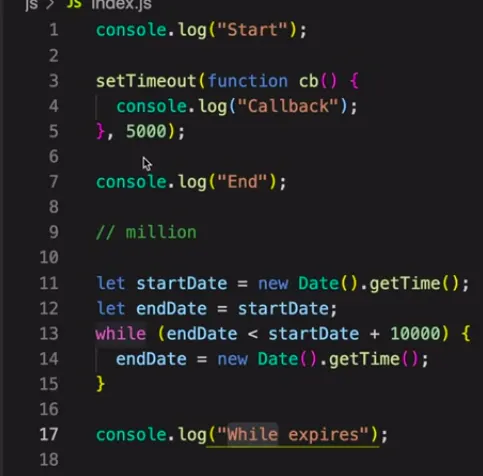
setTimeout(cb, 5000) does not guarantee the callback runs after exactly 5 seconds. It guarantees it runs after at least 5 seconds. As we saw in the fetch example, if the main thread is busy (millions of lines of code), the callback must wait in the callback queue until the call stack is empty — even if the timer expired long ago.
console.log("Start");
setTimeout(() => console.log("Callback"), 5000);
const startDate = Date.now();let endDate = startDate;while (endDate < startDate + 10000) { // block the main thread for 10 seconds  endDate = Date.now();}
console.log("While loop finished");
// Start// While loop finished   (after 10 s)// Callback              (right after — not at 5 s)
We use the Date API above only to simulate a long-running task. There is no way to force a timer to interrupt busy code, so: never block the main thread. Break heavy work into smaller chunks, or move it to a Web Worker.
From the fetch API example:
Event loop summary
| Component | What it does |
|---|---|
| Call stack | Runs one execution context at a time |
| Web APIs | Browser features (timers, DOM, fetch) that wait outside the call stack |
| Callback (task) queue | Waiting callbacks from setTimeout, setInterval, DOM events |
| Microtask queue | Waiting callbacks from Promises, await, queueMicrotask, MutationObserver — higher priority |
| Event loop | When the call stack is empty: run all microtasks, then one task, repeat |