On this page
React — Interview Questions
Self-test drill. Each answer is hidden — read the question, answer it in your head, then reveal.
Last reviewed 15 Sept 2026
Short answers for quick revision. Each answer has a small example, and Deep dive → links point to the full chapter in the React notes.
Sections: Basics & JSX · Components, props & state · Rendering & the virtual DOM · Lifecycle & hooks · Patterns · Performance · Routing & state management · React 18 & 19 · Output questions
Basics & JSX
What is React?
React is a JavaScript library for building user interfaces, maintained by Meta. It is component-based (the UI is split into small reusable pieces), declarative (you describe the UI for a state, React updates the DOM) and uses a virtual DOM for efficient updates.
React handles only the view layer — routing, data fetching and global state come from other libraries or a framework like Next.js.
What are the features of React?
- JSX — an HTML-like syntax inside JavaScript.
- Components — reusable, independent pieces of UI.
- Virtual DOM — a lightweight copy of the DOM used to compute minimal updates.
- One-way data binding — data flows from parent to child, which makes changes easier to trace.
- Hooks — state and lifecycle features in function components.
- Declarative UI — describe what the UI should look like, not how to update it.
- Learn once, write anywhere — web (React DOM), mobile (React Native), server (SSR).
List some of the major advantages of React
- Reusable components reduce duplicate code and make teamwork easier.
- Efficient updates through the virtual DOM and reconciliation.
- Easy to learn if you know JavaScript — no template language to learn.
- Huge ecosystem and community, so most problems already have a well-tested library.
- Great developer tools (React DevTools, Profiler, Fast Refresh).
- SEO-friendly with server rendering (Next.js).
- Testable — components are functions of props and state.
What are the limitations of React?
- React is only a view library, so you must pick your own routing, state and data-fetching libraries.
- Fast-moving ecosystem — patterns and best practices keep changing (classes → hooks → Server Components).
- JSX and build tooling add a learning step for beginners.
- Poor SEO and slow first load for client-only apps (solved by SSR/SSG frameworks).
- Documentation of third-party libraries varies in quality.
What are the major problems with the MVC framework?
- DOM manipulation is expensive and was done by hand.
- Slow and inefficient for apps with many updates.
- Large memory use with many two-way bindings and watchers.
- Circular dependencies between models, views and controllers create a complex, hard-to-trace flow.
- As the app grows, it becomes hard to answer “what changed this value?” React’s one-way data flow fixes exactly that.
How is React different from Angular?
| React | Angular | |
|---|---|---|
| Type | UI library | full framework |
| Language | JavaScript/TypeScript + JSX | TypeScript + HTML templates |
| Data binding | one-way | two-way available |
| DOM | virtual DOM + reconciliation | change detection / Signals on the real DOM |
| Learning curve | smaller core | steeper (DI, RxJS, modules) |
| Flexibility | pick your own libraries | batteries included |
What is a Single Page Application (SPA)?
An SPA loads one HTML page and updates the content in the browser with JavaScript as the user navigates, instead of requesting a new page from the server each time. Navigation feels instant and app state survives between “pages”, but the first load is bigger and SEO needs extra work.
What is the difference between declarative and imperative?
- Imperative: you write how to do something, step by step (create an element, set text, append it, update it later).
- Declarative: you describe what the result should look like for the current state, and React figures out the DOM operations.
// Declarative (React)function Counter({ count }) { return <p>Clicked {count} times</p>;}// Imperative (plain DOM)const p = document.createElement('p');p.textContent = `Clicked ${count} times`;document.body.appendChild(p);// ...and you must remember to update it whenever count changesWhat is Babel?
Babel is a JavaScript compiler (transpiler). It converts modern JavaScript and JSX into code older browsers understand, using presets like @babel/preset-env and @babel/preset-react.
What is webpack?
Webpack is a module bundler. It starts at an entry file, follows every import, and produces optimized bundles. Loaders transform individual files (babel-loader, css-loader); plugins hook into the whole build (HtmlWebpackPlugin, TerserPlugin).
Comparison of CRA and Vite
| Create React App (CRA) | Vite | |
|---|---|---|
| Bundler | webpack | esbuild (dev) + Rollup (build) |
| Dev server start | slow — bundles the whole app first | instant — serves native ES modules |
| Hot reload | slower as the app grows | near-instant HMR |
| Config | hidden (needs eject or CRACO) | a simple vite.config.js |
| Status | deprecated in February 2025 | actively maintained, recommended |
Why is esbuild faster than webpack?
- It’s written in Go and compiled to native code, while webpack runs in Node.js/JavaScript.
- It uses parallelism across CPU cores.
- It does less work: fewer abstractions, no complex plugin pipeline for the common cases.
- Everything is designed around speed (single-pass parsing, efficient memory use).
What is a source map?
A source map maps the compiled/minified/bundled code back to your original source files, so DevTools shows your real code and line numbers in errors and breakpoints instead of bundle.min.js:1:52342.
What is JSX?
JSX (JavaScript XML) is a syntax extension to JavaScript that lets you write HTML-like markup inside JavaScript. It isn’t a string or HTML — a compiler turns it into function calls that create React elements.
const element = <h1 className="greeting">Hello, world!</h1>;
// compiles to (React 17+ automatic runtime):const element = _jsx('h1', { className: 'greeting', children: 'Hello, world!' });Why can’t browsers read JSX?
Browsers only understand plain JavaScript. JSX is not part of the JavaScript standard, so it must be compiled first (by Babel, SWC or esbuild) into React.createElement / jsx() calls.
How did React syntax change from ES5 to ES6?
| ES5 | ES6+ |
|---|---|
var React = require('react') | import React from 'react' |
module.exports = App | export default App |
React.createClass({...}) | class App extends React.Component |
function(props) { return ... } | (props) => ... (arrow functions) |
var name = this.props.name | const { name } = this.props (destructuring) |
'Hello ' + name | `Hello ${name}` (template literals) |
What is an arrow function and how is it used in React?
A shorter function syntax that doesn’t have its own this — it uses this from the surrounding scope. In React it’s used for callbacks and class field methods, which removes the need for bind.
class Counter extends React.Component {  increment = () => {                  // class field: `this` is the instance    this.setState(s => ({ count: s.count + 1 }));  };  render() {    return <button onClick={this.increment}>+</button>;  }}
const Item = ({ item, onDelete }) => (  <li onClick={() => onDelete(item.id)}>{item.name}</li>   // passing arguments);
What do you understand by “In React, everything is a component”?
The whole UI is built from components — small, independent, reusable pieces that each return some UI. A page is a component made of a header, a sidebar and content components, which are themselves made of smaller components. Components can be composed, reused and tested in isolation.
What is the difference between createElement and cloneElement?
createElement(type, props, ...children)— creates a new React element. This is what JSX compiles to.cloneElement(element, props, ...children)— copies an existing element and merges new props into it. Used when a component needs to add props to the children it received.
function RadioGroup({ name, children }) { return ( <div> {React.Children.map(children, child => React.cloneElement(child, { name }) // inject the group name into each radio )} </div> );}What is the difference between an element and a component?
- An element is a plain object describing what you want on screen. It’s immutable and cheap to create.
- A component is a function or class that returns elements, and can take props and have state.
const element = <Button color="blue" />; // an element (an object)function Button({ color }) { ... } // a component (a function)Difference between a function and a class component
| Function component | Class component |
|---|---|
| A function that returns JSX | Extends React.Component with a render() method |
State with useState | State with this.state / this.setState |
Side effects with useEffect | Lifecycle methods |
No this | Uses this; handlers often need binding |
| Logic reuse with custom hooks | Logic reuse with HOCs and render props |
| Recommended today | Legacy; still needed for error boundaries |
Deep dive → Components, Props and State
When should you use a class component over a function component?
Almost never in new code. The only thing function components still can’t do is be an error boundary (getDerivedStateFromError / componentDidCatch) — everything else has a hook. You’ll also use classes when maintaining an existing class-based codebase.
How do you modularize code in React?
- One component per file, exported with
export default. - Group by feature (a folder per feature with its components, hooks and tests) rather than by type.
- Extract shared logic into custom hooks, and shared UI into a components library.
- Keep components small; split “smart” (data) from “presentational” (UI) parts.
What is the purpose of render() in React?
render() is the only required method in a class component. It reads this.props and this.state and returns what should appear on screen (JSX, null, a string, an array, a fragment or a portal). It must be pure — no state changes, no DOM access, no API calls.
In function components, the function body itself is the render.
Components, props & state
What are state and props? What’s the difference between them?
- Props are inputs passed into a component by its parent. They’re read-only.
- State is data owned and changed by the component itself.
| Props | State |
|---|---|
| Passed from the parent | Managed inside the component |
| Read-only | Changed with setState / the useState setter |
| Make a component configurable | Make a component interactive over time |
| Change comes from above | Change comes from inside |
| Both trigger a re-render when they change | Both trigger a re-render when they change |
What are the ways to create state?
// 1. Function component — useStateconst [count, setCount] = useState(0);
// 2. Function component — useReducer (complex state)const [state, dispatch] = useReducer(reducer, initialState);
// 3. Class component — in the constructorconstructor(props) {  super(props);  this.state = { count: 0 };}
// 4. Class component — class fieldstate = { count: 0 };
What is the purpose of using super(props) in the constructor?
super(props) calls the parent (React.Component) constructor, which sets this.props. Without it, this.props is undefined inside the constructor, and using this before super() throws a ReferenceError.
class Button extends React.Component {  constructor(props) {    super(props);    console.log(this.props);  // { label: "Save" }  }}
class Broken extends React.Component {  constructor(props) {    super();                  // no props passed    console.log(this.props);  // undefined  }}
(Outside the constructor, this.props works either way — React assigns it after construction.)
What is a common mistake where a function is called on every render?
Adding () when passing an event handler:
<button onClick={this.handleClick()}>Click</button> // ❌ called during render<button onClick={this.handleClick}>Click</button> // ✅ passed as a function<button onClick={() => this.handleDelete(id)}>Delete</button> // ✅ with argumentsIf the handler sets state, calling it during render triggers another render, which calls it again: “Too many re-renders. React limits the number of renders to prevent an infinite loop.”
How do you use setState() correctly?
-
Never assign state directly —
this.state.count = 5doesn’t re-render. UsesetState. -
setState is asynchronous — reading state right after it won’t show the new value. Use the second-argument callback (classes) or
useEffect. -
Use the updater function when the new value depends on the old one, because updates are batched:
this.setState(prev => ({ count: prev.count + 1 }));setCount(c => c + 1); -
setStatemerges objects one level deep in classes; theuseStatesetter replaces the value — spread it yourself. -
Never mutate state — create new objects and arrays.
Deep dive → Use setState() correctly
What are the ways of binding methods?
// 1. bind in render — new function every render<button onClick={this.handleClick.bind(this)}>Click</button>
// 2. arrow function in render — new function every render, but allows arguments<button onClick={() => this.handleClick(id)}>Click</button>
// 3. bind in the constructor — bound onceconstructor(props) {  super(props);  this.handleClick = this.handleClick.bind(this);}
// 4. class property with an arrow function — recommended for classeshandleClick = () => { ... };
Why is binding needed? onClick={this.handleClick} passes the function without its object. React calls it as a plain function, and class bodies are strict mode, so this is undefined and this.setState throws.
What are controlled components?
A form input whose value is controlled by React state: the value comes from state, and onChange updates that state, making React the “single source of truth”.
const [name, setName] = useState('');<input value={name} onChange={e => setName(e.target.value)} />What are uncontrolled components?
Inputs whose value is kept by the DOM. You read it when you need it, using a ref (or FormData), and set the initial value with defaultValue.
const inputRef = useRef(null);<input defaultValue="Bob" ref={inputRef} />// inputRef.current.value when submitting<input type="file" /> is always uncontrolled — only the user can set its value.
How do you set state with a dynamic key name?
Use a computed property name:
// Function componentconst handleChange = e =>  setForm(prev => ({ ...prev, [e.target.name]: e.target.value }));
// Class component (setState merges, so other fields are kept)handleChange = e => this.setState({ [e.target.name]: e.target.value });
Can we pass data from a child to a parent component? If yes, how?
Yes — the parent passes a function as a prop, and the child calls it with the data. (Data still flows down; the callback is the channel back up.)
function Parent() {  const [query, setQuery] = useState('');  return (    <>      <SearchBox onSearch={setQuery} />      <p>Searching: {query}</p>    </>  );}
function SearchBox({ onSearch }) {  return <input onChange={e => onSearch(e.target.value)} />;}
Other options: lifting state up, Context, or a state library.
What is prop drilling?
Passing props through many intermediate components that don’t use them, just to reach a deeply nested child. It makes components harder to reuse and refactor.
Fixes: component composition (children), Context, or a state management library.
How do you loop inside JSX?
Use map(), because JSX takes expressions, not statements. Give each item a stable key.
<ul> {items.map(item => ( <li key={item.id}>{item.name}</li> ))}</ul>What is a switching component?
A component that renders one of several components based on a prop — useful for tabs, wizards and status screens.
const PAGES = { home: <Home />, about: <About />, contact: <Contact /> };
function Page({ page }) {  return PAGES[page] ?? <NotFound />;}
How do you use innerHTML in React?
With dangerouslySetInnerHTML, and only with sanitized HTML — otherwise you open an XSS hole. (React escapes normal JSX values, which is why the prop has a scary name.)
<div dangerouslySetInnerHTML={{ __html: DOMPurify.sanitize(userHtml) }} />What are synthetic events in React?
A SyntheticEvent is React’s cross-browser wrapper around the native browser event. It has the same interface (target, preventDefault(), stopPropagation()), works identically in all browsers, and exposes the original as e.nativeEvent.
Since React 17, listeners are attached to the root container rather than document, and event pooling was removed (so e.persist() is no longer needed).
What are Web Components, and how do they relate to React?
Web Components (custom elements + Shadow DOM) are a browser standard for framework-independent, encapsulated components. React is a library for building UIs with data flow. You can use Web Components inside React (use a ref for their imperative API) or render React inside a Web Component. React 19 added full custom element support (properties and custom events).
Rendering & the virtual DOM
What is the virtual DOM?
The virtual DOM (VDOM) is an in-memory representation of the real DOM — a lightweight tree of plain JavaScript objects describing what the UI should look like.
How does the virtual DOM work?
The virtual DOM works in three simple steps:
- Whenever the underlying data changes, the UI is re-rendered into a new virtual DOM tree.
- The difference between the previous tree and the new one is calculated (diffing).
- Only the parts that actually changed are applied to the real DOM (commit).
Why use the virtual DOM instead of the real DOM for comparison?
- Performance optimization: manipulating the real DOM is slow (re-rendering, style recalculation, layout).
- Efficient updates: React computes the differences in memory and applies the minimum set of real DOM changes.
- Batching: multiple changes are grouped into a single DOM update.
- Simpler code: you describe the UI declaratively instead of writing manual DOM updates.
Honest caveat: the virtual DOM isn’t automatically faster than well-written direct DOM code — its real benefit is giving you declarative code with good-enough performance.
Can you see the virtual DOM?
Not directly — it lives in memory as JavaScript objects. But you can observe it:
-
React DevTools — inspect the component tree, which reflects the virtual DOM structure.
-
Console logs — log a React element to see its object form:
console.log(<div>Hello</div>);// { type: "div", props: { children: "Hello" }, key: null, ... } -
React Profiler — see which components rendered and how long it took.
-
DevTools “Highlight updates” — visually flash components that re-render.
What is the difference between the Shadow DOM and the virtual DOM?
- The Shadow DOM is a browser technology for scoping markup and CSS inside web components — real, isolated DOM nodes.
- The virtual DOM is a concept implemented by libraries in JavaScript on top of browser APIs — an in-memory description, not actual DOM.
What is React Fiber?
React Fiber is the reconciliation engine introduced in React 16. It rewrote React’s rendering so that work can be split into small units, paused, resumed, reused and prioritized. That’s what makes concurrent features possible — React can interrupt a long render to handle an urgent update like typing, then continue.
What is reconciliation?
Reconciliation is the process React uses to update the DOM. When a component’s state changes, React builds a new virtual DOM tree and compares it with the previous one to decide whether (and what) to update in the real DOM.
What is the diffing algorithm?
Comparing two trees perfectly is O(n³), so React uses an O(n) heuristic based on two assumptions: elements of different types produce different trees, and keys identify which children are the same across renders.
When diffing, React first compares the root elements, and the behavior varies by type.
List without a key attribute
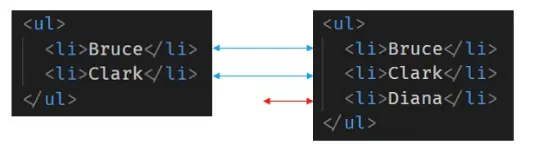
Consider a list with two items, Bruce and Clark. Adding an item at the end: React iterates both lists, comparing items one by one. Finding no difference in the first two, it simply inserts the third — updating the tree without rebuilding it.
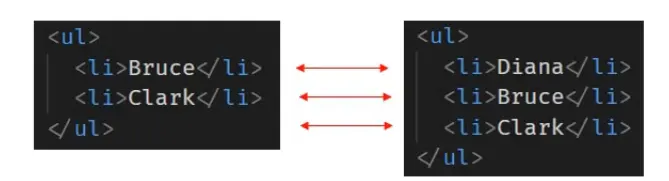
However, inserting an item at the beginning makes React see every position as different, so it mutates every child — inefficient.
List with a key attribute
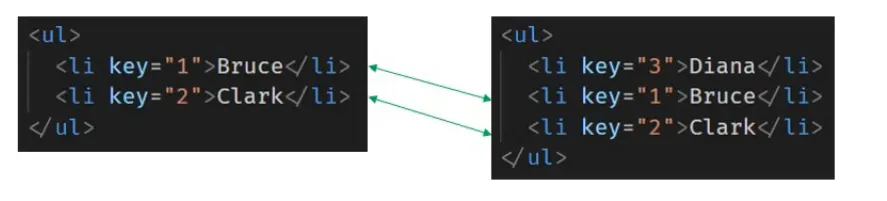
When items have unique keys, React uses them to match children across trees. If a new item (key=3) is added at the top, React identifies it as new and preserves the subtrees for keys 1 and 2.
What are the rules covered by the diffing algorithm?
| Rule | Description |
|---|---|
| Same type comparison | Elements of the same type are updated in place; different types are destroyed and replaced |
| Use of keys | Keys in lists tell React which items changed, were added or removed |
| Depth-first reconciliation | React walks the tree top-down, left-to-right |
| Component reuse | A component of the same type keeps its instance and state, and receives new props |
| Children indexing | Without keys, children are matched by index/position |
| Batched updates | Multiple state updates are batched into one render |
What could be the issues with using the index as a key?
The index identifies a position, not an item. When the list is reordered, filtered or has items added/removed at the start, the same index points to a different item — so React reuses the wrong component, and its state (typed text, checkboxes, focus) sticks to the wrong row.
-
Initially we have 3 items, each with its index as the key:

key=0has a value of 1key=1has a value of 2key=2has a value of 3
-
When a new item is inserted at the beginning:
- The new item is assigned
key=0 - The keys of existing elements are incremented by 1
- The new item is assigned
-
During UI updates:
- React identifies the previous elements by their keys (
key=0,key=1,key=2) and reuses them - Only
key=3looks new, so a new element is created at the end
- React identifies the previous elements by their keys (
-
This causes misalignment: the DOM state stays with the old keys, so values appear on the wrong rows.
Safe to use the index only when the list is static, never reordered or filtered, and items are never inserted anywhere but the end.
Lifecycle & hooks
What are component lifecycle methods?
Methods React calls on a class component at different points in its life:
- Mounting:
constructor→getDerivedStateFromProps→render→componentDidMount - Updating:
getDerivedStateFromProps→shouldComponentUpdate→render→getSnapshotBeforeUpdate→componentDidUpdate - Unmounting:
componentWillUnmount - Error handling:
getDerivedStateFromError,componentDidCatch
Deep dive → Component Lifecycle Methods
What are mounting lifecycle methods?
| Method | Purpose |
|---|---|
constructor(props) | initialize state and bind handlers. No side effects |
static getDerivedStateFromProps(props, state) | derive state from props. Static — no this. Return an object or null |
render() | required; read props/state and return JSX. Must be pure |
componentDidMount() | runs after the DOM is ready — the place for side effects (fetching, subscriptions, timers) |
With a child component, the order is: parent constructor → parent render → child constructor → child render → child componentDidMount → parent componentDidMount.
What are updating lifecycle methods?
| Method | Purpose |
|---|---|
static getDerivedStateFromProps | runs before every render |
shouldComponentUpdate(nextProps, nextState) | return false to skip the re-render (default is true) |
render() | produce the new UI |
getSnapshotBeforeUpdate(prevProps, prevState) | read the DOM (e.g. scroll position) right before it changes; its return value goes to componentDidUpdate |
componentDidUpdate(prevProps, prevState, snapshot) | side effects after the update — always compare with the previous props/state or you’ll loop forever |
What are unmounting lifecycle methods?
componentWillUnmount() — called right before the component is removed. Use it to clean up: clear timers, remove event listeners, cancel subscriptions and in-flight requests. Don’t call setState here.
What are error handling lifecycle methods?
static getDerivedStateFromError(error)— return new state to render a fallback UI.componentDidCatch(error, info)— log the error (info.componentStackshows where it came from).
A class implementing either becomes an error boundary. Error boundaries don’t catch errors in event handlers, async code, server rendering, or in the boundary itself.
What are React Hooks?
Hooks are functions that let you use state and other React features in function components. They were added in React 16.8. Examples: useState, useEffect, useContext, useReducer, useRef, useMemo, useCallback.
Why do we need hooks?
- Use state and lifecycle features without classes — no
this, no binding. - Reuse stateful logic with custom hooks instead of HOCs and render props (which caused “wrapper hell”).
- Organize code by concern: related setup and cleanup live together, instead of being split across
componentDidMountandcomponentWillUnmount. - Less code and better minification.
What rules must hooks follow?
- Only call hooks at the top level — not inside loops, conditions, nested functions or after an early
return. - Only call hooks from React function components or custom hooks — not from plain functions, classes or event handlers.
Why? React tracks hook state by call order. If the order changes between renders, React returns the wrong state, and you may see “Rendered fewer hooks than expected.”
How do you ensure hooks follow the rules in your project?
Use the official ESLint plugin eslint-plugin-react-hooks with the rules-of-hooks and exhaustive-deps rules. It’s included by default in Vite and Next.js templates, and flags both rule violations and missing effect dependencies.
What is useState?
The hook that adds state to a function component. It returns an array: the current value and a setter.
const [count, setCount] = useState(0);Unlike class state, it doesn’t have to be an object, and the setter replaces the value instead of merging it.
Why is useState not named createState?
“Create” wouldn’t be accurate: state is only created the first time the component renders. On later renders, useState returns the current state. Also, by convention all hook names start with use.
What are the differences between class state and useState?
Class this.state | useState |
|---|---|
| Always an object | Any value (number, string, array, object) |
setState merges the object | The setter replaces the value |
| One state object per component | As many independent state variables as you like |
| Callback as the second argument | No callback — use useEffect |
What is useEffect and how do you use it?
useEffect lets you run side effects after render — data fetching, subscriptions, timers, manual DOM changes. It replaces componentDidMount, componentDidUpdate and componentWillUnmount.
useEffect(() => {  // setup: runs after render  const id = setInterval(tick, 1000);
return () => { // cleanup: runs before the next effect and on unmount clearInterval(id); };}, [dependencies]);| Dependencies | When it runs |
|---|---|
| omitted | after every render |
[] | once, after the first render |
[a, b] | after the first render, and whenever a or b changes |
What is the behaviour of useEffect with an incorrect dependency?
You get a stale closure: the effect keeps using values from the render when it was created.
useEffect(() => { const id = setInterval(() => setCount(count + 1), 1000); // count is always 0 return () => clearInterval(id);}, []); // ❌ lying about dependencies — the counter stops at 1Fixes: use the updater form setCount(c => c + 1), or add count to the dependency array (which recreates the interval on every change).
How do you fetch data using useEffect?
useEffect(() => {  const controller = new AbortController();
  (async () => {    try {      const res = await fetch(`/api/users/${id}`, { signal: controller.signal });      if (!res.ok) throw new Error(`HTTP ${res.status}`);      setUser(await res.json());    } catch (e) {      if (e.name !== 'AbortError') setError(e.message);    } finally {      setLoading(false);    }  })();
  return () => controller.abort();   // avoids race conditions and stale updates}, [id]);
For real apps, use TanStack Query or SWR — they add caching, deduplication, retries and background refetching.
Can we use async in useEffect?
Not directly. An async function returns a Promise, but useEffect expects the return value to be undefined or a cleanup function.
useEffect(async () => { ... }, []);          // ❌ warning
useEffect(() => {                             // ✅ async function inside  async function load() { ... }  load();}, []);
Is useEffect synchronous or asynchronous?
The effect function itself runs synchronously, but React schedules it to run after the browser has painted, so it doesn’t block the screen update. useLayoutEffect runs synchronously before the paint.
Compare using the Context API in class and function components
// Class: contextType (one context only)class Profile extends React.Component {  static contextType = UserContext;  render() { return <p>{this.context.name}</p>; }}
// Class: Consumer (any number of contexts, but nested)<UserContext.Consumer>{user => <p>{user.name}</p>}</UserContext.Consumer>
// Function: useContext (any number, no nesting)function Profile() { const user = useContext(UserContext); const theme = useContext(ThemeContext); return <p className={theme}>{user.name}</p>;}What is useReducer?
A hook for state management — an alternative to useState for state with multiple sub-values or complex transitions. You pass a reducer (a pure (state, action) => newState function) and get back the state and a dispatch function.
const [state, dispatch] = useReducer(reducer, initialState);dispatch({ type: 'increment' });useState is actually built on top of useReducer.
What are the differences between useState and useReducer?
useState | useReducer | |
|---|---|---|
| State shape | number, string, boolean | object or array |
| Number of transitions | one or two | many |
| Related transitions | no | yes |
| Business logic | simple | complex, kept in the reducer |
| Testing | harder (inside the component) | easy — the reducer is a pure function |
| Passing updates down | several callbacks | one stable dispatch |
How do you use useReducer with useContext?
Put the state and dispatch from useReducer into a Context, and any component can read the state or dispatch actions — a simple global store without Redux.
const StateContext = createContext();const DispatchContext = createContext();
function AppProvider({ children }) {  const [state, dispatch] = useReducer(reducer, initialState);  return (    <StateContext.Provider value={state}>      <DispatchContext.Provider value={dispatch}>{children}</DispatchContext.Provider>    </StateContext.Provider>  );}
// Anywhere below:const state = useContext(StateContext);const dispatch = useContext(DispatchContext);
Two contexts are used so components that only dispatch don’t re-render when the state changes.
What is useRef, and how does it differ from class components?
useRef returns a mutable object ({ current }) that stays the same across renders and doesn’t trigger a re-render when changed. It’s used for DOM access and as the function-component equivalent of a class instance variable.
const inputRef = useRef(null);<input ref={inputRef} />inputRef.current.focus();
const intervalRef = useRef();        // like `this.interval` in a classintervalRef.current = setInterval(...);
createRef vs useRef: createRef creates a new ref every time it’s called, so in a function component it would reset on every render.
What is the important use case of useRef compared to class components?
Storing a value that must survive re-renders without causing one — timer IDs, previous values, a counter of renders, whether it’s the first render, or any object you’d have put on this in a class.
function usePrevious(value) { const ref = useRef(); useEffect(() => { ref.current = value; }, [value]); return ref.current; // the value from the previous render}What is useCallback and why do we use it?
useCallback returns a memoized version of a function that only changes when its dependencies change.
Why: a new function is created on every render, and functions are compared by reference. A memoized child (React.memo) sees a “new” prop every time and re-renders anyway. useCallback keeps the same reference.
const increment = useCallback(() => setCount(c => c + 1), []);<MemoizedButton onClick={increment} /> // no longer re-renders on every parent renderIt’s only worth it when the function is passed to a memoized child, or used as a dependency of another hook.
What is useMemo?
useMemo returns a memoized value — it re-runs the calculation only when its dependencies change. Use it for expensive calculations and to keep object/array references stable.
const sorted = useMemo(() => hugeList.sort(compare), [hugeList]);const contextValue = useMemo(() => ({ user, setUser }), [user]);What are the differences between useMemo and useCallback?
useMemo | useCallback | |
|---|---|---|
| Returns | the result of the function | the function itself |
| For | expensive values, stable objects | stable function references |
| Equivalent | — | useCallback(fn, deps) = useMemo(() => fn, deps) |
Deep dive → Pure Component and React.memo
What is useImperativeHandle?
It customizes what a parent receives through a ref, so a component can expose a small API instead of its DOM node. Used with forwardRef (React 18 and earlier).
const VideoPlayer = forwardRef(function VideoPlayer(props, ref) { const videoRef = useRef(null); useImperativeHandle(ref, () => ({ play: () => videoRef.current.play(), pause: () => videoRef.current.pause() }), []); return <video ref={videoRef} {...props} />;});// The parent can call ref.current.play(), but not touch the DOM node directly.What is useLayoutEffect, and when should you use it?
It has the same signature as useEffect, but runs synchronously after DOM changes and before the browser paints.
Use it when: you need to measure the DOM (size, scroll position) and change something based on that measurement, to avoid a visible flicker — tooltips, positioning, scroll restoration.
Differences between useEffect and useLayoutEffect
useEffect | useLayoutEffect | |
|---|---|---|
| Timing | after the browser paints | before the browser paints |
| Blocks painting | No | Yes |
| Use for | data fetching, subscriptions, logging | DOM measurements, avoiding flicker |
| Server rendering | fine | warns — it can’t run on the server |
What are custom hooks and where do we use them?
A custom hook is a JavaScript function whose name starts with use and that calls other hooks. It’s the modern way to share stateful logic between components (replacing HOCs and render props).
function useToggle(initial = false) {  const [on, setOn] = useState(initial);  const toggle = useCallback(() => setOn(o => !o), []);  return [on, toggle];}
const [isOpen, toggleOpen] = useToggle();
Important: custom hooks share logic, not state — each component gets its own independent state. Common examples: useLocalStorage, useDebounce, useFetch, useMediaQuery, useOnlineStatus.
What is useDebugValue?
It displays a label for a custom hook in React DevTools. Most useful for hooks in shared libraries, not for every hook in an app.
useDebugValue(isOnline ? 'Online' : 'Offline');Patterns (HOC, render props, refs, context)
What is a higher-order component (HOC)?
A higher-order component is a function that takes a component and returns a new component. It wraps the original (composition, not mutation) to add shared behavior.
const withLoading = (Component) => ({ isLoading, ...props }) =>  isLoading ? <p>Loading…</p> : <Component {...props} />;
const UserListWithLoading = withLoading(UserList);<UserListWithLoading isLoading={loading} users={users} />
Well-known HOCs: connect() (React-Redux), withRouter() (React Router v5), React.memo().
Deep dive → Higher order component
What can you do with a HOC?
- Code reuse, logic and bootstrap abstraction
- Render hijacking — decide what to render (e.g. a spinner instead of the component)
- State abstraction and manipulation
- Props manipulation — add, edit or remove props
How do you create a props proxy for a HOC?
The HOC renders the wrapped component and adds or overrides props:
function withDefaults(WrappedComponent) { return class extends React.Component { render() { const newProps = { title: 'New Header', footer: false, showFeatureX: false, showFeatureY: true }; return <WrappedComponent {...this.props} {...newProps} />; } };}Order matters: props spread later win. Here newProps override anything the parent passed with the same name.
What are the limitations of HOCs?
- Don’t apply HOCs inside
render— a new component type is created on every render, so React remounts it and state is lost. - Static methods aren’t copied — use
hoist-non-react-staticsor copy them manually. - Refs aren’t passed through —
refisn’t a normal prop; useReact.forwardRef(orrefas a prop in React 19). - Wrapper hell — many nested HOCs make the tree and DevTools hard to read.
- Prop name collisions — two HOCs can silently overwrite each other’s props.
- Unclear data source — it’s hard to tell which HOC provided which prop.
Most HOC use cases are now written as custom hooks.
What are container and presentational components?
- Presentational (dumb) components only render UI from props — no data fetching, little or no state.
- Container (smart) components handle data, state and logic, and pass the results to presentational components.
This separation makes UI components reusable and easy to test. With hooks, the “container” logic often moves into a custom hook instead of a separate component.
What are render props?
A render prop is a technique for sharing code using a prop whose value is a function. The component with the logic calls that function to decide what to render.
function Mouse({ render }) {  const [pos, setPos] = useState({ x: 0, y: 0 });  return (    <div onMouseMove={e => setPos({ x: e.clientX, y: e.clientY })}>      {render(pos)}    </div>  );}
<Mouse render={({ x, y }) => <p>Mouse at {x}, {y}</p>} />
Any function prop used to decide what to render counts — including children as a function.
What are the caveats of render props?
- They can cancel out
PureComponent/React.memo— an inline function is a new reference on every render, so the shallow comparison always fails. - Nesting (“callback hell” in JSX) when several render-prop components are combined.
- The logic can only be used inside JSX, not in other logic like effects.
What are fragments?
Fragments let you group children without adding an extra DOM node.
function Columns() { return ( <> <td>Hello</td> <td>World</td> </> );}Use <React.Fragment key={id}> when mapping a list — the <> shorthand can’t take a key. Fragments avoid invalid HTML (a <div> inside a <tr>) and don’t break flex/grid layouts.
What are refs?
Refs give access to DOM nodes or component instances, and store mutable values that don’t trigger re-renders. Use them for focus, text selection, media playback, measuring elements, and integrating non-React libraries — not for things that can be done with props and state.
const inputRef = useRef(null);           // function componentsthis.inputRef = React.createRef();       // class components
<input ref={inputRef} />inputRef.current.focus();What are callback refs?
Instead of a ref object, you pass a function. React calls it with the element when it mounts and with null when it unmounts. It gives finer control — useful for measuring an element as soon as it appears, or keeping refs for a list of items.
<input ref={el => { this.textInput = el; }} />What are the caveats with callback refs?
If the callback is written inline, it’s a new function on each render, so React calls it twice on every update — first with null, then with the element. Define it as a class method or wrap it in useCallback to avoid that. In React 19, a ref callback can return a cleanup function instead.
What is ref forwarding?
Ref forwarding automatically passes a ref through a component to one of its children, using React.forwardRef. It lets a parent reach the DOM node inside a reusable component like <Input>.
const FancyInput = React.forwardRef((props, ref) => <input ref={ref} {...props} />);
const ref = useRef(null);<FancyInput ref={ref} />   // ref.current is the <input>
React 19: function components receive ref as a normal prop, so forwardRef is no longer needed.
Which is preferred: callback refs or findDOMNode()?
Refs (callback refs, createRef, useRef). findDOMNode is deprecated and removed in React 19: it breaks abstraction (a parent reaching into a child’s DOM), only returns the first child, is slow, and doesn’t work with function components or Strict Mode.
// ❌ LegacycomponentDidMount() {  findDOMNode(this).scrollIntoView();}
// ✅ Refclass MyComponent extends React.Component {  node = React.createRef();  componentDidMount() {    this.node.current.scrollIntoView();  }  render() {    return <div ref={this.node} />;  }}
Why are string refs legacy?
String refs (ref="myInput", read via this.refs.myInput) were removed in React 19 because:
- React has to track which component is currently rendering to resolve them, which is slow.
- They don’t work with static analysis or type checking.
- They don’t compose — a component can’t be used with a render prop that sets a string ref.
- They’re not supported in function components.
Use useRef, createRef or callback refs instead.
What are portals?
Portals render children into a DOM node outside the parent component’s DOM hierarchy, while staying in the same place in the React tree (props, context and event bubbling still work).
import { createPortal } from 'react-dom';
function Modal({ children }) {  return createPortal(<div className="modal">{children}</div>, document.body);}
Use cases: modals, tooltips, dropdowns and toasts that would otherwise be clipped by a parent’s overflow: hidden or z-index.
Gotcha: events from inside a portal bubble to React ancestors, even though they aren’t DOM ancestors.
What is the Context API?
Context passes data through the component tree without passing props manually at every level. It’s designed for data many components need — the current user, theme, language.
- Create:
const ThemeContext = createContext('light'); - Provide:
<ThemeContext.Provider value="dark">…</ThemeContext.Provider> - Consume:
const theme = useContext(ThemeContext);
defaultValue is used only when there is no Provider above the consumer.
What are the limitations of contextType?
- It works in class components only.
- A class can subscribe to only one context with it.
Use <Context.Consumer> for more contexts, or useContext in function components.
What is the limitation of Context?
Context compares the Provider’s value by reference. If you pass a new object on every render, every consumer re-renders whenever the Provider’s parent re-renders:
<UserContext.Provider value={{ user, setUser }}>   // ❌ new object each render
const value = useMemo(() => ({ user, setUser }), [user]);<UserContext.Provider value={value}>                // ✅ stable until user changes
Also, every consumer re-renders when any part of the value changes — context has no selectors. Split contexts by how often they change, or use a store library with selectors for frequently changing global state.
How do you apply validation on props in React?
With the prop-types package (development-only console warnings), or with TypeScript (compile-time errors — the modern choice).
import PropTypes from 'prop-types';
function UserCard({ name, age, onSelect }) { ... }
UserCard.propTypes = {  name: PropTypes.string.isRequired,  age: PropTypes.number,  onSelect: PropTypes.func.isRequired};
React 19 no longer checks propTypes (they’re silently ignored) and removed defaultProps for function components — use TypeScript and default parameters.
Deep dive → Typechecking With PropTypes
What is code splitting?
Code splitting breaks your bundle into smaller chunks that load on demand, so the initial download is smaller. It doesn’t reduce total code — it avoids loading code the user might never need.
const Settings = React.lazy(() => import('./Settings'));
<Suspense fallback={<Spinner />}> <Settings /></Suspense>React.lazyneeds a module with a default export.- Wrap lazy components in
Suspensefor a fallback, and an error boundary for load failures. - Routes are the best place to start splitting.
What is StrictMode?
A development-only tool that highlights potential problems. It renders no UI, and in React 18+ it:
- renders components twice to reveal impure rendering,
- mounts, unmounts and remounts components to reveal missing effect cleanup,
- warns about unsafe lifecycles, legacy string refs,
findDOMNodeand legacy context.
That’s why logs and API calls can appear twice in development — production runs them once.
Performance
What are Pure Components?
React.PureComponent is like React.Component, but it implements shouldComponentUpdate with a shallow comparison of props and state. If nothing changed, it skips re-rendering.
Watch out: mutating state or props (same reference) makes it skip updates it should do, and passing new objects/functions every render makes it re-render anyway.
What is React.memo?
React.memo is a higher-order component (React 16.6) that does the same shallow props comparison for function components.
const Row = React.memo(function Row({ label }) {  return <li>{label}</li>;});
// Custom comparison: return true to SKIP re-renderingexport default React.memo(Chart, (prev, next) => prev.data.version === next.data.version);
React.memo only checks props — the component still re-renders when its own state or a context it uses changes.
Deep dive → Pure Component and React.memo
How do you optimize a React application’s performance?
- Measure first with the React DevTools Profiler.
- Move state down so fewer components re-render; lift content up by passing JSX as
children. - Memoize where it helps:
React.memo,useMemo,useCallback(or let the React Compiler do it). - Stable keys in lists, never
Math.random()or the index for dynamic lists. - Virtualize long lists (
@tanstack/react-virtual,react-window) — render only visible rows. - Code split routes and heavy components with
React.lazy. - Debounce expensive work on fast input, or use
useTransition/useDeferredValue. - Avoid new objects/functions as props to memoized children and as context values.
- Optimize assets: image sizes, lazy-loaded images, fewer third-party scripts.
What is the difference between debouncing and useTransition?
- Debouncing waits a fixed delay after the user stops typing before running work — it delays the update.
useTransitionruns the update immediately at a lower priority — React can interrupt it for urgent updates like typing, and there’s no fixed delay. It also gives you anisPendingflag.
Use debouncing to reduce network requests; use transitions to keep expensive rendering responsive.
Routing & state management
What is React Router?
React Router is the standard routing library for React. It lets you navigate between views in a single-page application by mapping URLs to components, without full page reloads.
Current versions: v7 (same component API as v6, imported from react-router). Many interview questions still use v5 APIs — the differences are below.
What are the router components in React Router v6+?
<BrowserRouter>— uses the History API for clean URLs (/about).<HashRouter>— uses the URL hash (/#/about); needs no server config.<MemoryRouter>— keeps history in memory; useful for tests and non-browser environments.createBrowserRouter+<RouterProvider>— data router withloaders andactions.
What is the difference between BrowserRouter and HashRouter?
BrowserRouter | HashRouter |
|---|---|
Clean URLs: /users/5 | Hash URLs: /#/users/5 |
| Uses the HTML5 History API | Uses window.location.hash |
The server must return index.html for every route | Works on any static host — the hash part is never sent to the server |
| Better for SEO | Poor for SEO |
What is the purpose of the Route component?
<Route> maps a URL path to UI. When the path matches, its element is rendered.
<Routes> <Route path="/" element={<Home />} /> <Route path="/users/:id" element={<User />} /> <Route path="*" element={<NotFound />} /></Routes>What is the difference between component and render props in React Router v5 Route?
component={Profile}— React Router renders the component and passes route props (match,location,history). You can’t pass extra props.render={props => <Profile {...props} extra={x} />}— a function, so you can pass extra props.
Never write component={() => <Profile extra={x} />} — a new component type each render causes remounts.
v6+ replaced both with element={<Profile extra={x} />}.
What is useHistory (v5), and what replaced it?
useHistory() returned the history object for programmatic navigation. In v6+ it’s replaced by useNavigate().
// v5const history = useHistory();history.push('/dashboard');history.replace('/login');history.goBack();
// v6+const navigate = useNavigate();navigate('/dashboard');navigate('/login', { replace: true });navigate(-1);
What is useParams?
It returns an object of the dynamic segments matched in the current URL. Values are always strings.
// <Route path="/users/:userId" element={<User />} />, URL /users/42function User() { const { userId } = useParams(); // "42" return <h1>User {userId}</h1>;}What is useLocation?
It returns the current location object: pathname, search, hash, state and key. Commonly used for analytics on route change, reading state passed during navigation, and redirecting back after login.
const location = useLocation();useEffect(() => { analytics.pageView(location.pathname);}, [location]);What was useRouteMatch (v5)?
useRouteMatch checked whether the current URL matched a pattern and returned match info (path, url, params) — often used to build nested route paths. In v6+ use useMatch(pattern), and nested routes are defined with relative paths, so building paths by hand is rarely needed.
What was the Switch component used for (v5)?
<Switch> rendered only the first <Route> that matched, so order mattered and exact was often required. In v6+ it’s replaced by <Routes>, which picks the best match regardless of order.
What is the exact prop (v5)?
In v5, path="/" also matched /about (prefix matching). exact made it match only the exact path. v6+ matches exactly by default, so exact was removed.
How do you create nested routes?
v6+: nest <Route>s and render an <Outlet /> in the parent.
<Route path="dashboard" element={<Dashboard />}>  <Route index element={<Overview />} />      {/* /dashboard */}  <Route path="settings" element={<Settings />} />  {/* /dashboard/settings */}</Route>
function Dashboard() {  return (    <>      <h1>Dashboard</h1>      <Outlet />      {/* child routes render here */}    </>  );}
What was the Redirect component used for (v5)?
<Redirect to="/login" /> navigated to another route while rendering — for moved pages and auth checks. In v6+ use <Navigate to="/login" replace />.
What are route guards in React Router?
Route guards protect routes from unauthorized users — typically redirecting to login if not authenticated, or showing “forbidden” for missing roles.
v6+ (layout route):
function RequireAuth() {  const { user } = useAuth();  const location = useLocation();  if (!user) return <Navigate to="/login" replace state={{ from: location }} />;  return <Outlet />;}
<Route element={<RequireAuth />}>  <Route path="dashboard" element={<Dashboard />} /></Route>
v5 (from the original notes):
const PrivateRoute = ({ component: Component, ...rest }) => ( <Route {...rest} render={(props) => isAuthenticated ? <Component {...props} /> : <Redirect to="/login" /> } />);Client-side guards are for UX only — the API must still check permissions.
What is the difference between fetch and axios?
Both make HTTP requests.
fetch | axios |
|---|---|
| Built into browsers and Node 18+ | Needs to be installed |
Doesn’t reject on HTTP errors (404, 500) — check res.ok | Rejects for status codes ≥ 400 |
Parse JSON yourself: await res.json() | JSON parsed automatically (response.data) |
Send JSON with JSON.stringify + a Content-Type header | Pass an object |
Timeouts with AbortSignal.timeout(ms) | timeout option built in |
| No interceptors — wrap it yourself | Request/response interceptors built in |
Streams the response body (res.body.getReader()) | Streaming in Node (responseType: 'stream'), limited in browsers |
Cancel with AbortController | Cancel with AbortController (signal) |
What is Flux?
Flux is an architecture pattern (from Facebook) that enforces unidirectional data flow.
- Data flows one way: Action → Dispatcher → Store → View.
- Stores hold the data and the logic that updates it; any update must happen there.
- Views listen to stores and re-render when they change.
- It makes data changes predictable and reduces bugs from tangled two-way updates.
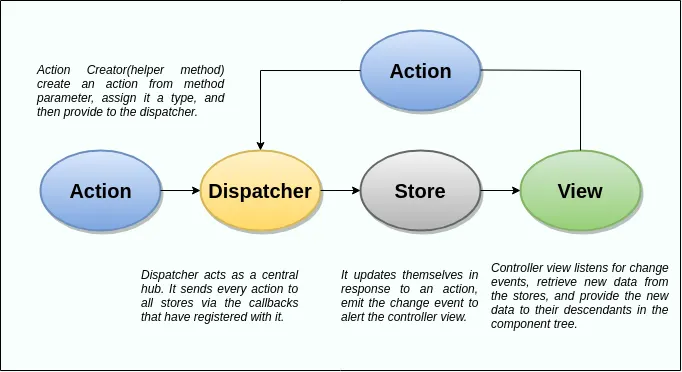
Redux is a simplified take on Flux: a single store, no dispatcher, and pure reducers.
What is Redux, and what are its core principles?
Redux is a predictable state container for JavaScript apps.
Three principles:
- Single source of truth — the whole app state lives in one store.
- State is read-only — the only way to change it is to dispatch an action.
- Changes are made with pure functions — reducers take the previous state and an action, and return a new state.
Core pieces: store (holds state), action (describes what happened), reducer (computes the next state), middleware (logging, async).
Use Redux Toolkit (configureStore, createSlice) for new code — createStore is deprecated.
Deep dive → Redux (core concepts)
What is the difference between Redux and the Context API?
| Context API | Redux (Toolkit) | |
|---|---|---|
| Purpose | pass values down without props (dependency injection) | manage and update global state |
| Re-renders | all consumers re-render when the value changes | components re-render only when their selected slice changes |
| Async, middleware | none built in | thunks, RTK Query, middleware |
| DevTools | none | time-travel debugging |
| Boilerplate | very little | a bit more (much less with RTK) |
| Good for | theme, locale, auth user, rarely changing data | large, frequently updated, shared client state |
What are useSelector and useDispatch?
The React-Redux hooks:
useSelector(selector)reads a value from the store and re-renders the component when that selected value changes (compared with===).useDispatch()returns the store’sdispatchfunction.
const count = useSelector(state => state.counter.value);const dispatch = useDispatch();<button onClick={() => dispatch(increment())}>{count}</button>Gotcha: a selector that returns a new object every time (state => ({ a: state.a })) re-renders on every dispatch — select primitives separately or use shallowEqual.
What is redux-thunk?
Middleware that lets you dispatch a function instead of an action object. The function receives dispatch and getState, so it can run async work (API calls) and dispatch actions when it finishes. Redux Toolkit includes it by default and adds createAsyncThunk.
const fetchUsers = () => async (dispatch) => { dispatch({ type: 'users/loading' }); const data = await api.getUsers(); dispatch({ type: 'users/loaded', payload: data });};React 18 & 19
What are the main features of React 18?
createRoot— the new root API that enables concurrent rendering.- Automatic batching — updates in timeouts, promises and native events are batched too.
- Transitions —
useTransition/startTransitionmark non-urgent updates. useDeferredValue,useId,useSyncExternalStore,useInsertionEffect.- Suspense on the server — streaming SSR (
renderToPipeableStream) and selective hydration. - Strict Mode remounts components in development to check effect cleanup.
What are the main features of React 19?
- Actions — async functions in transitions, with automatic pending state, errors and optimistic updates.
<form action={fn}>plususeActionState,useFormStatusanduseOptimistic.use()— read a promise or context, even inside conditions.refas a prop — no moreforwardReffor function components; ref callbacks can return cleanup.<Context>as a provider instead of<Context.Provider>.- Document metadata —
<title>,<meta>and<link>rendered anywhere are hoisted to<head>. - Server Components and Server Actions are stable.
- Removed:
ReactDOM.render,hydrate,findDOMNode, string refs,propTypeschecks,defaultPropsfor function components, legacy context.
Output questions
Predict what renders or what is logged, then click Show answer. Unless stated otherwise, assume React 18+ in production (no Strict Mode double rendering).
JSX & rendering
Q1. What renders when count is 0?
function Inbox({ count }) {  return <div>{count && <p>You have {count} messages</p>}</div>;}
<Inbox count={0} />
Show answer
<div>0</div>
0 && ... returns 0, and React renders numbers. Use count > 0 && ... or a ternary.
Q2. Which values render?
function App() { return ( <p> {true}{false}{null}{undefined}{'A'}{0}{NaN}{[1, 2]} </p> );}Show answer
A0NaN12
Booleans, null and undefined render nothing. Strings, numbers (including 0 and NaN) render as text, and arrays render each item.
Q3. What happens here?
function App() { const user = { name: 'Asha' }; return <p>{user}</p>;}Show answer
Error: Objects are not valid as a React child (found: object with keys {name}).
React can’t render a plain object. Render a property instead: {user.name}.
Q4. What does this component return?
function Profile() { return <div>Profile</div>;}Show answer
undefined — nothing renders.
JavaScript’s automatic semicolon insertion adds a ; right after return. Wrap multi-line JSX in parentheses that start on the return line.
Q5. Does this render the component?
function card() {  return <div className="card">Card</div>;}
function App() {  return <card />;}
Show answer
No. Lowercase <card /> is treated as an unknown HTML tag <card>, not your component. Component names must start with a capital letter: Card and <Card />.
Q6. What text is shown?
const title = '<b>Hello</b>';
function App() {  return <h1>{title}</h1>;}
Show answer
The literal text <b>Hello</b> — not bold.
React escapes values in JSX to prevent XSS. To render HTML you’d need dangerouslySetInnerHTML with sanitized content.
Q7. What does the child log?
function Parent() {  return <Child key="a1" name="Pen">Hello</Child>;}
function Child(props) {  console.log(props.key, props.name, props.children);  return null;}
Show answer
undefined "Pen" "Hello"
key is used by React and isn’t passed as a prop. Content between the tags becomes props.children.
State & batching
Q8. What is logged, and what is displayed after one click?
function App() {  const [count, setCount] = useState(0);
  const handleClick = () => {    setCount(count + 1);    setCount(count + 1);    setCount(count + 1);    console.log(count);  };
  return <button onClick={handleClick}>{count}</button>;}
Show answer
Logs 0. The button shows 1.
All three calls use count from the current render (0), so each sets the state to 0 + 1. And count doesn’t change within this render — the new value appears on the next render.
Q9. What is displayed after one click?
function App() {  const [count, setCount] = useState(0);
  const handleClick = () => {    setCount(c => c + 1);    setCount(c => c + 1);    setCount(c => c + 1);  };
  return <button onClick={handleClick}>{count}</button>;}
Show answer
3
Updater functions receive the latest pending state, so each one builds on the previous: 0 → 1 → 2 → 3.
Q10. What is displayed after one click (starting at 0)?
const handleClick = () => { setCount(c => c + 1); setCount(count + 5); setCount(c => c + 1);};Show answer
6
Updates are processed in order: 0 → 1, then replace with count + 5 = 0 + 5 = 5, then 5 → 6.
Q11. How many times does “render” log per click?
function App() {  const [a, setA] = useState(0);  const [b, setB] = useState(0);  console.log('render');
  const handleClick = () => {    setTimeout(() => {      setA(x => x + 1);      setB(x => x + 1);    }, 0);  };
  return <button onClick={handleClick}>{a + b}</button>;}
Show answer
Once in React 18+ (automatic batching).
In React 17 (or with the legacy ReactDOM.render), updates inside setTimeout weren’t batched, so it would log twice.
Q12. What is shown after typing in the first input, then the second?
function Form() {  const [name, setName] = useState({ first: '', last: '' });
  return (    <>      <input onChange={e => setName({ first: e.target.value })} />      <input onChange={e => setName({ last: e.target.value })} />      <p>{name.first} {name.last}</p>    </>  );}// Type "Asha" in the first input, then "Rao" in the second.
Show answer
Rao — the first name disappears.
The useState setter replaces the whole object (it doesn’t merge like class setState). After the second update the state is { last: 'Rao' }, so name.first is undefined. Fix: setName(prev => ({ ...prev, last: e.target.value })).
Q13. Does the list update after clicking “Add”?
function List() {  const [items, setItems] = useState(['a']);
  const add = () => {    items.push('b');    setItems(items);  };
  return (    <>      <button onClick={add}>Add</button>      <p>{items.join(',')}</p>    </>  );}
Show answer
No — it still shows a.
items is mutated and the same array reference is passed back. React compares with Object.is, sees no change, and skips the re-render. Fix: setItems([...items, 'b']).
Q14. Clicking the button 3 times — what is displayed and logged?
function Counter() { let count = 0; return ( <button onClick={() => { count++; console.log(count); }}> {count} </button> );}Show answer
The button always shows 0. The console logs 1, 2, 3.
A local variable changes, but that doesn’t trigger a re-render, so the UI never updates. (If the component re-rendered for another reason, count would reset to 0.)
Q15. Two counters are rendered. What do they show after clicking the first one twice?
function Counter() {  const [count, setCount] = useState(0);  return <button onClick={() => setCount(c => c + 1)}>{count}</button>;}
function App() {  return (    <>      <Counter />      <Counter />    </>  );}
Show answer
2 and 0.
Each component instance has its own independent state.
Q16. What happens?
function App() { const [count, setCount] = useState(0); return <button onClick={setCount(count + 1)}>{count}</button>;}Show answer
Error: Too many re-renders. React limits the number of renders to prevent an infinite loop.
setCount(count + 1) is called during render (its return value would be the handler). That causes another render, which calls it again. Use onClick={() => setCount(count + 1)}.
Q17. When does “init” log?
function expensiveInit() {  console.log('init');  return 0;}
function A() {  const [v, setV] = useState(expensiveInit());  return <button onClick={() => setV(x => x + 1)}>{v}</button>;}
function B() {  const [v, setV] = useState(expensiveInit);  return <button onClick={() => setV(x => x + 1)}>{v}</button>;}
Show answer
A logs init on every render (the function is called each time, and the result is ignored after the first render).
B logs init only once — passing the function itself makes it a lazy initializer.
Effects
Q18. What is the order of the logs on mount?
function App() {  console.log('1 render');
  useEffect(() => {    console.log('3 effect');    return () => console.log('cleanup');  }, []);
  useLayoutEffect(() => {    console.log('2 layout effect');  }, []);
  return <p>Hi</p>;}
Show answer
1 render2 layout effect3 effectRender runs first, useLayoutEffect runs before paint, and useEffect runs after paint. cleanup isn’t logged until unmount.
(In development with Strict Mode you’d also see cleanup followed by the effects again, because React mounts, unmounts and remounts once.)
Q19. What is logged when the parent renders Child?
function Child() {  useEffect(() => console.log('child effect'), []);  console.log('child render');  return null;}
function Parent() {  useEffect(() => console.log('parent effect'), []);  console.log('parent render');  return <Child />;}
Show answer
parent renderchild renderchild effectparent effectRendering is top-down, but effects run bottom-up — children’s effects run before their parent’s (just like componentDidMount).
Q20. Typing in the input — does “effect” log?
function App() {  const [count, setCount] = useState(0);  const [name, setName] = useState('');
  useEffect(() => {    console.log('effect');  }, [count]);
  return (    <>      <input value={name} onChange={e => setName(e.target.value)} />      <button onClick={() => setCount(c => c + 1)}>{count}</button>    </>  );}
Show answer
No. effect logs once on mount, and then only when count changes (button clicks). Changing name re-renders but doesn’t re-run the effect.
Q21. What does the counter show after 5 seconds?
function Timer() {  const [count, setCount] = useState(0);
  useEffect(() => {    const id = setInterval(() => {      setCount(count + 1);    }, 1000);    return () => clearInterval(id);  }, []);
  return <p>{count}</p>;}
Show answer
1 — it goes to 1 and stays there.
The effect runs once, so the interval callback keeps the count from the first render (0) — a stale closure. Every tick sets the count to 0 + 1. Fix: setCount(c => c + 1).
Q22. What happens?
function Profile() {  const [user, setUser] = useState({});
  useEffect(() => {    setUser({ name: 'Asha' });  });
  return <p>{user.name}</p>;}
Show answer
An infinite render loop (and eventually “Maximum update depth exceeded”).
With no dependency array the effect runs after every render, and setUser with a new object always triggers another render. Add [] as the dependency array.
Q23. Is this effect an infinite loop?
function App() {  const [count, setCount] = useState(0);
  useEffect(() => {    setCount(5);  });
  return <p>{count}</p>;}
Show answer
No. It shows 5.
First render: effect sets 5 → re-render. Second render: effect sets 5 again, but it’s the same value (Object.is(5, 5)), so React bails out and doesn’t re-render further. (With an object value like {} it would loop forever.)
Q24. What is logged when userId changes from 1 to 2?
function Chat({ userId }) {  useEffect(() => {    console.log('connect', userId);    return () => console.log('disconnect', userId);  }, [userId]);
  return null;}
Show answer
disconnect 1connect 2Before running the effect again, React runs the previous cleanup, which still sees the old userId from its closure.
Q25. Why is this a warning?
useEffect(async () => { const data = await fetchData(); setData(data);}, []);Show answer
An async function returns a Promise, but useEffect expects the return value to be undefined or a cleanup function. React warns: “useEffect must not return anything besides a function, which is used for clean-up.” Define an async function inside the effect and call it.
Keys & lists
Q26. What is typed where after clicking “Add to start”?
function App() {  const [items, setItems] = useState([{ id: 1 }, { id: 2 }]);
  return (    <>      <button onClick={() => setItems(prev => [{ id: 3 }, ...prev])}>Add to start</button>      {items.map((item, index) => (        <div key={index}>          {item.id} <input />        </div>      ))}    </>  );}// Type "first" into the input next to id 1, then click the button.
Show answer
The text “first” stays in the top row, which now shows id 3.
With key={index}, React matches rows by position. The row with key=0 is reused (its uncontrolled <input> keeps “first”), and only its text changes to the new id. With key={item.id} the text would move down with item 1.
Q27. What happens on every render?
{todos.map(todo => <TodoItem key={Math.random()} todo={todo} />)}Show answer
Every item unmounts and remounts on every render, because the keys are always new. It’s slow, and any state inside each item (input text, focus, open/closed) is lost each time.
Q28. Where is the key missing?
function List({ users }) {  return <ul>{users.map(user => <UserRow user={user} />)}</ul>;}
function UserRow({ user }) {  return <li key={user.id}>{user.name}</li>;}
Show answer
The warning “Each child in a list should have a unique key prop” still appears.
The key must be on the element returned by map: <UserRow key={user.id} user={user} />. A key inside the child component doesn’t help.
Q29. Does the form keep its input when switching users?
function Page({ userId }) { return <EditForm userId={userId} />;}// EditForm keeps the typed name in its own useState.// userId changes from 1 to 2.Show answer
Yes — the old typed text stays, because EditForm is the same component type in the same position, so React keeps its state.
To reset it, give it a key that changes: <EditForm key={userId} userId={userId} />.
Conditional rendering & component identity
Q30. Does the counter keep its value when toggling?
function App() {  const [isAdmin, setIsAdmin] = useState(false);
  return (    <>      <button onClick={() => setIsAdmin(a => !a)}>Toggle</button>      {isAdmin ? <Counter label="Admin" /> : <Counter label="User" />}    </>  );}
Show answer
Yes. Both branches render a <Counter> in the same position, so React treats it as the same component and keeps its state — only the label prop changes. Add different keys to reset it.
Q31. Does the counter keep its value when toggling?
{show ? <div><Counter /></div> : <section><Counter /></section>}Show answer
No — it resets to 0.
The parent element type changed (div → section), so React destroys the whole subtree and mounts a new Counter.
Q32. Why does the input lose focus on every keystroke?
function Form() {  const [name, setName] = useState('');
  function Field() {    return <input value={name} onChange={e => setName(e.target.value)} />;  }
  return <Field />;}
Show answer
Field is defined inside Form, so every render creates a new component type. React unmounts the old <input> and mounts a new one, which loses focus.
Define Field outside Form and pass value/onChange as props, or just render the <input> directly.
Q33. Does returning null unmount the component?
function Banner({ visible }) { const [dismissed, setDismissed] = useState(false); if (!visible) return null; return <p>{dismissed ? 'Dismissed' : 'Welcome'}</p>;}// visible goes true → false → trueShow answer
No. The component stays mounted while rendering null, so its state (dismissed) is kept when visible becomes true again. (Note: the hook is called before the early return, which is required.)
Events & this
Q34. What is logged when the button is clicked?
class App extends React.Component { handleClick() { console.log(this); } render() { return <button onClick={this.handleClick}>Click</button>; }}Show answer
undefined
The method is passed without its instance and called as a plain function. Class bodies run in strict mode, so this is undefined. Bind it, or use an arrow class field.
Q35. Clicking “Play” — what is logged?
<div onClick={() => console.log('toolbar')}> <button onClick={e => { e.stopPropagation(); console.log('play'); }}>Play</button> <button onClick={() => console.log('upload')}>Upload</button></div>Show answer
Clicking Play logs only play (propagation stopped). Clicking Upload logs upload then toolbar (the event bubbles).
Q36. Does the page reload?
<form onSubmit={() => { save(); return false; }}> <button>Save</button></form>Show answer
Yes. Returning false doesn’t prevent the default in React. Call e.preventDefault(): onSubmit={e => { e.preventDefault(); save(); }}.
Q37. A click inside a portal — does the parent’s handler run?
function App() { return ( <div onClick={() => console.log('parent')}> {createPortal(<button>Inside portal</button>, document.body)} </div> );}Show answer
Yes — it logs parent. Events from a portal bubble through the React tree, even though in the DOM the button is a child of <body>, not the div.
Refs
Q38. What is logged?
function App() { const ref = useRef(null); console.log('render', ref.current); useEffect(() => console.log('effect', ref.current), []); return <input ref={ref} />;}Show answer
render nulleffect <input>During the first render the DOM node doesn’t exist yet. React sets ref.current before effects run.
Q39. What does the button show after 3 clicks?
function App() { const clicks = useRef(0); return ( <button onClick={() => { clicks.current += 1; console.log(clicks.current); }}> {clicks.current} </button> );}Show answer
It still shows 0, while the console logs 1, 2, 3.
Changing ref.current doesn’t trigger a re-render. Use state for anything shown on screen.
Q40. (React 18) What is ref.current?
function MyInput(props) {  return <input {...props} />;}
function App() {  const ref = useRef(null);  useEffect(() => console.log(ref.current), []);  return <MyInput ref={ref} />;}
Show answer
null (with a warning: “Function components cannot be given refs”).
In React 18, ref isn’t passed to function components as a prop. Wrap MyInput in forwardRef. In React 19 ref is a regular prop, so spreading {...props} passes it to the <input> and this logs the element.
Memo, callbacks & context
Q41. Does Child re-render when the count changes?
const Child = React.memo(({ user }) => {  console.log('Child render');  return <p>{user.name}</p>;});
function Parent() {  const [count, setCount] = useState(0);  return (    <>      <button onClick={() => setCount(c => c + 1)}>{count}</button>      <Child user={{ name: 'Asha' }} />    </>  );}
Show answer
Yes, on every click.
{ name: 'Asha' } is a new object on every render, so the shallow comparison fails. Define it outside the component or use useMemo.
Q42. Does Child re-render when the count changes?
const Child = React.memo(({ onClick }) => {  console.log('Child render');  return <button onClick={onClick}>Child</button>;});
function Parent() {  const [count, setCount] = useState(0);  const handleClick = useCallback(() => console.log('clicked'), []);
  return (    <>      <button onClick={() => setCount(c => c + 1)}>{count}</button>      <Child onClick={handleClick} />    </>  );}
Show answer
No. handleClick keeps the same reference (empty dependencies), and Child is memoized, so its props are equal and it skips rendering.
Q43. Same as above, but without React.memo — does Child re-render?
function Child({ onClick }) { console.log('Child render'); return <button onClick={onClick}>Child</button>;}// Parent still uses useCallback for handleClickShow answer
Yes. Without React.memo, a child always re-renders when its parent does. useCallback alone does nothing here.
Q44. Does Title re-render when the context value changes?
const Title = React.memo(function Title() { const theme = useContext(ThemeContext); console.log('Title render'); return <h1 className={theme}>Title</h1>;});Show answer
Yes. React.memo only compares props. A context the component reads still triggers a re-render when its value changes.
Q45. What is rendered?
const Ctx = createContext('default');
function Show() {  return <span>{useContext(Ctx)}</span>;}
function App() {  return (    <>      <Show />      <Ctx.Provider value={undefined}><Show /></Ctx.Provider>      <Ctx.Provider value="outer">        <Ctx.Provider value="inner"><Show /></Ctx.Provider>      </Ctx.Provider>    </>  );}
Show answer
default, (nothing), inner
- No Provider above → the default value.
- A Provider with
value={undefined}→undefined(the default is not used). - Nested Providers → the closest one wins.
Q46. How many times does the slow calculation run when “Count Two” is clicked?
function App() {  const [one, setOne] = useState(0);  const [two, setTwo] = useState(0);
  const isEven = useMemo(() => {    console.log('calculating');    return one % 2 === 0;  }, [one]);
  return (    <>      <button onClick={() => setOne(o => o + 1)}>One {one} {isEven ? 'even' : 'odd'}</button>      <button onClick={() => setTwo(t => t + 1)}>Two {two}</button>    </>  );}
Show answer
Zero times. calculating logs on mount and whenever one changes. Clicking “Two” re-renders, but useMemo returns the cached value because its dependency didn’t change.
Class components
Q47. What is logged right after clicking?
class Counter extends React.Component {  state = { count: 0 };
  increment = () => {    this.setState({ count: this.state.count + 1 }, () => console.log('callback', this.state.count));    console.log('after', this.state.count);  };
  render() {    return <button onClick={this.increment}>{this.state.count}</button>;  }}
Show answer
after 0callback 1setState is applied later, so the line after it still sees the old value. The callback runs after the update has been applied.
Q48. What does the button show after one click?
incrementFive = () => { for (let i = 0; i < 5; i++) { this.setState({ count: this.state.count + 1 }); }};Show answer
1
The five updates are batched, and all of them read the same this.state.count (0). Use this.setState(prev => ({ count: prev.count + 1 })) to get 5.
Q49. What is the mount order of these logs?
class Parent extends React.Component {  constructor(p) { super(p); console.log('P constructor'); }  componentDidMount() { console.log('P didMount'); }  render() { console.log('P render'); return <Child />; }}
class Child extends React.Component {  constructor(p) { super(p); console.log('C constructor'); }  componentDidMount() { console.log('C didMount'); }  render() { console.log('C render'); return null; }}
Show answer
P constructorP renderC constructorC renderC didMountP didMountRender goes top-down; componentDidMount runs child first.
Q50. Parent calls setState with the same value every 2 seconds. What re-renders?
class Parent extends React.Component { state = { name: 'Rishabh' }; componentDidMount() { setInterval(() => this.setState({ name: 'Rishabh' }), 2000); } render() { return ( <> <Regular name={this.state.name} /> {/* extends Component */} <Pure name={this.state.name} /> {/* extends PureComponent */} </> ); }}Show answer
Every 2 seconds Parent and Regular re-render. Pure does not.
A class setState always re-renders (even with the same value), and a regular child re-renders with its parent. PureComponent shallow-compares props — 'Rishabh' === 'Rishabh' — and skips.
Q51. Does the error boundary catch this?
function SaveButton() {  return (    <button onClick={() => { throw new Error('Save failed'); }}>      Save    </button>  );}
<ErrorBoundary>  <SaveButton /></ErrorBoundary>
Show answer
No. Error boundaries catch errors during rendering, lifecycle methods and constructors — not in event handlers or async code. Use try...catch in the handler.
Hooks rules
Q52. What error happens when the user logs in?
function Greeting({ user }) { if (!user) { return <p>Please log in</p>; } const [open, setOpen] = useState(false); return <p onClick={() => setOpen(!open)}>Hello {user.name}</p>;}Show answer
Error: Rendered more hooks than during the previous render.
When user was missing, no hook was called; after logging in, useState is called. Hooks must run in the same order on every render — move useState above the early return.
Q53. Do these two components share the count?
function useCounter() {  const [count, setCount] = useState(0);  return [count, () => setCount(c => c + 1)];}
function A() { const [c, inc] = useCounter(); return <button onClick={inc}>A {c}</button>; }function B() { const [c, inc] = useCounter(); return <button onClick={inc}>B {c}</button>; }
Show answer
No. Custom hooks share logic, not state. Each component that calls useCounter gets its own count.
Strict Mode & React 18
Q54. In development with , what is logged on mount?
function App() { useEffect(() => { console.log('mount'); return () => console.log('unmount'); }, []); return null;}Show answer
mountunmountmountReact 18+ Strict Mode mounts, unmounts and remounts every component once in development to check that effects clean up. Production logs mount once.
Q55. In development with , what does this show?
function Counter() { const [count, setCount] = useState(0); useEffect(() => { setCount(c => c + 1); }, []); return <p>{count}</p>;}Show answer
2 in development, 1 in production.
The effect runs twice in Strict Mode (mount → unmount → mount), and state is preserved between them, so it’s incremented twice.