On this page
Event Listener
Last reviewed 14 Sept 2026
index.html
<html> <body> <h1>Hello JavaScript</h1> <button id="clickMe">Click Me</button> <script src="index.js"></script> </body></html>index.js
document.getElementById("clickMe").addEventListener("click", function xyz() { console.log("Button Clicked");});addEventListener registers the callback xyz for the click event. Whenever we click the button, xyz() is pushed into the call stack (through the callback queue and event loop — see the Event Loop chapter) and runs.
How many times did we click the button?
We could use a global variable count to store the value, but then any other code could change it. For security (data hiding), we can use a closure:
function attachEventListeners() {  let count = 0;  document.getElementById("clickMe").addEventListener("click", function xyz() {    console.log("Button Clicked", ++count);  });}
attachEventListeners();
Output (after clicking 3 times):
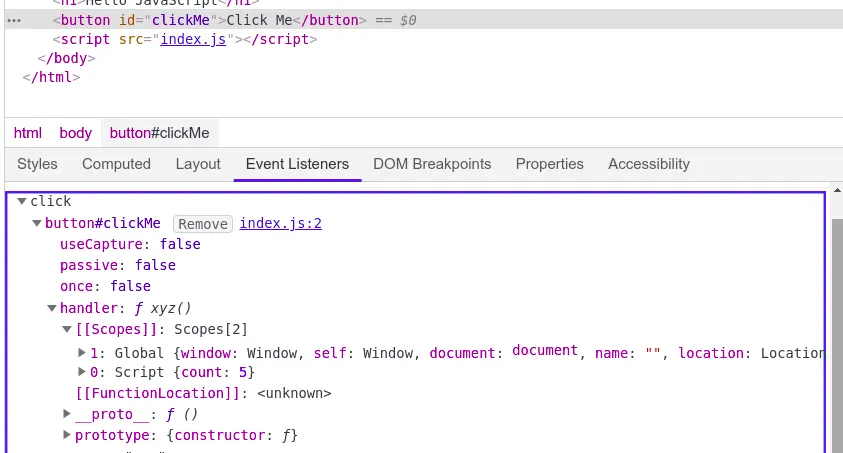
Button Clicked 1Button Clicked 2Button Clicked 3Now xyz() forms a closure with attachEventListeners, so it remembers count even after attachEventListeners has finished. In DevTools (Elements tab → Event Listeners) you can see the listener attached to the Click Me button, and its scope chain (Closure, Script and Global).
Garbage collection and removing event listeners
- Event listeners are heavy and take memory. Whenever you attach an event listener, it forms a closure, so the variables it uses (e.g.
countin the previous example) are not freed while the listener is attached. That is why we should remove event listeners we no longer need. - Too many listeners can reduce page performance.
To remove a listener, you must pass the same function reference that was used to add it:
const button = document.getElementById("clickMe");
function handleClick() {  console.log("Button Clicked");}
button.addEventListener("click", handleClick);button.removeEventListener("click", handleClick); // works — same reference
button.addEventListener("click", () => console.log("hi"));button.removeEventListener("click", () => console.log("hi")); // does NOT work — a different function
Other ways to clean up:
// Run only once, then remove itself automaticallybutton.addEventListener("click", () => console.log("first click only"), { once: true });
// Remove many listeners at once with AbortControllerconst controller = new AbortController();button.addEventListener("click", () => console.log("A"), { signal: controller.signal });window.addEventListener("resize", () => console.log("B"), { signal: controller.signal });controller.abort(); // both listeners removed
Event bubbling, capturing and delegation
When you click an element, the event travels in three phases:
- Capturing — from
windowdown to the target element. - Target — the element that was clicked.
- Bubbling — from the target back up to
window(default foraddEventListener).
<div id="parent"> <button id="child">Click</button></div>document.getElementById("parent").addEventListener("click", () => console.log("parent"));document.getElementById("child").addEventListener("click", () => console.log("child"));
// Clicking the button prints:// child// parent ← the event bubbled up
document.getElementById("parent").addEventListener("click", () => console.log("parent (capture)"), true);// With capture = true, "parent (capture)" runs BEFORE "child"event.stopPropagation() stops the event from travelling further:
document.getElementById("child").addEventListener("click", (e) => { e.stopPropagation(); console.log("child only"); // parent's bubbling listener will not run});Event delegation — attach one listener to a parent instead of many listeners on children. It uses bubbling, saves memory, and works for elements added later.
<ul id="list"> <li data-id="1">Item 1</li> <li data-id="2">Item 2</li></ul>document.getElementById("list").addEventListener("click", (e) => { const item = e.target.closest("li"); if (!item) return; console.log("Clicked item", item.dataset.id); // "Clicked item 2"});e.target is the element actually clicked; e.currentTarget is the element the listener is attached to (#list).