On this page
Closure
Last reviewed 14 Sept 2026
What is a closure?
Let’s take an example:
function x() {  var a = 7;  function y() {    console.log(a);  }  y();}
x();
Output: 7
In DevTools you can see that the function y() has [[Scopes]], which contains a. So even when we return y() and use it later, it will still have a with the value 7.
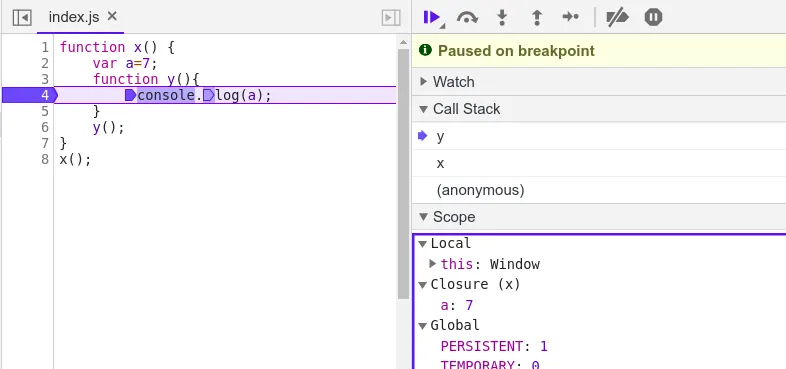
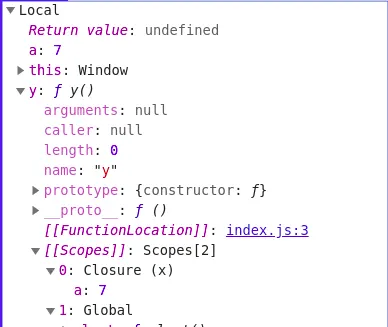
A closure is the combination of a function bundled together (enclosed) with references to its surrounding state (the lexical environment). In other words, a closure gives you access to an outer function’s scope from an inner function. In JavaScript, closures are created every time a function is created, at function creation time. So a function along with its lexical scope bundled together forms a closure.
function x() {  var a = 7;  function y() {    console.log(a);  }  a = 100;  return y;}
var z = x();console.log(z);z();
Output:
ƒ y() { console.log(a);}100Note: Here the closure comes into the picture. A returned function always maintains its lexical scope — the function along with a reference to those variables (e.g. var a). It remembers where it was actually present. So in simple terms, the code does not just return a function; it returns a closure (the function along with its lexical scope).
It prints 100, not 7, because the closure keeps a reference to the variable a, not a copy of its value at the time y was created.
Scope chain
function z() {  var b = 900;  function x() {    var a = 7;    function y() {      console.log(a, b);    }    y();  }  x();}
z();
Output: 7 900
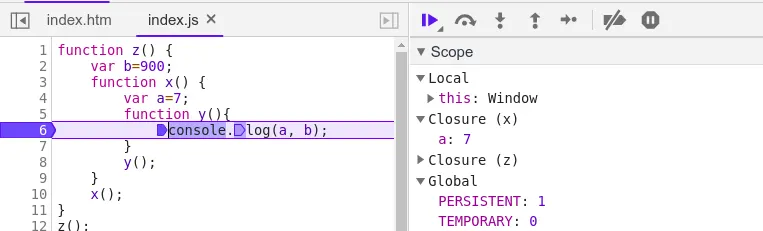
So now y forms a closure with the scope of x and z.
Uses of closures:
- Module design pattern
- Currying
- Functions like
once(run only once) - Memoize
- Maintaining state in the async world
setTimeout- Iterators, and many more
setTimeout and closure
function x() {  var a = 1;  setTimeout(() => {    console.log(a);  }, 3000);  console.log("Hello JavaScript");}
x();
Output:
Hello JavaScript1 (after 3 seconds)setTimeout takes the callback function, attaches it to a timer, and when the timer expires it calls that function. JavaScript doesn’t wait for the timer. The callback forms a closure, so it still remembers a even though x() finished long ago.
Let’s print 1 to 5, where each number n is printed after n seconds (n = 1…5).
Normally we try the example below, but it prints a different output:
function x() {  for (var i = 1; i <= 5; i++) {    setTimeout(() => {      console.log(i);    }, i * 1000);  }  console.log("Hello JavaScript");}
x();
Output:
Hello JavaScript66666The loop does not wait for the timers. All five callbacks form a closure with the same var i (a reference, not a copy). By the time the timers expire, the loop has already finished and i has become 6.
Case 1: fix it with let (block scope)
function x() {  for (let i = 1; i <= 5; i++) {    setTimeout(() => {      console.log(i);    }, i * 1000);  }  console.log("Hello JavaScript");}
x();
Output:
Hello JavaScript12345Because let is block-scoped, every time the loop runs, i is a new copy altogether. The function in setTimeout forms a closure with a new copy of i bound to it.
Case 2: fix it with a closure, using only var
function x() {  for (var i = 1; i <= 5; i++) {    function closer(i) {      setTimeout(function () {        console.log(i);      }, i * 1000);    }    closer(i);  }  console.log("Hello JavaScript");}
x();
Output:
Hello JavaScript12345Every time you call closer(i), it creates a new function scope with its own copy of i (the parameter), and the callback closes over that copy.
The same fix is often written with an IIFE:
for (var i = 1; i <= 5; i++) { (function (j) { setTimeout(() => console.log(j), j * 1000); })(i);}Some more examples
Consider this as the base code:
function outer() {  var a = 10;  function inner() {    console.log(a);  }  return inner;}
outer()();
Output: 10
outer()() means: call outer(), which returns inner, then immediately call that returned function.
Case 1: use let instead of var, declared just before the return statement
function outer() {  function inner() {    console.log(a);  }  let a = 10;  return inner;}
outer()();
Output: 10
The position of a doesn’t matter, because inner runs after let a = 10 has executed.
Subcase: call the inner function before a is initialized
function outer() {  inner();  let a = 10;  function inner() {    console.log(a);  }}
outer();
Output:
Uncaught ReferenceError: Cannot access 'a' before initializationHere we are trying to access let a before initialization. Since it is let, it is in the temporal dead zone, so we cannot use it before initialization. If we used var instead of let, it would run successfully but print undefined. To understand more, compare it with the example from Variable Hoisting:
console.log(a);console.log(b);
var a = 10;let b = 10;
Output:
undefinedUncaught ReferenceError: Cannot access 'b' before initializationCase 2: pass a parameter from the outer scope
function outer(b) {  function inner() {    console.log(a, b);  }  let a = 10;  return inner;}
var close = outer("Hello");close();
Output: 10 "Hello"
The inner function forms a closure with its outer function’s environment, and the parameter b is part of the outer function’s environment, so inner can access it.
Case 3: the outer function is inside another function
function outermost() {  var c = 20;  function outer(b) {    function inner() {      console.log(a, b, c);    }    let a = 10;    return inner;  }  return outer;}
var close = outermost()("Hello");close();
Output: 10 "Hello" 20
Now the inner function forms a closure with both outer and outermost, and has access to both environments.
Case 4: a variable with a conflicting name is defined outside
function outermost() {  var c = 20;  function outer(b) {    function inner() {      console.log(a, b, c);    }    let a = 10;    return inner;  }  return outer;}
let a = 100;var close = outermost()("Hello");close();
Output: 10 "Hello" 20
Since inner forms a closure with outer and outermost, it finds a in its nearest parent scope (outer) first. So defining a global variable with the same name does not have any impact on the closure.
Case 5: let a = 10 is not present in outer()
function outermost() {  var c = 20;  function outer(b) {    function inner() {      console.log(a, b, c);    }    return inner;  }  return outer;}
let a = 100;var close = outermost()("Hello");close();
Output: 100 "Hello" 20
When a function doesn’t find a in its own lexical environment, it searches its parent, then the parent’s parent, all the way up to the global scope. Here it finds a = 100 in the global scope. If a is not present in the global scope either, it throws ReferenceError: a is not defined.
Closures for data hiding and encapsulation
var counter = 0;
function incrementCounter() {  counter++;}
In this case, anyone (any other function) can access the variable counter and change it.
So a good way to implement data hiding is:
function counter() {  var count = 0;  return function incrementCounter() {    count++;    console.log(count);  };}
var counter1 = counter();counter1();counter1();
Output:
12Now we can increment the counter, but we can’t change count in any other way — there is no direct access to it.
console.log(counter1.count); // undefined// console.log(count); // ReferenceError: count is not definedCase: what if we store the closure in 2 different variables and call them?
function counter() {  var count = 0;  return function incrementCounter() {    count++;    console.log(count);  };}
var counter1 = counter();counter1();counter1();
var counter2 = counter();counter2();
Output:
121Each call to counter() creates a new count, so counter2 has its own separate copy.
Scalability
The above code is not scalable. To make it scalable, we can add other functions like decrement. One way is a constructor function:
function Counter() {  var count = 0;
  this.incrementCounter = function () {    count++;    console.log(count);  };
  this.decrementCounter = function () {    count--;    console.log(count);  };}
var counter1 = new Counter();counter1.incrementCounter(); // 1counter1.incrementCounter(); // 2counter1.decrementCounter(); // 1console.log(counter1.count); // undefined — still private
Above is a constructor function, and counter1 gives access to both methods, which share the same private count.
The same thing with a plain function returning an object (module pattern):
function createCounter() {  let count = 0;  return {    increment: () => ++count,    decrement: () => --count,    get value() { return count; }  };}
const c = createCounter();c.increment();c.increment();c.decrement();console.log(c.value); // 1
Practical uses of closures
once — run a function only once
function once(fn) {  let called = false;  let result;  return function (...args) {    if (!called) {      called = true;      result = fn.apply(this, args);    }    return result;  };}
const init = once(() => {  console.log('Initialized');  return 42;});
console.log(init()); // "Initialized", then 42console.log(init()); // 42 — the function body does not run again
memoize — cache results
function memoize(fn) {  const cache = {};  return function (n) {    if (n in cache) {      console.log('from cache');      return cache[n];    }    return (cache[n] = fn(n));  };}
const square = memoize(n => n * n);console.log(square(4)); // 16console.log(square(4)); // "from cache", then 16
Function factory
function multiplyBy(x) {  return function (y) {    return x * y;  };}
const double = multiplyBy(2);const triple = multiplyBy(3);console.log(double(5), triple(5)); // 10 15
Module pattern (IIFE)
const bank = (function () {  let balance = 0;                  // private  function log(msg) { console.log(msg); } // private helper
  return {    deposit(amount) {      balance += amount;      log(`Deposited ${amount}`);    },    getBalance() {      return balance;    }  };})();
bank.deposit(500);             // "Deposited 500"console.log(bank.getBalance()); // 500console.log(bank.balance);      // undefined
Disadvantages
- Over-consumption of memory, because every time a closure forms, its variables are kept in memory.
- Closed-over variables are not garbage collected as long as the closure (the inner function) is still reachable.
- If not handled properly, it can lead to memory leaks (e.g. event listeners or timers holding closures that are never removed).
Garbage collection (GC) is a form of automatic memory management. The garbage collector attempts to reclaim memory occupied by objects that are no longer in use by the program.
Relation between garbage collection and closures
function a() {  var x = 0, z = 10;  return function b() {    console.log(x);  };}
var y = a();// .....y();
b() forms a closure with a(). Normally x could be garbage collected after a() finishes, but due to the closure it is not freed. So the memory for x cannot be freed as long as y is reachable.
But modern browsers (e.g. V8 in Chrome) have smart garbage collection: since z is not used by b, its memory can be freed.
To release the closure, remove the reference:
y = null; // now b and x can be garbage collectedMemory leak example
function attach() { const bigData = new Array(1_000_000).fill('*'); document.getElementById('btn').addEventListener('click', function handler() { console.log(bigData.length); // closure keeps bigData alive });}// Fix: remove the listener when it is no longer needed// button.removeEventListener('click', handler);Closure interview questions
// Q1: What is the output?function makeCounter() { let count = 0; return () => ++count;}const a1 = makeCounter();const b1 = makeCounter();console.log(a1(), a1(), b1()); // 1 2 1 — separate closures// Q2: What is the output?var fns = [];for (var i = 0; i < 3; i++) { fns.push(() => i);}console.log(fns.map(f => f())); // [3, 3, 3] — all share one i (use let to get [0, 1, 2])// Q3: What is the output?let x = 1;const getX = () => x;x = 2;console.log(getX()); // 2 — closures read the current value, not a snapshot// Q4: Implement a function that adds, sum(1)(2)(3)() → 6function sum(a) { return function (b) { if (b === undefined) return a; return sum(a + b); };}console.log(sum(1)(2)(3)()); // 6Interview practice: Practise closures in interview form: debounce, memoize and curry in the Machine Coding track.