On this page
Scope
Last reviewed 14 Sept 2026
Scope in JavaScript refers to the accessibility or visibility of variables. That is, which parts of a program have access to a variable, or where the variable is visible.
Why is scope important?
- The main benefit of scope is security. Variables can be accessed only from a certain area of the program, so we avoid unintended modifications from other parts of the program.
- Scope also reduces namespace collisions. That is, we can use the same variable names in different scopes.
Types of scope
There are three types of scope in JavaScript:
- Global scope — declared outside any function or block; accessible everywhere.
- Function scope — declared inside a function; accessible only inside that function.
- Block scope — declared with
let/constinside{ }; accessible only inside that block.
(Modules also have their own module scope — top-level variables in an ES module are not global.)
Global scope
var globalVar = 'I am global';let globalLet = 'I am global too';
function show() {  console.log(globalVar); // "I am global" — accessible inside functions  console.log(globalLet); // "I am global too"}
show();console.log(globalVar);   // "I am global"
Function scope
var myVar = 1;let myVar2 = 2;
function someScopeFunc() {  var myVar = 10;  let myVar2 = 20;  console.log(myVar);  // 10  console.log(myVar2); // 20}
someScopeFunc();console.log(myVar);    // 1console.log(myVar2);   // 2
Same with const as well. Variables declared inside a function (with var, let or const) cannot be accessed outside it:
function secret() { var hidden = 'inside';}secret();// console.log(hidden); // ReferenceError: hidden is not definedBlock scope
// varvar myVar = 2;if (true) {  var myVar = 10;}console.log(myVar); // 10
// letlet someVar = 2;if (true) {  let someVar = 10;}console.log(someVar); // 2
let and const do not override the outer someVar value, but var always overrides myVar, because var ignores blocks. If we re-declare a let or const in the same scope, it throws an error.
let and const can’t be accessed from outside their pair of curly braces (block scope).
for (var i = 0; i < 3; i++) {}console.log(i); // 3 — var leaks out of the loop
for (let j = 0; j < 3; j++) {}// console.log(j); // ReferenceError: j is not defined
Lexical scope
Lexical scope (also known as static scope) means that scope is determined by where the code is written (at lexing/compile time), not by where a function is called at runtime. For example:
let number = 42;
function printNumber() {  console.log(number);}
function log() {  let number = 54;  printNumber();}
log(); // Prints 42
Here console.log(number) will always print 42, no matter where printNumber() is called from. This is different from languages with dynamic scope, where it would print different values depending on the caller. We call printNumber from log, but what matters is where printNumber is written. printNumber is written outside log, so it can only see let number = 42.
What is a lexical environment?
A lexical environment is a structure that holds identifier-variable mapping. (Here identifier refers to the name of variables/functions, and variable is the reference to the actual object — including function objects and arrays — or a primitive value.) It also keeps a reference to its parent lexical environment.
Note — don’t confuse lexical scope with the lexical environment. Lexical scope is decided at compile time (by where code is written); a lexical environment is where variables are actually stored during program execution.
Conceptually a lexical environment looks like this:
lexicalEnvironment = { a: 25, obj: <ref. to the object>, outer: <ref. to the parent lexical environment>}Context vs scope
Every function invocation has both a scope and a context. Fundamentally, scope is function/block-based while context is object-based.
- Scope is about variable access — which variables a function can see when it runs. It is unique to each invocation.
- Context is the value of
this— a reference to the object that “owns” the currently executing code. (In the global execution context of a browser,thisis theWindowobject. A plain function call likemyFunc()in non-strict mode also getsWindowasthis.)
const user = {  name: 'Asha',  greet() {    const greeting = 'Hello';           // scope: variables greet can access    console.log(`${greeting}, ${this.name}`); // context: this = user  }};
user.greet(); // "Hello, Asha"
To understand these concepts, assume you are sitting in a room. Your right hand is the method, and you can access your mobile, which is a variable. So we can say the mobile and water bottle are in your hand’s scope. In a similar way, methods have access to variables and functions. Context is more focused on which hand you are using. Your room is the lexical environment where all these objects are stored.
let, const and the temporal dead zone
let and const declarations are hoisted, but they are not accessible in the temporal dead zone. (See also the Variable Hoisting chapter.)
console.log(b);console.log(a);
let a = 10;var b = 100;
Output:
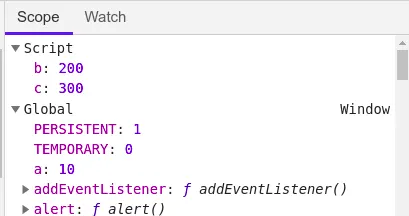
undefinedUncaught ReferenceError: Cannot access 'a' before initializationconsole.log(x); // Uncaught ReferenceError: x is not defined — x is not declared anywhereIn the case of var, the variable is stored in the global object (window), but let and const are stored in a separate memory space (the Script scope in DevTools). During the memory creation phase, let and const are hoisted but left uninitialized (not undefined), and we cannot access them until their line runs and initializes them. This gap is the temporal dead zone.
The period between entering the scope and the declaration line, where the variable cannot be accessed, is the temporal dead zone (TDZ).
Best practice: shrink the temporal dead zone window to 0 by moving declarations and initializations to the top of the scope.
console.log("Hello ");let a = 10;let a = 100;Output:
Uncaught SyntaxError: Identifier 'a' has already been declaredNote that even "Hello " is not printed. A SyntaxError is found before the code runs, so the whole script is rejected until the syntax error is resolved. With var we can do the above (var a = 10; var a = 100; is allowed).
const is more strict than let
Case 1: initialize let later
let a;a = 10;console.log(a); // 10Case 2: initialize const later
const b;b = 1000;console.log(b);// Uncaught SyntaxError: Missing initializer in const declarationCase 3: assign const again
const b = 1000;b = 10000;console.log(b);// Uncaught TypeError: Assignment to constant variable.Case 4: declare the same let again
let a = 20;const b = 1000;let a = 10;console.log(a);// Uncaught SyntaxError: Identifier 'a' has already been declaredCase 5: const objects can still be changed
const user = { name: 'A' };user.name = 'B'; // allowed — the object is changed, not the variableconsole.log(user.name); // "B"var | let | const | |
|---|---|---|---|
| Scope | function | block | block |
| Hoisted | yes, as undefined | yes, but in TDZ | yes, but in TDZ |
| Redeclare in same scope | yes | no | no |
| Reassign | yes | yes | no |
| Must initialize | no | no | yes |
Added to window (global) | yes | no | no |
TypeError, SyntaxError and ReferenceError
- ReferenceError — a variable that does not exist (or is in the TDZ) is referenced.
- SyntaxError — the code is not valid JavaScript. It is detected before the code runs, so nothing in that script executes.
- TypeError — an operation cannot be performed on a value, typically because the value is not of the expected type (e.g. calling something that is not a function, or assigning to a
const).
// ReferenceErrorconsole.log(notDeclared);     // notDeclared is not defined
// TypeErrorconst n = 5;n();                          // n is not a functionnull.length;                  // Cannot read properties of null
// SyntaxError (whole script fails to run)// let 1x = 5;                // Invalid or unexpected token
Block scope and shadowing
Block: a block (compound statement) combines multiple JavaScript statements into one group using { }.
But why do we need grouping?
if (true) true;JavaScript expects a single statement after if. A block lets us use a group of multiple statements where JavaScript expects a single statement:
if (true) { var a = 10; console.log(a);}Block scope: the variables and functions we can access inside the block.
Hoisting in block scope
{ var a = 10; let b = 20; const c = 30;}When we debug in the browser, we see that a goes to the Global scope, while a separate memory space (Block scope) is allocated for b and c.
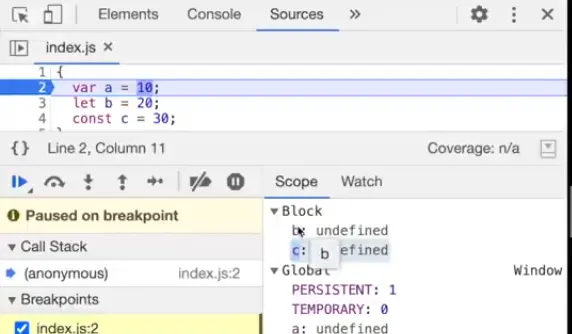
We cannot use let and const outside the block (ReferenceError: b is not defined), but we can use var outside the block.
Shadowing
var a = 100;let b = 200;const c = 300;
{  var a = 10;  let b = 20;  const c = 30;  console.log(a);  console.log(b);  console.log(c);}
console.log(a);console.log(b);console.log(c);
Output:
10203010200300Let’s put 3 breakpoints in index.js and start debugging (Inspect > Sources tab, and click the line numbers as shown in the screenshot below).
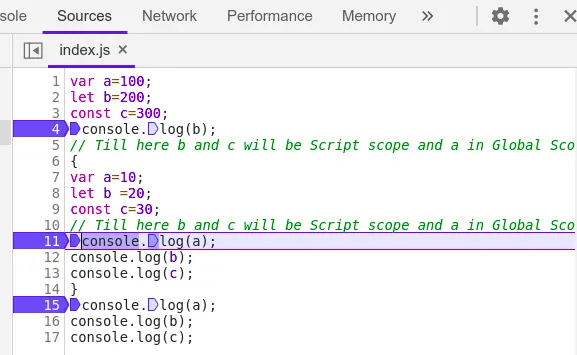
Now reload the tab and start observing values and their scope.
1. Scope and value at the first breakpoint
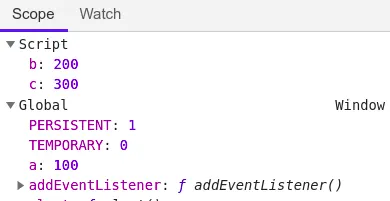
2. Scope and value at the second breakpoint
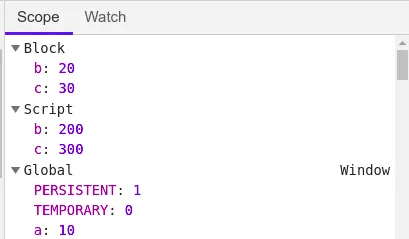
3. Scope and value at the third breakpoint
The above screenshots explain why the inner b and c don’t change the outer ones, and why redeclaring the same let in the same scope gives an error — both would need to live in the same memory space.
So we can conclude:
- var: the inner
var a = 10modifies the outera, because both are the same variable in the Global scope. - let: the inner
let bdoes not modify the outer value. Thebinside the block is stored in the Block memory space, and theboutside is stored in the Script memory space, so the console prints different values. - const: same behavior as
let.
Variable shadowing occurs when a variable in an inner scope has the same name as a variable in the outer scope. Normally the inner scope can access outer variables, but shadowing hides the outer variable — inside the inner scope, the name refers to the inner variable.
Shadowing with var
var a = 10; // variable declared in global scope{ var a = 100; // variable declared inside a block — same variable!}console.log(a);Output: 100
What if we declare a inside a function scope?
var a = 10; // variable declared in global scope
func();
function func() {  var a = 100; // variable declared inside a function — a new local variable}
console.log(a);
Output: 10
Shadowing with let
let a = 10; // variable declared in global scope{ let a = 100; // variable declared inside a block}console.log(a);Output: 10
Illegal shadowing
// Illegallet a = 20;{ var a = 10; // Uncaught SyntaxError: Identifier 'a' has already been declared}// Legallet a = 20;function x() { var a = 10; // OK — var stays inside the function}
var b = 20;{ let b = 10; // OK — let stays inside the block}| Illegal shadowing | Legal shadowing |
|---|---|
let a = 20; { var a = 10; } | let a = 20; function x() { var a = 10; } |
var a = 20; { let a = 10; } | |
| SyntaxError: Identifier ‘a’ has already been declared | runs fine |
Explanation:
A shadowing variable (the one inside the block) must not cross its boundary. Only var crosses a block boundary and moves to the outer (global/function) scope, where it clashes with the outer let a. When we use a function instead, var stays inside the function boundary (function scope) and does not interfere with the let outside.
Tricky scope questions
// Q1let x = 1;{ let x = 2; { console.log(x); // 2 — nearest enclosing x }}// Q2 — TDZ inside a blocklet y = 1;{ // console.log(y); // ReferenceError — the inner y shadows the outer one but is in TDZ let y = 2;}// Q3 — function declarations in blocks (avoid){ function hi() { return 'hi'; }}console.log(typeof hi); // "function" in non-strict scripts; ReferenceError in strict mode/modules// Q4 — implicit globalfunction leak() { z = 5; // no var/let/const}leak();console.log(z); // 5 — became global (ReferenceError in strict mode)