On this page
Variable Hoisting
Last reviewed 14 Sept 2026
Hoisting means we can refer to a variable or function declared later in the code, without getting an exception. This happens because in the memory creation phase of the execution context, JavaScript allocates memory for variables and functions before running the code.
Case 1: print variable and method invocation before declaration
getName();console.log(x);
var x = 7;
function getName() {  console.log("Hello World!");}
Output:
Hello World!undefinedCase 2: print method name after declaration
var x = 7;
function getName() {  console.log("Hello World!");}
console.log(getName);
Output:
ƒ getName() { console.log("Hello World!");}Case 3: print method name before declaration
console.log(getName);
var x = 7;
function getName() {  console.log("Hello World!");}
Output: (same as Case 2 — the whole function is already in memory)
ƒ getName() { console.log("Hello World!");}Case 4: replace function syntax with a function expression / arrow function
console.log(getName);getName();
var getName = () => {  console.log("Hello World!");};
Output:
undefinedUncaught TypeError: getName is not a functionNow getName behaves like a variable, so its value is undefined in the memory phase, and calling undefined() throws a TypeError.
Let’s understand this concept in depth
If you go through the execution context explained earlier, you will get to know that in the memory creation phase, the value of a var variable is undefined and a function declaration is stored as it is (the whole function). This explains the first 3 cases, and in the 4th case getName behaves as a variable and has the undefined value.
| Declared with | Memory creation phase | Access before the line |
|---|---|---|
function getName() {} | whole function stored | works |
var x | undefined | undefined |
var fn = function / () => {} | undefined | undefined; calling it → TypeError |
let / const | allocated but not initialized (TDZ) | ReferenceError |
class | allocated but not initialized (TDZ) | ReferenceError |
You can see the call stack in the browser: Right click > Inspect > Sources tab (Chrome).
Case 5: let and const — temporal dead zone (TDZ)
let and const are also hoisted, but they are not given the value undefined. They stay uninitialized until their line runs. The time between the start of the scope and the declaration line is called the temporal dead zone.
console.log(a); // ReferenceError: Cannot access 'a' before initializationlet a = 10;console.log(b); // ReferenceError: b is not defined — b is not declared anywhereNote the two different messages: “Cannot access before initialization” means the variable exists but is in the TDZ; “is not defined” means it does not exist at all.
const getName = () => { console.log("Hello World!");};// If console.log(getName) were placed above this line:// ReferenceError: Cannot access 'getName' before initializationProof that let is hoisted:
let x = 'outer';function test() { console.log(x); // ReferenceError — not "outer"! let x = 'inner';}test();If let x inside test were not hoisted, the log would print "outer". It throws instead, because the inner x is already reserved for the whole function but not yet initialized.
Tricky hoisting questions
// Q1: function declaration vs var with the same nameconsole.log(typeof foo); // "function" — function declaration wins in the memory phasevar foo = 1;function foo() {}console.log(typeof foo); // "number" — the assignment runs during execution// Q2: hoisting happens per function scopevar num = 1;function show() { console.log(num); // undefined — the local var num is hoisted inside show var num = 2;}show();// Q3: two function declarations with the same name — the last one winsgreet(); // "second"function greet() { console.log('first'); }function greet() { console.log('second'); }// Q4: var ignores blocks, so it is hoisted to the function/global levelconsole.log(y); // undefinedif (false) { var y = 5; // never runs, but the declaration is still hoisted}Run an empty file
When we have nothing in the JS file, the JavaScript engine still creates a global execution context and a global object. In browsers the global object is window, which holds many methods (setTimeout, alert, document…). Chrome’s JavaScript engine is V8. At the global level this === window — only in the case of browsers (in Node.js the global object is global; globalThis works everywhere).
Any variable declared with var (or a function declaration) outside a function will be in the global space (window). Variables declared with let and const are global too, but they are not added as properties of window. Let’s take an example:
var a = 10;let c = 20;
function b() {  var x = 10;}
console.log(window.a); // 10console.log(a);        // 10console.log(window.c); // undefined — let/const are not attached to windowconsole.log(c);        // 20console.log(x);        // Uncaught ReferenceError: x is not defined — x is local to b
A function can use variables from the global scope:
function a() {  console.log(b);}
var b = 10;a();
Output:
10When a() runs, b is not in a’s local memory, so JavaScript looks in the parent (global) environment and finds b = 10.
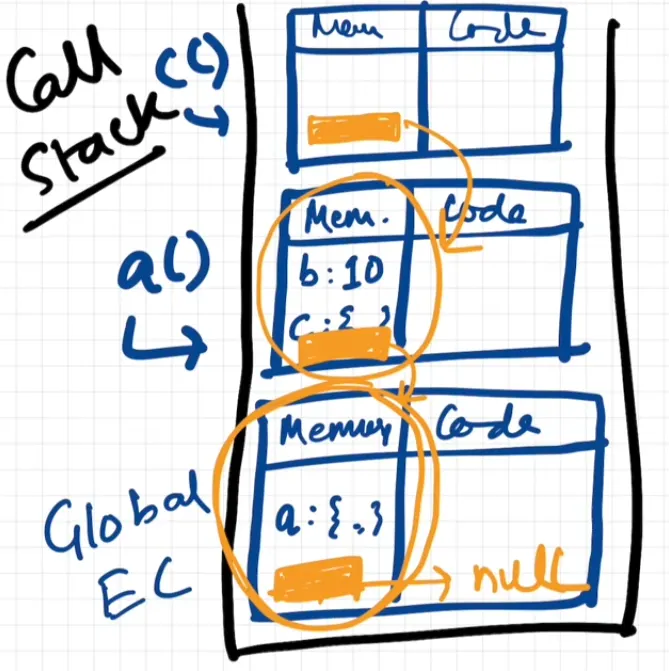
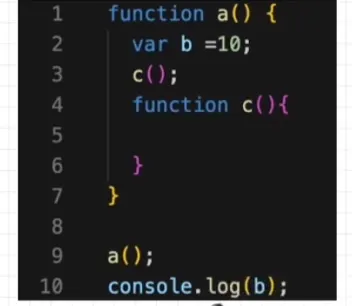
JavaScript engine always creates a global execution context in the beginning to execute the code. It also creates a new lexical environment to store the variables defined in a function during the execution of that function. A lexical environment is a data structure that holds identifier-variable mapping. Lexical Environment = the local memory + a reference to the lexical environment of its parent. In the above screenshot you can see c() is lexically inside a(), and a() is lexically in the global environment. Initially the JavaScript engine searches for a variable in its own lexical environment, then it searches in the lexical environment of its parent, and so on. This search is called the scope chain. The global environment has null as its parent.
function a() { var b = 10; c(); function c() { console.log(b); // 10 — not in c, found in a (c's lexical parent) }}a();console.log(b); // ReferenceError: b is not defined — global cannot look inside a“Lexical” means where the code is written, not where it is called:
var value = 'global';
function printValue() {  console.log(value);}
function run() {  var value = 'local';  printValue(); // "global" — printValue was written in the global scope}
run();