On this page
How JavaScript works
Last reviewed 14 Sept 2026
Everything in JavaScript happens inside an execution context. It is like a container in which the whole JavaScript code is executed. JavaScript is a synchronous, single-threaded language.
Execution context
In JavaScript, Execution context is an abstract concept that holds information about the environment within which the current code is being executed. The JavaScript engine creates the global execution context before it starts to execute any code. From that point on, a new execution context gets created every time a function is executed, as the engine parses through your code. In fact, the global execution context is nothing special. It’s just like any other execution context, except that it gets created by default. It has 2 phases: Memory creation phase and Code execution phase:
| Memory (Variable Environment) | Code (Thread of Execution) |
|---|---|
| Key: Value pair | Commands |
| Functions |
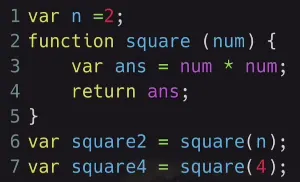 What happens when you run JavaScript code?
Example code:
var n = 2;function square(num) {  var ans = num * num;  return ans;}var square2 = square(n);var square4 = square(4);
console.log(square2, square4); // 4 16
Phase 1 — Memory creation (Global Execution Context)
JavaScript skims the whole code and allocates memory before running anything:
| Memory (Variable Environment) | Code (Thread of Execution) |
|---|---|
n: undefined | — |
square: function square(num) { ... } (whole function is stored) | — |
square2: undefined | — |
square4: undefined | — |
Phase 2 — Code execution
It will read line by line:
var n = 2;→ it will replacen: undefinedwithn: 2.function square(num) {...}→ nothing to do, it was already stored in memory.var square2 = square(n);→ a function is invoked, so a new execution context is created forsquare, with its own two phases:
| Memory (square(n)) | Code (square(n)) |
|---|---|
num: undefined → num: 2 | var ans = num * num; |
ans: undefined → ans: 4 | return ans; — returns 4 to the caller |
After this it will replace the value of ans in square2, so square2 = 4.
After this, the above execution context will be deleted and a new one will be created for square4 (num: 4, ans: 16), so square4 = 16.
Final global memory: n: 2, square: function, square2: 4, square4: 16.
When the whole program finishes, the global execution context is also deleted.
Why this matters — hoisting
Because memory is allocated before execution, you can see variables and functions before their line runs:
console.log(n);         // undefined — memory was created, value not assigned yetconsole.log(square(3)); // 9 — whole function was stored in phase 1
var n = 2;function square(num) {  return num * num;}
Call Stack
Call Stack is there for managing execution context. It maintains the order of execution context. In above Example first it has Global Execution Context then Execution Context 1 (square2 function) but after the execution phase of ec1 it will be removed from Call stack. Now Call stack again has only global execution context and it will proceed for execution context 2(square4 function). On the web you will read it Sometimes as Execution Context Stack, Sometimes Program Stack, Control Stack, Runtime Stack, Machine Stack but all are the same.
A call stack is a mechanism for an interpreter (like the JavaScript interpreter in a web browser) to keep track of its place in a script that calls multiple functions — what function is currently being run and what functions are called from within that function, etc.
- When a script calls a function, the interpreter adds it to the call stack and then starts carrying out the function.
- Any functions that are called by that function are added to the call stack further up, and run where their calls are reached.
- When the current function is finished, the interpreter takes it off the stack and resumes execution where it left off in the last code listing.
- If the stack takes up more space than it had assigned to it, it results in a “stack overflow” error.
Example — watch the call stack
function first() {  console.log('first start');  second();  console.log('first end');}
function second() {  console.log('second');}
first();
// Output:// first start// second// first end| Step | Call stack (top → bottom) |
|---|---|
| Program starts | Global |
first() called | first → Global |
second() called inside first | second → first → Global |
second finishes | first → Global |
first finishes | Global |
| Program ends | (empty) |
Stack overflow example
function recurse() {  recurse(); // no base case — keeps adding to the stack}
recurse(); // RangeError: Maximum call stack size exceeded
You can see the call stack in Chrome DevTools → Sources tab → set a breakpoint → Call Stack panel.