On this page
Built-in Objects, this, Prototypes & Classes
Last reviewed 14 Sept 2026
Date object
const dateObjectName = new Date([parameters]);The parameters can be:
- Nothing — the current date and time:
new Date(). - A date string — e.g.
new Date("December 25, 1995 13:30:00"). Omitted hours, minutes or seconds are set to zero. The ISO format"1995-12-25T13:30:00"is the most reliable. - Year, month, day — e.g.
new Date(1995, 11, 25). Months start at 0 (0 = January, 11 = December). - Year, month, day, hour, minute, second — e.g.
new Date(1995, 11, 25, 9, 30, 0). - A timestamp — milliseconds since 1 January 1970 UTC, e.g.
new Date(0).
const xmas = new Date(1995, 11, 25, 9, 30, 0);
console.log(xmas.getFullYear()); // 1995console.log(xmas.getMonth());    // 11 — December (0-based)console.log(xmas.getDate());     // 25 — day of the monthconsole.log(xmas.getDay());      // 1 — day of the week (0 = Sunday, so 1 = Monday)console.log(xmas.getHours());    // 9
console.log(new Date(2026, 0, 31 + 1).getDate()); // 1 — overflow rolls into Februaryconsole.log(Date.now());         // current timestamp in ms, e.g. 1789000000000console.log(typeof new Date());  // "object"console.log(typeof Date());      // "string" — without `new`, Date returns a string
The function JSClock() below returns the current time in digital clock format:
function JSClock() {  const time = new Date();  const hour = time.getHours();  const minute = time.getMinutes();  const second = time.getSeconds();
  let temp = '' + (hour > 12 ? hour - 12 : hour);  if (hour === 0) temp = '12';  temp += (minute < 10 ? ':0' : ':') + minute;  temp += (second < 10 ? ':0' : ':') + second;  temp += hour >= 12 ? ' P.M.' : ' A.M.';  return temp;}
console.log(JSClock()); // e.g. "9:05:07 P.M."
// Modern alternativeconsole.log(new Date().toLocaleTimeString('en-US')); // e.g. "9:05:07 PM"
Text formatting
String object
The String object is a wrapper around the string primitive. You rarely create one directly — JavaScript wraps primitives automatically when you call a method.
const foo = new String('foo'); // String objectconst bar = 'foo';             // string primitive
console.log(foo);              // [String: 'foo']console.log(typeof foo);       // "object"console.log(typeof bar);       // "string"console.log(foo == bar);       // true — value comparedconsole.log(foo === bar);      // false — object vs primitiveconsole.log(bar.toUpperCase());// "FOO" — primitive temporarily wrapped
String methods
| Method | Description |
|---|---|
charAt, charCodeAt, codePointAt, at | Return the character or character code at a position. |
indexOf, lastIndexOf | Return the position of a substring (first or last), or -1. |
startsWith, endsWith, includes | Return whether the string starts with, ends with or contains a substring. |
concat | Joins strings and returns a new string. |
String.fromCharCode, String.fromCodePoint | Build a string from Unicode values. Called on String, not on an instance. |
split | Splits a string into an array of substrings. |
slice | Extracts a section and returns a new string (supports negative indexes). |
substring | Extracts characters between two indexes (no negative indexes). substr is deprecated. |
match, matchAll, replace, replaceAll, search | Work with regular expressions or patterns. |
toLowerCase, toUpperCase | Return the string in lowercase or uppercase. |
normalize | Returns the Unicode Normalization Form of the string. |
repeat | Returns the string repeated a given number of times. |
trim, trimStart, trimEnd | Remove whitespace from both ends, the start or the end. |
padStart, padEnd | Pad the string to a given length. |
const s = 'Hello, World';
console.log(s.charAt(0));          // "H"console.log(s.at(-1));             // "d" — negative index counts from the endconsole.log(s.indexOf('o'));       // 4console.log(s.lastIndexOf('o'));   // 8console.log(s.includes('World'));  // trueconsole.log(s.startsWith('Hell')); // trueconsole.log(s.split(', '));        // ["Hello", "World"]console.log(s.slice(-5));          // "World"console.log(s.substring(0, 5));    // "Hello"console.log(s.replace('l', 'L'));  // "HeLlo, World" — only the first matchconsole.log(s.replaceAll('l', 'L'));// "HeLLo, WorLd"console.log('  hi  '.trim());      // "hi"console.log('ab'.repeat(3));       // "ababab"console.log('5'.padStart(3, '0')); // "005"console.log(String.fromCharCode(65, 66)); // "AB"
// Common interview task — reverse a stringconsole.log('abc'.split('').reverse().join('')); // "cba"
Embedded expressions (template literals)
const five = 5;const ten = 10;console.log(`Fifteen is ${five + ten} and not ${2 * five + ten}.`);// "Fifteen is 15 and not 20."Internationalization (Intl)
The Intl object is the namespace for the ECMAScript Internationalization API. It provides language-sensitive string comparison (Collator), number formatting (NumberFormat) and date/time formatting (DateTimeFormat).
Date and time formatting
const msPerDay = 24 * 60 * 60 * 1000;
// July 17, 2014 00:00:00 UTCconst july172014 = new Date(msPerDay * (44 * 365 + 11 + 197));
const options = {  year: '2-digit', month: '2-digit', day: '2-digit',  hour: '2-digit', minute: '2-digit', timeZoneName: 'short',  timeZone: 'America/Los_Angeles'};
const americanDateTime = new Intl.DateTimeFormat('en-US', options).format;console.log(americanDateTime(july172014)); // "07/16/14, 05:00 PM PDT"
Without the timeZone option, the output depends on the time zone of the computer running the code.
const d = new Date(Date.UTC(2026, 0, 15));console.log(new Intl.DateTimeFormat('en-GB', { dateStyle: 'long', timeZone: 'UTC' }).format(d)); // "15 January 2026"console.log(new Intl.DateTimeFormat('en-US', { dateStyle: 'long', timeZone: 'UTC' }).format(d)); // "January 15, 2026"Number formatting
NumberFormat formats numbers, for example currencies.
const gasPrice = new Intl.NumberFormat('en-US', {  style: 'currency',  currency: 'USD',  minimumFractionDigits: 3});console.log(gasPrice.format(5.259)); // "$5.259"
const hanDecimalRMBInChina = new Intl.NumberFormat('zh-CN-u-nu-hanidec', {  style: 'currency',  currency: 'CNY'});console.log(hanDecimalRMBInChina.format(1314.25)); // "¥一,三一四.二五"
console.log(new Intl.NumberFormat('en-IN').format(1234567.891)); // "12,34,567.891" — Indian groupingconsole.log(new Intl.NumberFormat('en-IN', { style: 'currency', currency: 'INR' }).format(2500)); // "₹2,500.00"
Array object
An array is an ordered list of values that you access by an index (starting at 0).
Creating an array
These statements create equivalent arrays:
const arr1 = new Array(element0, element1, /* ..., */ elementN);const arr2 = Array(element0, element1, /* ..., */ elementN);const arr3 = [element0, element1, /* ..., */ elementN];Trap — a single number argument sets the length:
const a = Array(42);console.log(a.length);  // 42 — no elements, just 42 empty slotsconsole.log(a[0]);      // undefined
// const b = Array(9.3); // RangeError: Invalid array lengthconst c = Array.of(9.3);console.log(c);         // [9.3] — Array.of always creates elements
console.log(Array.from('abc'));            // ["a", "b", "c"]console.log(Array.from({ length: 3 }, (_, i) => i * 2)); // [0, 2, 4]
If you use a non-integer index, a normal property is created instead of an array element:
const arr = [];arr[3.4] = 'Oranges';console.log(arr.length); // 0console.log(arr.hasOwnProperty(3.4)); // true — stored as the key "3.4"Arrays are objects, so they can also hold extra named properties (these are ignored by length and most array methods):
const nums = [1, 2, 3];nums.property = 'value';console.log(nums.property); // "value"console.log(nums.length); // 3Array methods
Methods that change (mutate) the original array: push, pop, shift, unshift, splice, reverse, sort, fill.
Methods that return a new array/value: concat, slice, map, filter, reduce, join, toSorted, toReversed, …
concat() joins arrays/values and returns a new array.
const myArray = ['1', '2', '3'];const joined = myArray.concat('a', ['b', 'c']);console.log(joined); // ["1", "2", "3", "a", "b", "c"]console.log(myArray); // ["1", "2", "3"] — unchangedjoin(delimiter = ’,’) joins all elements into a string.
const elements = ['Wind', 'Rain', 'Fire'];console.log(elements.join(' - ')); // "Wind - Rain - Fire"console.log(elements.join()); // "Wind,Rain,Fire"push() adds elements to the end and returns the new length.
const list = ['1', '2'];console.log(list.push('3')); // 3 — new length, not the arrayconsole.log(list); // ["1", "2", "3"]pop() removes the last element and returns it.
const list = ['1', '2', '3'];const last = list.pop();console.log(list, last); // ["1", "2"] "3"shift() removes the first element and returns it.
const list = ['1', '2', '3'];const first = list.shift();console.log(list, first); // ["2", "3"] "1"unshift() adds elements to the front and returns the new length.
const list = ['1', '2', '3'];console.log(list.unshift('4', '5')); // 5console.log(list); // ["4", "5", "1", "2", "3"]slice(start, end) returns a new array from start up to (but not including) end.
const letters = ['a', 'b', 'c', 'd', 'e'];console.log(letters.slice(1, 4)); // ["b", "c", "d"]console.log(letters.slice(-2)); // ["d", "e"]console.log(letters); // unchangedsplice(index, countToRemove, …itemsToAdd) removes and/or inserts elements in place, and returns the removed items.
const list = ['1', '2', '3', '4', '5'];const removed = list.splice(1, 3, 'a', 'b', 'c', 'd');console.log(removed); // ["2", "3", "4"]console.log(list);    // ["1", "a", "b", "c", "d", "5"]// Started at index 1, removed 3 elements, then inserted 4 new ones there.
const nums = [1, 2, 3];nums.splice(1, 0, 99); // insert without removingconsole.log(nums);     // [1, 99, 2, 3]
slice vs splice
slice | splice | |
|---|---|---|
| Changes original | No | Yes |
| Returns | new array with the selected part | array of removed items |
| Arguments | (start, end) | (start, deleteCount, ...items) |
reverse() reverses the array in place and returns the same array.
const list = ['1', '2', '3'];const result = list.reverse();console.log(list); // ["3", "2", "1"]console.log(result === list); // true — same arraysort() sorts in place and returns the same array. By default it converts elements to strings and compares them.
const words = ['Wind', 'Rain', 'Fire'];words.sort();console.log(words); // ["Fire", "Rain", "Wind"]
// Trap — numbers are sorted as strings by defaultconsole.log([10, 1, 5, 100].sort());                // [1, 10, 100, 5]console.log([10, 1, 5, 100].sort((a, b) => a - b)); // [1, 5, 10, 100]console.log([10, 1, 5, 100].sort((a, b) => b - a)); // [100, 10, 5, 1]
sort() can take a compare function (a, b):
- return a negative number if
ashould come beforeb - return a positive number if
ashould come afterb - return
0if they are equal
// Sort by the last letter of each wordconst sortFn = function (a, b) {  if (a[a.length - 1] < b[b.length - 1]) return -1;  if (a[a.length - 1] > b[b.length - 1]) return 1;  return 0;};
const words2 = ['Wind', 'Rain', 'Fire'];words2.sort(sortFn);console.log(words2); // ["Wind", "Fire", "Rain"] — d, e, n
const users = [{ name: 'Zed', age: 30 }, { name: 'Amy', age: 25 }];users.sort((a, b) => a.name.localeCompare(b.name));console.log(users.map(u => u.name)); // ["Amy", "Zed"]
indexOf(searchElement, fromIndex) returns the index of the first match, or -1.
const a = ['a', 'b', 'a', 'b', 'a'];console.log(a.indexOf('b')); // 1console.log(a.indexOf('b', 2)); // 3 — start searching from index 2console.log(a.indexOf('z')); // -1 — not foundconsole.log([NaN].indexOf(NaN));// -1 — use includes(NaN) insteadlastIndexOf(searchElement, fromIndex) works like indexOf, but searches backwards from the end.
const a = ['a', 'b', 'c', 'd', 'a', 'b'];console.log(a.lastIndexOf('b')); // 5console.log(a.lastIndexOf('b', 4)); // 1 — search backwards from index 4console.log(a.lastIndexOf('z')); // -1forEach(callback) runs the callback for every item and returns undefined. You cannot break out of it.
const a = ['a', 'b', 'c'];const result = a.forEach((element, index) => console.log(index, element));// 0 "a"// 1 "b"// 2 "c"console.log(result); // undefinedmap(callback) returns a new array with the callback’s return value for each item.
const a1 = ['a', 'b', 'c'];const a2 = a1.map(item => item.toUpperCase());console.log(a2); // ["A", "B", "C"]
console.log([1, 2, 3].map(n => { n * 2 })); // [undefined, undefined, undefined] — forgot return
filter(callback) returns a new array with the items for which the callback returns a truthy value.
const mixed = ['a', 10, 'b', 20, 'c', 30];console.log(mixed.filter(item => typeof item === 'number')); // [10, 20, 30]console.log([0, 1, '', 'x', null].filter(Boolean)); // [1, "x"] — remove falsy valuesfind(callback) returns the first matching item (or undefined); findIndex returns its index (or -1).
const users = [{ id: 1 }, { id: 2 }];console.log(users.find(u => u.id === 2)); // { id: 2 }console.log(users.findIndex(u => u.id === 3)); // -1every(callback) returns true if the callback is true for every item.
some(callback) returns true if it is true for at least one item.
const isNumber = value => typeof value === 'number';
console.log([1, 2, 3].every(isNumber));     // trueconsole.log([1, '2', 3].every(isNumber));   // falseconsole.log([1, '2', 3].some(isNumber));    // trueconsole.log(['1', '2', '3'].some(isNumber));// false
console.log([].every(isNumber)); // true — nothing fails on an empty arrayconsole.log([].some(isNumber));  // false
reduce(callback, initialValue) calls callback(accumulator, currentValue, currentIndex, array) for each item to reduce the array to a single value, and returns the final accumulator.
const a = [10, 20, 30];const total = a.reduce((accumulator, currentValue) => accumulator + currentValue, 0);console.log(total); // 60
// Step by step: acc=0 → 0+10=10 → 10+20=30 → 30+30=60
// Group items by a keyconst people = [{ name: 'A', city: 'Pune' }, { name: 'B', city: 'Delhi' }, { name: 'C', city: 'Pune' }];const byCity = people.reduce((acc, p) => {  (acc[p.city] ||= []).push(p.name);  return acc;}, {});console.log(byCity); // { Pune: ["A", "C"], Delhi: ["B"] }
// console.log([].reduce((a, b) => a + b)); // TypeError: Reduce of empty array with no initial value
map vs forEach
map | forEach | |
|---|---|---|
| Returns | new array | undefined |
| Chainable | Yes (.map().filter()) | No |
| Use when | you need a transformed array | you only need side effects (logging, saving) |
Keyed collections
Map object
A Map is a collection of key/value pairs. Keys can be any type, and entries are iterated in insertion order.
const sayings = new Map();sayings.set('dog', 'woof');sayings.set('cat', 'meow');sayings.set('elephant', 'toot');
console.log(sayings.size);        // 3console.log(sayings.get('dog'));  // "woof"console.log(sayings.get('fox'));  // undefinedconsole.log(sayings.has('bird')); // false
sayings.delete('dog');console.log(sayings.has('dog'));  // false
for (const [key, value] of sayings) {  console.log(key + ' goes ' + value);}// "cat goes meow"// "elephant goes toot"
sayings.clear();console.log(sayings.size);        // 0
// Any value can be a keyconst objKey = { id: 1 };const m = new Map([[objKey, 'object'], [1, 'number'], ['1', 'string']]);console.log(m.get(objKey)); // "object"console.log(m.get(1)); // "number"console.log(m.get('1')); // "string" — 1 and "1" are different keys
// Convert between Map and objectconst obj = Object.fromEntries(new Map([['a', 1], ['b', 2]]));console.log(obj); // { a: 1, b: 2 }console.log(new Map(Object.entries(obj)).get('a')); // 1Object vs Map
Objects have traditionally been used to map strings to values. Map has some advantages:
- Object keys are strings or symbols;
Mapkeys can be any value (objects, numbers, functions). - A
Maphas asizeproperty; for an object you must count keys yourself (Object.keys(obj).length). - A
Mapalways iterates in insertion order. (Objects mostly do too, but integer-like keys come first.) - An object has a prototype, so it has default keys that can clash with yours (like
toStringor__proto__). This can be avoided withObject.create(null). Mapis optimized for frequent additions and removals.
How to choose:
- Use a Map when keys are unknown until run time, or when keys are not strings.
- Use a Map when you need primitive keys kept as their own type — an object turns every key into a string.
- Use an object for fixed, known properties with logic that works on individual fields, and for data you will send as JSON.
const o = {};o[1] = 'number';o['1'] = 'string';console.log(Object.keys(o)); // ["1"] — the number key was converted to a string and overwritten
console.log(JSON.stringify(new Map([['a', 1]]))); // "{}" — Map is not serialized by JSON
WeakMap object
A WeakMap is a collection of key/value pairs where keys must be objects and values can be anything. Keys are held weakly: if nothing else refers to a key object, it can be garbage collected and its entry disappears.
Because entries can disappear at any time, a WeakMap is not enumerable — there is no size, keys(), values() or forEach. It only has set, get, has and delete.
const visits = new WeakMap();let user = { name: 'Asha' };
visits.set(user, 3);console.log(visits.get(user)); // 3console.log(visits.has(user)); // true
user = null; // no other reference — the entry can now be garbage collected
// visits.set('key', 1); // TypeError: Invalid value used as weak map key
One use case is storing private data for objects. Only code with access to the privates WeakMap can read the data:
const privates = new WeakMap();
function Public(secret) {  const me = { secret }; // private data  privates.set(this, me);}
Public.prototype.reveal = function () {  const me = privates.get(this);  return me.secret;};
const p = new Public('hidden');console.log(p.reveal()); // "hidden"console.log(p.secret);   // undefined — not stored on the instance
// module.exports = Public; // export only Public, not privates
Set object
A Set is a collection of unique values of any type, iterated in insertion order.
const mySet = new Set();mySet.add(1);mySet.add('some text');mySet.add('foo');mySet.add(1);               // ignored — already present
console.log(mySet.has(1));  // truemySet.delete('foo');console.log(mySet.size);    // 2
for (const item of mySet) console.log(item);// 1// "some text"
Converting between Array and Set
const mySet2 = new Set([1, 2, 3, 4]);
console.log(Array.from(mySet2)); // [1, 2, 3, 4]console.log([...mySet2]);        // [1, 2, 3, 4]
// Remove duplicates from an arrayconsole.log([...new Set([1, 2, 2, 3, 1])]); // [1, 2, 3]
Array vs Set
Sets have some advantages over arrays for collections of unique values:
- Deleting by value from an array (
arr.splice(arr.indexOf(val), 1)) is slow;set.delete(val)is fast. - Sets let you delete by value; arrays need the index.
NaNcannot be found withindexOfin an array, butset.has(NaN)works.- Sets keep values unique automatically.
set.has()is much faster thanarray.includes()for large collections.
const myset = new Set();myset.add(75);myset.add(12);
console.log(myset.delete(75)); // true — 75 existed and was removedconsole.log(myset.delete(99)); // false — not foundconsole.log(myset);            // Set(1) { 12 }
console.log(new Set([NaN]).has(NaN)); // trueconsole.log(new Set([{}, {}]).size);  // 2 — objects are compared by reference
WeakSet object
A WeakSet is a collection of objects only, each appearing once.
Differences from Set:
- A WeakSet can hold only objects, not primitive values.
- References are held weakly — if no other reference to an object exists, it can be garbage collected.
- A WeakSet is not enumerable (no
size, no iteration). It only hasadd,hasanddelete.
Use cases are limited, but it is handy for tagging objects (e.g. DOM elements) without causing memory leaks.
const processed = new WeakSet();
function processOnce(obj) {  if (processed.has(obj)) return 'already done';  processed.add(obj);  return 'processing';}
const task = { id: 1 };console.log(processOnce(task)); // "processing"console.log(processOnce(task)); // "already done"// processed.add(1);           // TypeError: Invalid value used in weak set
Map / Set vs WeakMap / WeakSet
| Map / Set | WeakMap / WeakSet | |
|---|---|---|
| Key / value types | any | objects only |
| Prevents garbage collection | Yes | No |
Iterable / size | Yes | No |
| Use case | general collections | metadata or private data attached to objects |
Working with objects
An object is a collection of properties, and a property is a pair of a name (key) and a value. A property whose value is a function is called a method.
Creating objects
1. Object initializer (literal) — the most common way.
const myCar = {  make: 'Ford',  model: 'Mustang',  year: 1969};
const obj = {  property_1: 'value_1', // key may be an identifier...  2: 'value_2',          // or a number...  'property n': 'value_n' // or a string};
The same object can be built step by step with new Object():
const myCar2 = new Object();myCar2.make = 'Ford';myCar2.model = 'Mustang';myCar2.year = 1969;Properties that were never assigned are undefined (not null):
console.log(myCar.color); // undefined2. Constructor function — useful to create many objects of the same type:
- Define the object type with a constructor function (by convention, it starts with a capital letter).
- Create instances with
new.
function Car(make, model, year) {  this.make = make;  this.model = model;  this.year = year;}
const mycar = new Car('Eagle', 'Talon TSi', 1993);console.log(mycar.model); // "Talon TSi"
this refers to the new object being created, so each argument is stored on that object.
3. Object.create() — creates an object with a chosen prototype, without writing a constructor:
// Animal properties and methodconst Animal = {  type: 'Invertebrates', // default value  displayType() {        // method to display the type    console.log(this.type);  }};
const animal1 = Object.create(Animal);animal1.displayType(); // "Invertebrates" — inherited from Animal
const fish = Object.create(Animal);fish.type = 'Fishes';  // own property shadows the inherited onefish.displayType();    // "Fishes"
console.log(Object.getPrototypeOf(fish) === Animal); // true
Enumerating object properties
There are three native ways to list object properties:
for...in— all enumerable properties, including inherited ones from the prototype chain.Object.keys(o)— the object’s own enumerable property names.Object.getOwnPropertyNames(o)— all own property names, enumerable or not.
function showProps(obj, objName) {  let result = '';  for (const key in obj) {    // Object.hasOwn filters out properties from the prototype chain    if (Object.hasOwn(obj, key)) {      result += `${objName}.${key} = ${obj[key]}\n`;    }  }  return result;}
console.log(showProps(myCar, 'myCar'));// myCar.make = Ford// myCar.model = Mustang// myCar.year = 1969
const parent = { inherited: 1 };const child = Object.create(parent);child.own = 2;Object.defineProperty(child, 'hidden', { value: 3, enumerable: false });
for (const k in child) console.log(k); // "own", "inherited"console.log(Object.keys(child)); // ["own"]console.log(Object.getOwnPropertyNames(child)); // ["own", "hidden"]console.log(Object.entries(child)); // [["own", 2]]Defining methods
A method is a function stored as a property of an object.
function sayHello() {  return 'hello';}
const myObj = {  myMethod: function (params) {    return 'method';  },
  // shorthand — works too  myOtherMethod(params) {    return 'other method';  }};
myObj.sayHello = sayHello; // assign an existing function as a method
console.log(myObj.myMethod(), myObj.myOtherMethod(), myObj.sayHello());// "method" "other method" "hello"
Adding getters and setters later
Getters and setters can be added to an existing object with Object.defineProperty or Object.defineProperties:
const o = { a: 0 };
Object.defineProperties(o, {  b: { get() { return this.a + 1; } },  c: { set(x) { this.a = x / 2; } }});
o.c = 10;         // runs the setter, which assigns 10 / 2 (5) to aconsole.log(o.b); // 6 — runs the getter, which returns a + 1console.log(o.a); // 5
Adding properties to all instances (prototype)
Every object inherits from another object called its prototype. For objects created with a constructor, that prototype is Constructor.prototype.
A property added to the prototype is shared by all instances, not just one:
const car1 = new Car('Honda', 'City', 2020);const car2 = new Car('Tata', 'Nexon', 2022);
Car.prototype.color = null;            // shared defaultCar.prototype.describe = function () { // shared method  return `${this.make} ${this.model}`;};
car1.color = 'black';                  // own property on car1 only
console.log(car1.color);      // "black"console.log(car2.color);      // null — from the prototypeconsole.log(car2.describe()); // "Tata Nexon"console.log(Object.hasOwn(car2, 'color')); // false — inherited
this keyword
this refers to the object that is executing the current code. Its value is not decided where the function is written — it depends on how the function is called (except for arrow functions).
Quick rules (in priority order):
- Called with
new→thisis the new object. - Called with
call,applyorbind→thisis the object you pass. - Called as a method (
obj.fn()) →thisisobj. - Called as a plain function (
fn()) →undefinedin strict mode, the global object otherwise. - Arrow function → uses
thisfrom the surrounding scope (rules 1–4 do not apply).
1. Global context
// Non-strict script in a browserconsole.log(this); // Window object- In a browser script,
thisat the top level iswindow, even in strict mode. - In an ES module (
<script type="module">), top-levelthisisundefined. - In a Node.js CommonJS file, top-level
thisismodule.exports({}), notglobal.
2. Inside regular functions
function showThis() { console.log(this);}showThis(); // Window (browser) or globalThis (Node) — non-strict mode'use strict';function showThis() { console.log(this);}showThis(); // undefinedAs a method of an object — this is the object before the dot:
const obj = {  name: 'Alice',  greet: function () {    console.log(this.name);  }};
obj.greet(); // "Alice"
3. Inside arrow functions
Arrow functions do not have their own this. They use this from the scope where they were defined.
const obj = {  name: 'Alice',  greet: () => {    console.log(this.name);  },  greetLater() {    setTimeout(() => console.log(this.name), 0); // arrow inside a method  }};
obj.greet();      // undefined — `this` is the outer (module/global) scope, not objobj.greetLater(); // "Alice" — the arrow uses greetLater's `this`, which is obj
4. Inside classes
Instance methods — this is the instance:
class Person {  constructor(name) {    this.name = name;  }  greet() {    console.log(`Hello, my name is ${this.name}`);  }}
const person = new Person('Alice');person.greet(); // "Hello, my name is Alice"
const greet = person.greet;// greet(); // TypeError: Cannot read properties of undefined — class bodies are always strict
Static methods — this is the class itself:
class Person2 {  static info() {    console.log(this === Person2);  }}
Person2.info(); // true
5. In event handlers
With a regular function, this is the element the listener is attached to (same as event.currentTarget):
const button = document.querySelector('button');
button.addEventListener('click', function () {  console.log(this); // <button> element});
With an arrow function, this comes from the surrounding scope:
button.addEventListener('click', (event) => { console.log(this); // Window (or the enclosing context) console.log(event.currentTarget); // <button> — use this instead});6. Explicit binding: call, apply and bind
call and apply invoke the function immediately with a chosen this. bind returns a new function with this fixed.
function greet(greeting, punctuation) {  console.log(`${greeting}, ${this.name}${punctuation}`);}
const person = { name: 'Alice' };
greet.call(person, 'Hi', '!');     // "Hi, Alice!" — arguments one by onegreet.apply(person, ['Hey', '?']); // "Hey, Alice?" — arguments as an array
const boundGreet = greet.bind(person, 'Hello');boundGreet('.');                   // "Hello, Alice."
const other = { name: 'Bob' };boundGreet.call(other, '!');       // "Hello, Alice!" — a bound function cannot be re-bound
7. In constructors (with new)
When a function is called with new, this is the newly created object:
function Animal(type) {  this.type = type;}
const cat = new Animal('cat');console.log(cat.type); // "cat"
8. In setTimeout and setInterval
A regular function callback is called as a plain function, so this is the global object (window in browsers; in Node it is the Timeout object):
setTimeout(function () { console.log(this); // Window (browser)}, 1000);An arrow function keeps this from the enclosing scope:
const timer = { seconds: 5, start() { setTimeout(() => { console.log(this.seconds); // 5 — `this` is timer }, 1000); }};timer.start();9. Special cases
Assigning a function to an object property — this depends on the call, not where the function was created:
const obj = { name: 'Alice' };
const greet = function () {  console.log(this.name);};
obj.greet = greet;obj.greet(); // "Alice"
Losing this — taking a method out of its object:
const obj2 = {  name: 'Alice',  greet: function () {    console.log(this.name);  }};
const greet2 = obj2.greet;greet2(); // undefined (or TypeError in strict mode) — called without an object
setTimeout(obj2.greet, 0);              // undefined — same problemsetTimeout(() => obj2.greet(), 0);      // "Alice" — fix 1: wrap in an arrowsetTimeout(obj2.greet.bind(obj2), 0);   // "Alice" — fix 2: bind
Interview question — what does this print?
const user = {  name: 'Sam',  regular() { return this.name; },  arrow: () => this?.name,  nested() {    function inner() { return this?.name; }    const innerArrow = () => this.name;    return [inner(), innerArrow()];  }};
console.log(user.regular()); // "Sam"console.log(user.arrow());   // undefined — arrow takes outer `this`console.log(user.nested());  // [undefined, "Sam"] — plain inner() loses `this`; the arrow keeps it
Prototypes and prototypal inheritance
JavaScript is a prototype-based language. Every object has a hidden link to another object called its prototype ([[Prototype]], readable with Object.getPrototypeOf(obj) or the older obj.__proto__).
When you read a property, JavaScript first looks on the object itself. If it is not there, it looks on the prototype, then the prototype’s prototype, and so on until it reaches null. This is the prototype chain. It is why arrays have map, strings have toUpperCase, and every object has toString.
Every regular function also has a prototype property — an object that becomes the prototype of instances created with new. Methods placed there are shared by all instances.
The saying “everything in JavaScript is an object” comes from this: arrays, functions and dates all have Object.prototype at the end of their prototype chain.
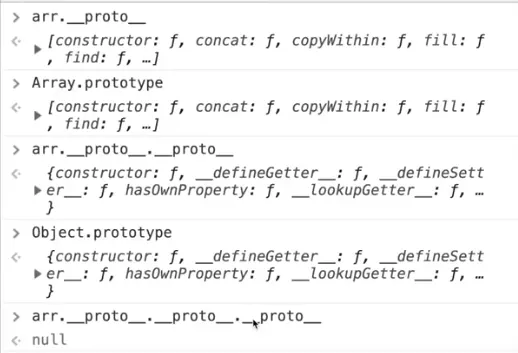
const arr = [1, 2];console.log(Object.getPrototypeOf(arr) === Array.prototype);            // trueconsole.log(Object.getPrototypeOf(Array.prototype) === Object.prototype); // trueconsole.log(Object.getPrototypeOf(Object.prototype));                   // null — end of the chain
function fn() {}console.log(fn.__proto__ === Function.prototype);                       // trueconsole.log(Function.prototype.__proto__ === Object.prototype);         // true
const object = { name: "Akshay", city: "Dehradun", getIntro: function () { console.log(this.name + " from " + this.city); }};
const object2 = { name: "Aditya"};
// Never do this in real code — changing __proto__ is slowobject2.__proto__ = object;
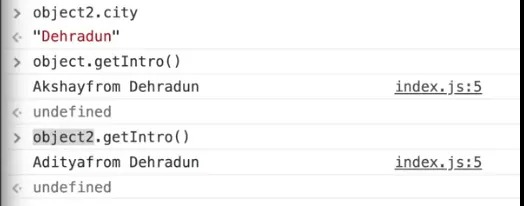
console.log(object2.name); // "Aditya" — own propertyconsole.log(object2.city); // "Dehradun" — not on object2, found on its prototypeobject2.getIntro(); // "Aditya from Dehradun" — inherited method, `this` is object2object2 now inherits from object. Because city is not defined on object2, it is read from object; the same happens for methods.
Better alternatives to setting __proto__:
const object3 = Object.create(object); // set the prototype at creationobject3.name = 'Neha';object3.getIntro(); // "Neha from Dehradun"
Object.setPrototypeOf(object2, object); // standard API (still slow — avoid in hot code)
Adding methods to built-in prototypes
Methods added to a built-in prototype become available on every object of that type:
Function.prototype.mybind = function () {  console.log("User defined bind method");};
function fun() {  // any function}
fun.mybind(); // "User defined bind method" — every function now has mybind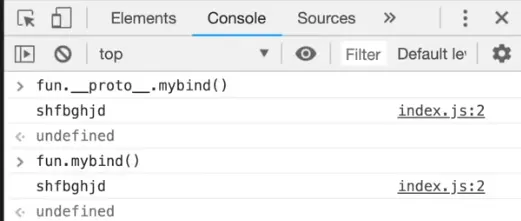
This is how polyfills are written. In application code, avoid modifying built-in prototypes — it can clash with future JavaScript features or other libraries.
prototype vs __proto__
prototype | __proto__ | |
|---|---|---|
| Exists on | functions (and classes) | every object |
| What it is | object that will become the prototype of instances created with new | link to this object’s own prototype |
| Example | Car.prototype | mycar.__proto__ === Car.prototype |
__proto__ is a legacy accessor kept for compatibility; prefer Object.getPrototypeOf / Object.setPrototypeOf.
JavaScript classes
A class is a template for creating objects. It is mostly syntactic sugar over constructor functions and prototypes.
class Employee {  // Initializing an object  constructor(id, name) {    this.id = id;    this.name = name;  }
  // Declaring a method (stored on Employee.prototype)  detail() {    return `${this.id} ${this.name}`;  }}
const e1 = new Employee(101, "Martin Roy");const e2 = new Employee(102, "Duke William");
console.log(e1.detail()); // "101 Martin Roy"console.log(e2.detail()); // "102 Duke William"console.log(typeof Employee);                         // "function"console.log(e1.detail === e2.detail);                 // true — shared via the prototypeconsole.log(Object.getPrototypeOf(e1) === Employee.prototype); // true
Points to remember:
- Class declarations are hoisted but not initialized (temporal dead zone). Using a class before its declaration throws
ReferenceError: Cannot access 'Employee' before initialization. - A class cannot be declared twice in the same scope:
SyntaxError: Identifier 'Employee' has already been declared. - A class must be called with
new:Employee()throwsTypeError: Class constructor Employee cannot be invoked without 'new'. - Code inside a class body always runs in strict mode.
// const early = new Late(); // ReferenceError: Cannot access 'Late' before initializationclass Late {}Class expressions
A class can also be defined with a class expression. The name is optional, so it can be named or unnamed.
Unnamed class expression
const emp = class {  constructor(id, name) {    this.id = id;    this.name = name;  }};
console.log(emp.name); // "emp" — takes the variable name
Named class expression
The class name is visible only inside the class body. From outside, use the variable.
const emp2 = class Employee2 {  constructor(id, name) {    this.id = id;    this.name = name;  }  whoAmI() {    return Employee2.name; // allowed inside the class  }};
const emp1 = new emp2("1", "employee");console.log(emp1.name);     // "employee"console.log(emp2.name);     // "Employee2" — the class's own nameconsole.log(emp1.whoAmI()); // "Employee2"
// const emp3 = new Employee2("1", "employee"); // ReferenceError: Employee2 is not defined
Re-declaring a class expression
A class declaration cannot be declared twice, but a class expression stored in a var (or reassigned let) can be replaced:
var Emp = class {  constructor(id, name) {    this.id = id;    this.name = name;  }  detail() {    return `${this.id} ${this.name}`;  }};
console.log(new Emp(101, "Martin Roy").detail()); // "101 Martin Roy"
// Re-declaring the classvar Emp = class {  constructor(id, name) {    this.id = id;    this.name = name;  }  detail() {    return `#${this.id} - ${this.name}`;  }};
console.log(new Emp(103, "James Bella").detail()); // "#103 - James Bella"
Static methods
A static method belongs to the class itself, not to instances. It is often used for utility functions.
Points to remember:
- The
statickeyword declares a static method. - A static method can have any name, and a class can have several.
- If two static methods have the same name, the last one wins.
- Inside a static method,
thisis the class, sothis.otherStatic()calls another static method. - Inside an instance (non-static) method,
thisis the instance, so call static methods with the class name (ClassName.method()) orthis.constructor.method().
class MathUtil {  static add(a, b) {    return a + b;  }  static double(n) {    return this.add(n, n);             // `this` is MathUtil  }  static add(a, b) {                   // same name — this one wins    return `sum: ${a + b}`;  }  instanceMethod() {    return MathUtil.add(1, 2) + ' / ' + this.constructor.add(3, 4);  }}
console.log(MathUtil.double(5));             // "sum: 10"console.log(new MathUtil().instanceMethod()); // "sum: 3 / sum: 7"// new MathUtil().add(1, 2);                  // TypeError: add is not a function — not on instances
Inheritance with extends and super
class Animal {  constructor(name) {    this.name = name;  }  speak() {    return `${this.name} makes a sound`;  }}
class Dog extends Animal {  constructor(name, breed) {    super(name);         // must call super() before using `this`    this.breed = breed;  }  speak() {    return `${super.speak()} — woof`; // call the parent method  }}
const d = new Dog('Rex', 'Labrador');console.log(d.speak());           // "Rex makes a sound — woof"console.log(d instanceof Dog);    // trueconsole.log(d instanceof Animal); // true
Class fields, private members and getters
class BankAccount {  currency = 'INR';      // public field — set on every instance  #balance = 0;          // private field — only accessible inside the class  static count = 0;      // static field
  constructor(owner) {    this.owner = owner;    BankAccount.count++;  }
  deposit(amount) {    if (amount <= 0) throw new Error('Invalid amount');    this.#balance += amount;    return this;         // return this to allow chaining  }
  get balance() {        // read like a property    return `${this.#balance} ${this.currency}`;  }
  #log() {               // private method    return 'secret';  }}
const acc = new BankAccount('Asha');acc.deposit(100).deposit(50);console.log(acc.balance);       // "150 INR"console.log(BankAccount.count); // 1console.log(acc['#balance']);   // undefined — not a normal property// acc.#balance;                // SyntaxError: Private field '#balance' must be declared in an enclosing class
Iterables, iterators and generators
Iterables
An iterable is an object that can be looped over with for...of, spread (...) and destructuring. Arrays, strings, Map, Set, arguments and NodeList are built-in iterables. Plain objects are not.
for (const variable of iterable) { // code block to be executed}for (const ch of 'hey') console.log(ch); // "h", "e", "y"console.log([...new Set([1, 1, 2])]); // [1, 2]const [first, second] = 'ab'; // "a", "b"
// for (const x of { a: 1 }) {} // TypeError: {(intermediate value)} is not iterableIterators
The iterator protocol defines how to produce a sequence of values. An object is an iterator when it has a next() method that returns an object with two properties:
| Property | Meaning |
|---|---|
value | The value returned by the iterator (can be omitted when done is true) |
done | true if the iterator has finished, false if it produced a new value |
const it = ['a', 'b'][Symbol.iterator]();console.log(it.next()); // { value: "a", done: false }console.log(it.next()); // { value: "b", done: false }console.log(it.next()); // { value: undefined, done: true }A home-made iterator
function myNumbers() {  let n = 0;  return {    next: function () {      n += 10;      return { value: n, done: false };    }  };}
const n = myNumbers();console.log(n.next().value); // 10console.log(n.next().value); // 20console.log(n.next().value); // 30
This is an iterator but not an iterable — it cannot be used with for...of.
Custom iterables
An object is iterable when it has a [Symbol.iterator] method that returns an iterator (an object with next()).
const myNumbers2 = {};
myNumbers2[Symbol.iterator] = function () {  let n = 0;  let done = false;  return {    next() {      n += 10;      if (n === 100) done = true;      return { value: n, done: done };    }  };};
for (const num of myNumbers2) {  console.log(num); // 10, 20, 30, ..., 90 — stops when done is true (100 is not logged)}
console.log([...myNumbers2].length); // 9
// A range object that works with for...ofconst range = { from: 1, to: 4, [Symbol.iterator]() { let current = this.from; const last = this.to; return { next: () => current <= last ? { value: current++, done: false } : { value: undefined, done: true } }; }};
console.log([...range]); // [1, 2, 3, 4]Generators
A generator function (function*) can pause and resume. Calling it does not run the body — it returns a generator object, which is both an iterator and an iterable. Each next() runs the code until the next yield, which pauses and returns a value.
function* myGenerator() {  yield 1; // pause and return 1  yield 2; // pause and return 2  yield 3; // pause and return 3}
const gen = myGenerator(); // returns an iterator — nothing has run yet
console.log(gen.next()); // { value: 1, done: false }console.log(gen.next()); // { value: 2, done: false }console.log(gen.next()); // { value: 3, done: false }console.log(gen.next()); // { value: undefined, done: true }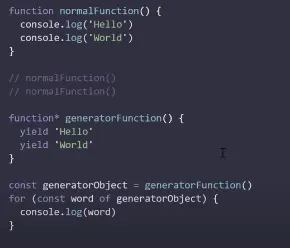
// Generators work with for...of and spreadconsole.log([...myGenerator()]); // [1, 2, 3]
// return value — included in next(), but NOT in for...offunction* withReturn() {  yield 'a';  return 'end';}const g = withReturn();console.log(g.next()); // { value: "a", done: false }console.log(g.next()); // { value: "end", done: true }console.log([...withReturn()]); // ["a"] — the return value is skipped
// Infinite sequence — values are produced only when askedfunction* idGenerator() {  let id = 1;  while (true) yield id++;}const ids = idGenerator();console.log(ids.next().value, ids.next().value, ids.next().value); // 1 2 3
// Passing a value back into the generatorfunction* conversation() {  const name = yield 'What is your name?';  yield `Hello, ${name}!`;}const chat = conversation();console.log(chat.next().value);        // "What is your name?"console.log(chat.next('Asha').value);  // "Hello, Asha!" — 'Asha' becomes the result of the first yield
// The simplest way to make a class iterableclass Team {  constructor(...members) { this.members = members; }  *[Symbol.iterator]() {    yield* this.members; // delegate to the array's iterator  }}console.log([...new Team('A', 'B')]); // ["A", "B"]