On this page
WebSocket in NodeJS
Last reviewed 2 Sept 2026
WebSocket is a communication protocol enabling full-duplex communication, allowing simultaneous two-way communication between a user’s browser and the server. It establishes a continuous connection, enabling messages to be sent between the web server and browser at any time. Unlike traditional request/response formats, WebSocket facilitates server-initiated communication with the client. To implement WebSocket in NodeJS, the “socket.io” dependency needs installation. Additionally, installing the “express” module is essential for server-side applications.
npm install socket.io —save
npm install express —save
Polling is the process where the computer or controlling device waits for an external device to check for its readiness or state, often with low-level hardware
If 1000 clients do polling in each sec to the server then it will increase the load on the server.
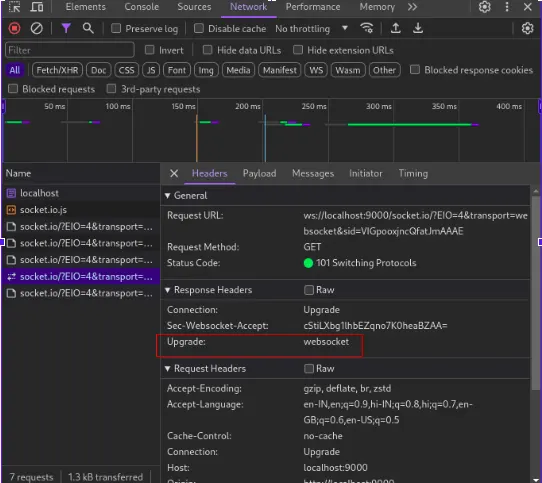
In simple request response, our connection was getting closed but here when you make a web socket connection, you do not close it. It’s bidirectional. Users have control to close it whenever they want.
Upgrade
The HTTP 1.1 (only) Upgrade header can be used to upgrade an already established client/server connection to a different protocol (over the same transport protocol). For example, it can be used by a client to upgrade a connection from HTTP 1.1 to HTTP 2.0, or an HTTP or HTTPS connection into a WebSocket.
To implement a web socket, we use socket.io library.
Why are we using http with express for websocket? Why can’t we use just express?
The app in Express is not the httpServer, so if the WebSocketServer doesn’t explicitly know about Express and how to get the server from it, then you probably need to give it the actual httpServer object rather than the Express object which you can do by changing this:
app.listen(2345);
wsServer = new WebSocketServer({'httpServer':app});
to this:
var server = app.listen(2345);
var wsServer = new WebSocketServer({'httpServer': server});
Let’s understand it by code.
Please find the boiler code
index.js
const path = require("path")
const http = require("http");
const express = require("express");
const app = express();
const server = http.createServer(app);
app.use(express.static(path.resolve("./public")));
app.get("/", (req, res) => {
res.sendFile("/public/index.html");
});
server.listen(9000, () => console.log("Server started at 9000"));
Create public/index.html
<html lang="en">
<head>
<meta charset="UTF-8">
<meta name="viewport" content="width=device-width, initial-scale=1.0">
</head>
<body>
Chatting..
</body>
</html>
Install socket.io on server
npm i socket.io
Update index.js
**const path = require("path");**
**const http = require("http");**
**const express = require("express");**
**const { Server } = require("socket.io");**
const app = express();
const server = http.createServer(app);
const io = new Server(server);
app.use(express.static(path.resolve(”./public”)));
**io.on("connection", (socket) => {**
**console.log("a new user connected " ,socket.id);**
});
**app.get("/", (req, res) => {**res.sendFile(“/public/index.html”);
});
**server.listen(9000, () => console.log("Server started at 9000"));**Implement socker.io on frontend
Update public/index.html
<html lang="en">
<head>
<meta charset="UTF-8" />
<meta name="viewport" content="width=device-width, initial-scale=1.0" />
Chat App
</head>
<body>
Chatting..
<script src="/socket.io/socket.io.js"></script>
<script>
var socket = io();
</script>
</body>
</html>
Update public/index.html
<html lang="en">
<head>
<meta charset="UTF-8" />
<meta name="viewport" content="width=device-width, initial-scale=1.0" />
Chat App
</head>
<body>
Chatting..
<script src="/socket.io/socket.io.js"></script>
<script>
const socket = io();
const sendBtn = document.getElementById(“sendBtn”);
const messageInput = document.getElementById(“message”);
**sendBtn.addEventListener("click", (e)=>{**const message = messageInput.value;
**console.log(message);**socket.emit(“user-message”,message)
})
</script>
</body>
</html>
We can see the message when we send it to the server in the network console.
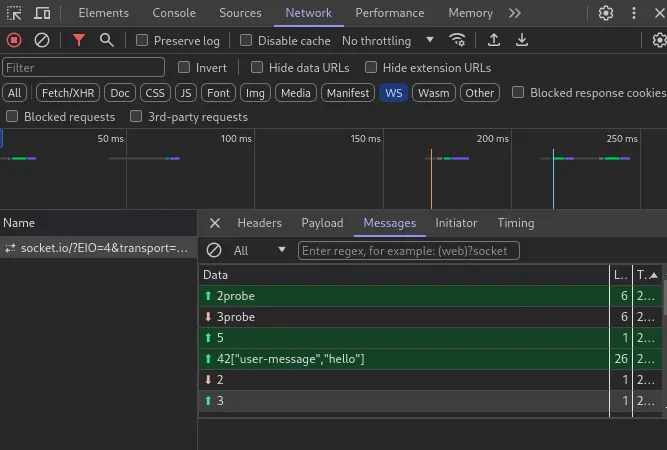
Let’s get the message in the server
index.js
const path = require("path");
const http = require("http");
const express = require("express");
const { Server } = require("socket.io");
const app = express();
const server = http.createServer(app);
const io = new Server(server);
app.use(express.static(path.resolve("./public")));
io.on("connection", (socket) => {
socket.on("user-message", (message) =>{
console.log("A new user message ", message);
})
});
app.get("/", (req, res) => {
res.sendFile("/public/index.html");
});
server.listen(9000, () => console.log("Server started at 9000"));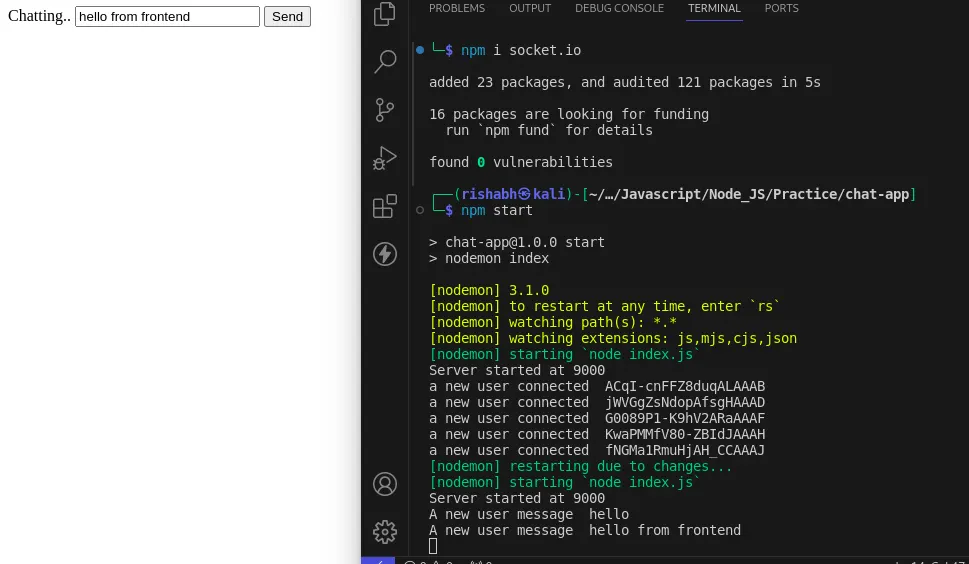
Now we want the server to emit the message to all clients.
Update index.js
const path = require("path");
const http = require("http");
const express = require("express");
const { Server } = require("socket.io");
const app = express();
const server = http.createServer(app);
const io = new Server(server);
app.use(express.static(path.resolve("./public")));
io.on("connection", (socket) => {
socket.on("user-message", (message) =>{
//emit to all users
io.emit("message",message);})
});
app.get("/", (req, res) => {
res.sendFile("/public/index.html");
});
server.listen(9000, () => console.log("Server started at 9000"));
Update public/index.html
<html lang="en">
<head>
<meta charset="UTF-8" />
<meta name="viewport" content="width=device-width, initial-scale=1.0" />
</head>
<body>
Chatting..
<script src="/socket.io/socket.io.js"></script>
<script>
const socket = io();
const sendBtn = document.getElementById("sendBtn");
const messageInput = document.getElementById("message");
socket.on("message", (message)=>{
console.log(message);
})
sendBtn.addEventListener("click", (e)=>{
const message = messageInput.value;
console.log(message);
socket.emit(“user-message”,message)
})
</script>
</body>
</html>
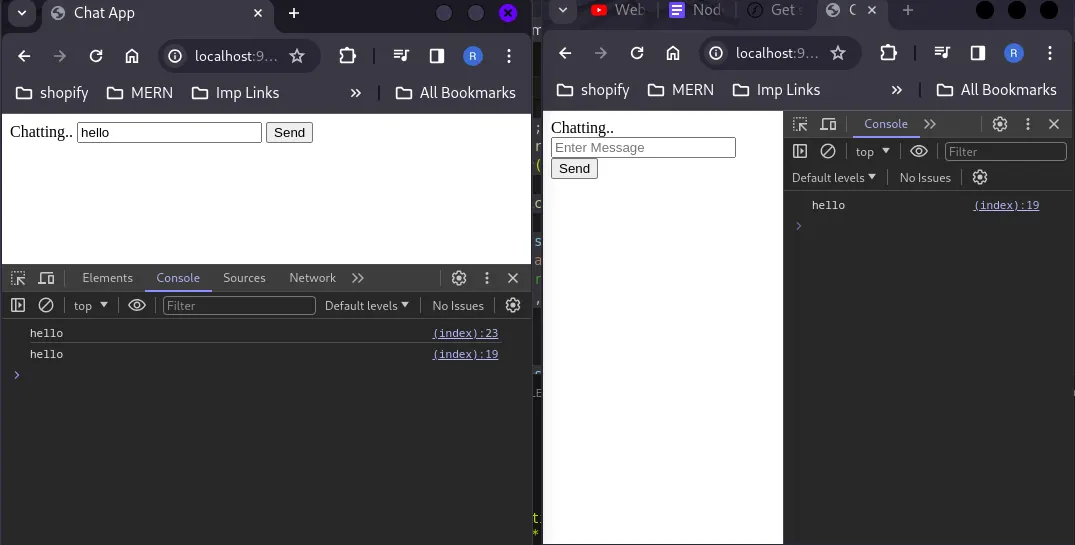
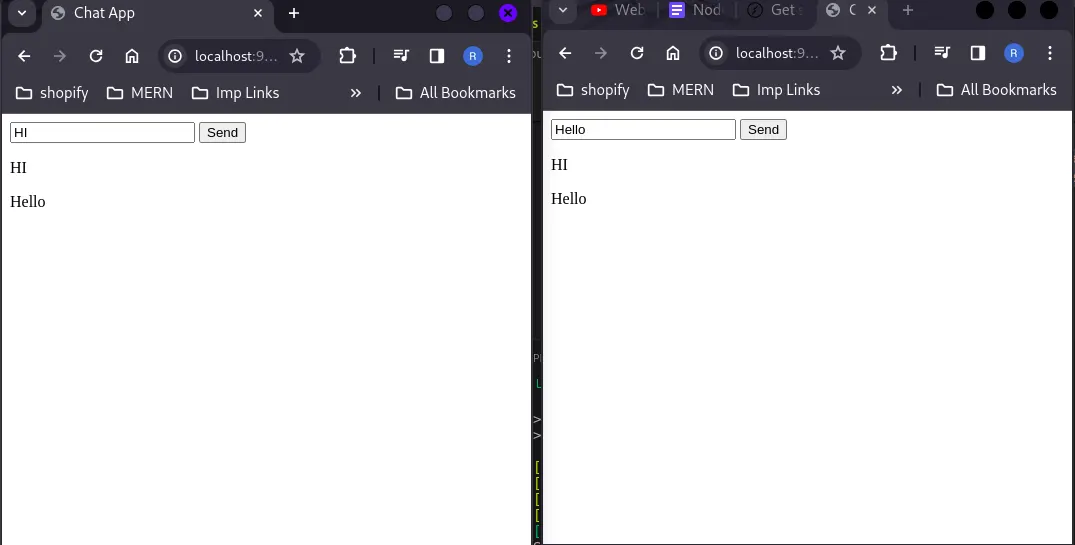
Now we want to show it on the frontend not in the console.
Update public/index.html
<html lang="en">
<head>
<meta charset="UTF-8" />
<meta name="viewport" content="width=device-width, initial-scale=1.0" />
Chat App
</head>
<body>
<script src="/socket.io/socket.io.js"></script>
<script>
const socket = io();
const sendBtn = document.getElementById(“sendBtn”);
const messageInput = document.getElementById(“message”);
const allMessages = document.getElementById(“messages”);
**socket.on("message", (message)=>{**const p = document.createElement(“p”);
p.innerText=message;
allMessages.appendChild(p)
});
**sendBtn.addEventListener("click", (e)=>{**const message = messageInput.value;
**console.log(message);**socket.emit(“user-message”,message)
})
</script>
</body>
</html>