On this page
System Design — Reference Notes
Last reviewed 2 Sept 2026
Implement Rate Limiting | Rate Limiting Strategies - System Design
The basic principle of API rate limiting is fairly simple: if access to the API is unlimited, anyone (or anything) can use the API as much as they want at any time, potentially preventing other legitimate users from accessing the API.
What is rate limiting?
Rate limiting is a strategy for limiting network traffic. It puts a cap on how often someone can repeat an action within a certain timeframe – for instance, trying to log in to an account. Rate limiting can help stop certain kinds of malicious bot activity. It can also reduce strain on web servers. However, rate limiting is not a complete solution for managing bot activity.
Different Methods of Rate Limiting
As discussed above, we can actually use various methods in performing API rate limiting, but there are three most common methods:
1. Throttling
Throttling is performed by setting up a temporary state within the API, so the API can properly assess all requests. Based on certain rules, a specific type of request will be throttled during this temporary state; when throttled, a user may either be slowed considerably (by reducing the bandwidth service) or completely disconnected from the API.
We can implement throttling at the API level, user level, and application level, making it a versatile method for rate limiting.
2. Request Queues
Another popular method of rate limiting is “requests queues”, which limits the number of requests in any given period of time. For example, we can set the rate limit at three requests per second.
3. Algorithm-Based
In this approach, we are using algorithms to implement the API rate limit, and there are actually various ready-to-use algorithms we can use to implement rate limiting:
Fixed Window
In this method, we use a “fixed” number as a limit, and we use a simple incremental counter to count the number of requests. If this fixed window limit is reached in a set period of time (i.e. 3,000 per hour), then additional requests will be blocked temporarily.
Sliding Log
In this method, a time-stamped log is used to identify different user logs. With each new request, the total number of the logs is calculated, and when logs exceed a certain rate limit, they will be discarded.
Sliding Window
Essentially combining fixed window and sliding log algorithms, with this approach both a counter and a log are used to determine a faster rate limiting process. The small number of data needed to assess each request allows a faster calculation process, making it ideal for processing a large number of requests.
There are many algorithms but we will discuss below two:
- Token Bucket
- Leaky Bucket
Token Bucket
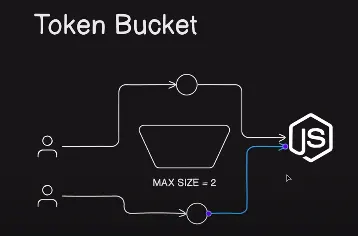
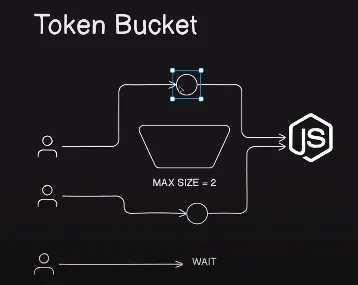
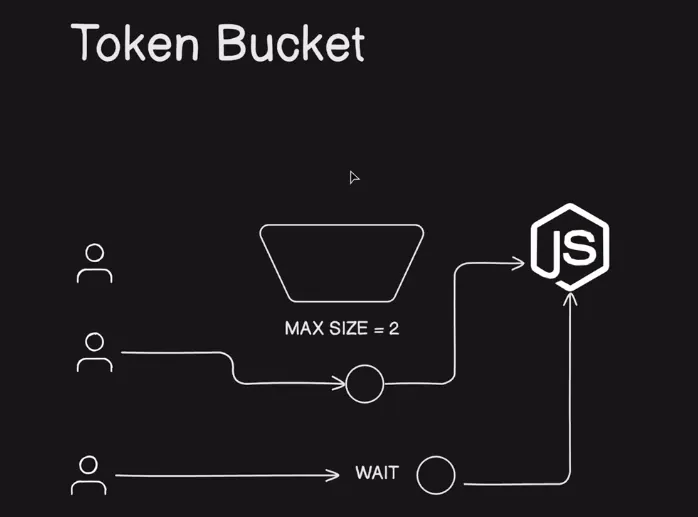
A token bucket is a container that has a predefined capacity. Tokens are then put into the bucket at certain rates either periodically or sporadically. Once the bucket is full, no more tokens are added. Finally, when the bucket is full, incoming requests are dropped (most likely go into DLQ or some sort of queues to re-process those messages) and this limits the incoming traffic at certain limits. Therefore, it is a great algorithm for Rate Limiter.
Rate Limiter
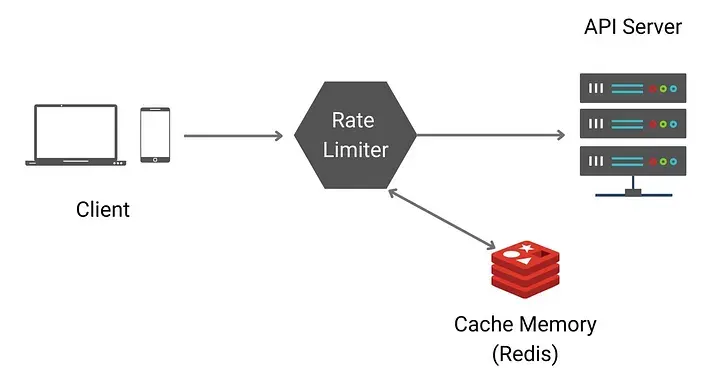
Rate limiter in high level is a counter to keep track of how many requests are sent from the same user, IP address, etc. If the counter is larger than the limit, the request is disallowed.
Where do we store counters? Using the database is not a good idea due to slowness of disk access. In-memory cache is better because it is fast and supports a time-based expiration strategy. For instance, REDIS will be a good one which is an in-memory store and offers two commands: INCR and EXPIRE.
INCR: It increases the stored counter by 1
EXPIRE: It sets a timeout for the counter. If the timeout expires, the counter is automatically deleted.
Why Token Bucket Algorithm?
One thing I disregarded in using TBA is its scalability. Yes, we can simply create a while loop that keeps track of the length of the array when deciding to proceed requests to downstream. However, designing scalable distributed systems, we need to consider rate limiters in various instances.
It is already recommended to put a rate limiter in the server side component per API so that the system can rate limit on different kinds of APIs with different amounts of bucket size and refill rates. For instance, if we have two APIs as followed in SNS system:
-
Write the number of posts per second
-
Like the number of posts per second
Obviously, writing posts should have a smaller bucket size than that of liking posts. In this, we need to implement different sorts of Token Bucket Algorithm which is why we need to abstract this layer and create a term, “Token Bucket Algorithm” instead of simple while loops.
Also, these days, the API Gateway in Cloud systems such as AWS, GCP already contains the rate limiting options so that the users can specifically limit APIs based on its latency, number of requests, and etc.
Advantages:
- Control: We have control over the traffic
- Flexibility: Allows for bursty data transfers.
- Fairness: Can allocate bandwidth more fairly among multiple users or types of data.
- Simple Implementation: it’s straightforward to implement.
Disadvantages:
- Greedy clients can exploit your token. Same user can send multiple request from different machine and all token will be used by same user and unavailable for others user
- We will need state management system to track the tokens
- Token Bucket has the tendency to generate tokens at a fixed rate, even when the network traffic is not present. This leads to accumulation of unused tokens during times when there is no traffic, hence leading to wastage.
- Due to token accumulation, delays can be introduced in the packet delivery. If the token bucket happens to be empty, packets will have to wait for new tokens, leading to increased latency and potential packet loss.
- Token Bucket happens to be less flexible than leaky bucket when it comes to network traffic shaping. The fixed token generation rate cannot be easily altered to meet changing network requirements, unlike the adaptable nature of leaky bucket.
- The implementation involved in token bucket can be more complex, especially due to the fact that different token generation rates are used for different traffic types. Configuration and management might be more difficult due to this.
- Usage of large bursts of data may lead to inefficient use of bandwidth, and may cause congestion. Leaky bucket algorithms, on the other hand, help prevent congestion by limiting the amount of data sent at any given time, promoting more efficient bandwidth utilization.
Implement in nodejs
const MAX_TOKENS = 5;
const REFILL_RATE = 5000; // Milliseconds between token refills (5 seconds)
const bucket = {
tokens: MAX_TOKENS,
hasTokens: function () { // Checks if we have tokens available
return this.tokens > 0;
},
consumeToken: function () { // Function to consume a token
if (this.hasTokens())
this.tokens -= 1;
},
releaseToken: function () { // Function to release a token
if (this.tokens < MAX_TOKENS)
this.tokens += 1;
}
};
async function handleIncomingRequest(requestId) {
if (!bucket.hasTokens()) {
console.log(‘Out of tokens! Please try again later’, requestId);
return;
}
bucket.consumeToken();
console.log(’✅ Processing Request…’, requestId);
await waitFor(2 * 1000); // Simulate a fake wait time
return true;
}
function waitFor(ms) {
return new Promise(resolve => setTimeout(resolve, ms));
}
setInterval(() => {
if (!bucket.hasTokens())
bucket.releaseToken();
}, REFILL_RATE); // Add back tokens once every REFILL_RATE milliseconds!
Leaky Bucket
The Leaky Bucket algorithm is another rate limiting mechanism that enforces a constant output rate by continuously leaking excess traffic or requests.
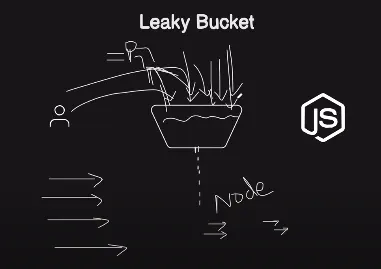 Here’s how it works
Leaky Bucket: Imagine a bucket with a hole at the bottom. Requests or data enter the bucket, and the bucket leaks (removes) data at a fixed rate, regardless of the rate at which data enters.
Request Processing: When a request or packet arrives, it is placed in the bucket. If the bucket is full, excess requests are either delayed or dropped.
Key characteristics of the Leaky Bucket algorithm:
- Constant Output: It ensures a constant output rate, as the bucket leaks at a fixed rate, regardless of input rates.
- Smoothing: It smooths traffic by allowing for some flexibility in handling bursts. Requests are processed at a constant rate.
Implementing in nodejs
const BUCKET_CAPACITY = 10; // Max requests the bucket can hold
const LEAK_RATE = 1000; // Milliseconds between requests processing
let leakyBucket = {
requests: [],
addRequest: function(requestId) {
if (this.requests.length < BUCKET_CAPACITY) {
this.requests.push(requestId);
console.log(`📥 Request ${requestId} added.`);
return true;
} else {
console.log(`❌ Bucket full. Request ${requestId} dropped.`);
return false;
}
},
processRequest: function() {
if (this.requests.length > 0) {
const requestId = this.requests.shift();
console.log(`✅ Processing Request ${requestId}`);
return true;
}
return false;
}
};
function handleIncomingRequest(requestId) {
if (!leakyBucket.addRequest(requestId)) {
console.log(‘Request could not be processed. Try again later.’);
}
}
setInterval(() => {
leakyBucket.processRequest();
}, LEAK_RATE); // Processes one request per LEAK_RATE
Token Bucket vs Leaky Bucket
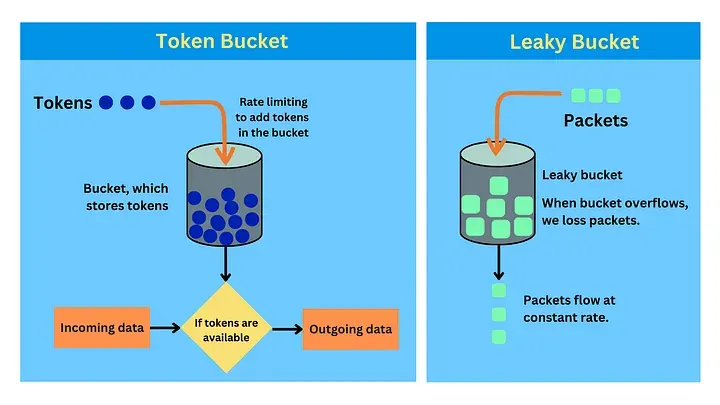
Token Bucket allows for bursts of traffic when tokens are available in the bucket. It offers more flexibility for handling sudden spikes in requests. Leaky Bucket provides a fixed output rate, ensuring a steady flow of requests. It’s effective at smoothing traffic.
Both algorithms have their use cases. Token Bucket is often used when you want to allow short bursts of traffic but still maintain a long-term rate limit, while Leaky Bucket is suitable when you need a strict, constant output rate. The choice between the two depends on the specific requirements and behaviour you want to achieve in your rate limiting system.
Real life Examples:
Token bucket
- Think of a video streaming service. The service allows data bursts for fast initial streaming (buffering) as long as tokens are available in the bucket. Once the tokens are used up, the streaming rate is limited to the rate of token replenishment.
- Customer care: If all operators are busy then we need to hold the line. Once free, we will able to connect with them
Leaky bucket
- Uploading multiple videos on youtube but only 5 upload max at a time or any other website like compressing and resizing images, the website will only process 10-15 at a time.
- Imagine an ISP limiting internet speed. The ISP uses a leaky bucket to smooth out the internet traffic. Regardless of how bursty the incoming traffic is, the data flow to the user is at a consistent, predetermined rate. If the data comes in too fast and the bucket fills up, excess packets are dropped.
Making a Decision
Choosing the right rate-limiting algorithm can be tricky. Here are some simple guidelines to help you decide which algorithm fits best for your needs.
Use Token Bucket When:
- You want more granular control over how fast requests are processed.
- Your traffic patterns change frequently and you need to be adaptive.
- You want more control over distributing limited resources among users beyond first-come-first-served.
Use Leaky Bucket When:
- You want a straightforward way to manage consistent traffic flow.
- Keeping your implementation simple and light is a priority.
- You want to ensure sudden spikes in traffic don’t overwhelm your system.
Bloom Filters
Ecommerce Microservice architecture
1. Basic Components
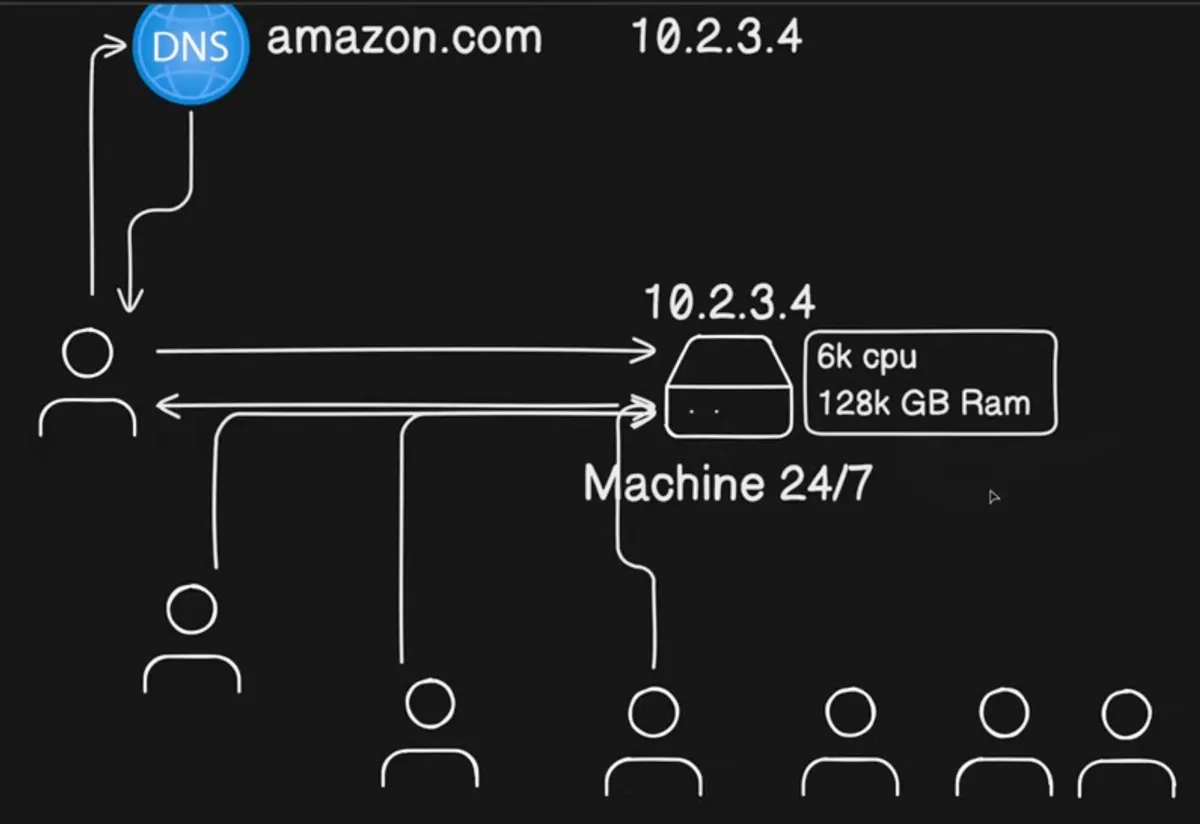
Client-Server Model
- Client: Mobile, laptop, IoT device (user-facing).
- Server: Machine with public IP (handles requests 24/7).
- DNS Server: Maps human-readable domains (e.g., amazon.com) to IP addresses.
- DNS Resolution: Client → DNS → Server IP → Server.
Vertical Scaling
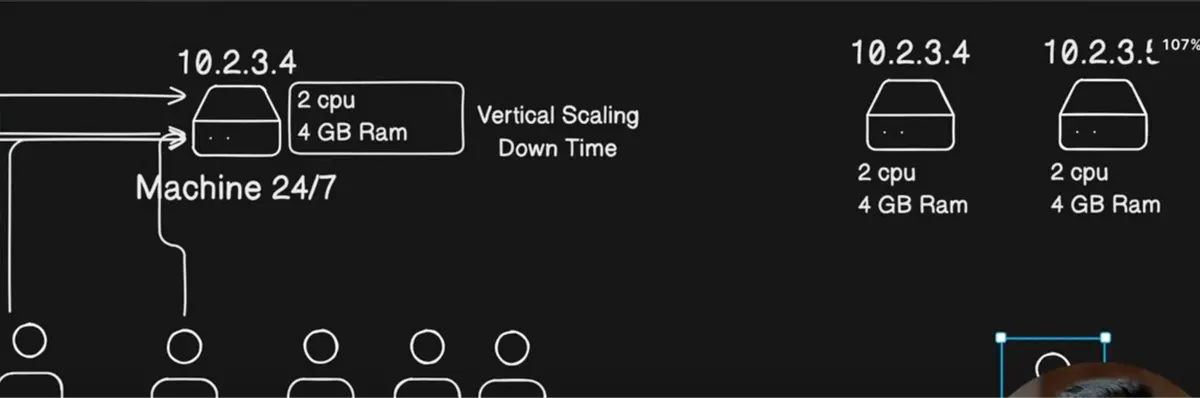
- Definition: Increasing server resources (CPU, RAM) on a single machine.
- Pros: Simple to implement.
- Cons: Downtime during upgrades(when we increase RAM,CPU), physical limits.
- Example: Upgrading from 2 CPU/4GB RAM → 64 CPU/128GB RAM
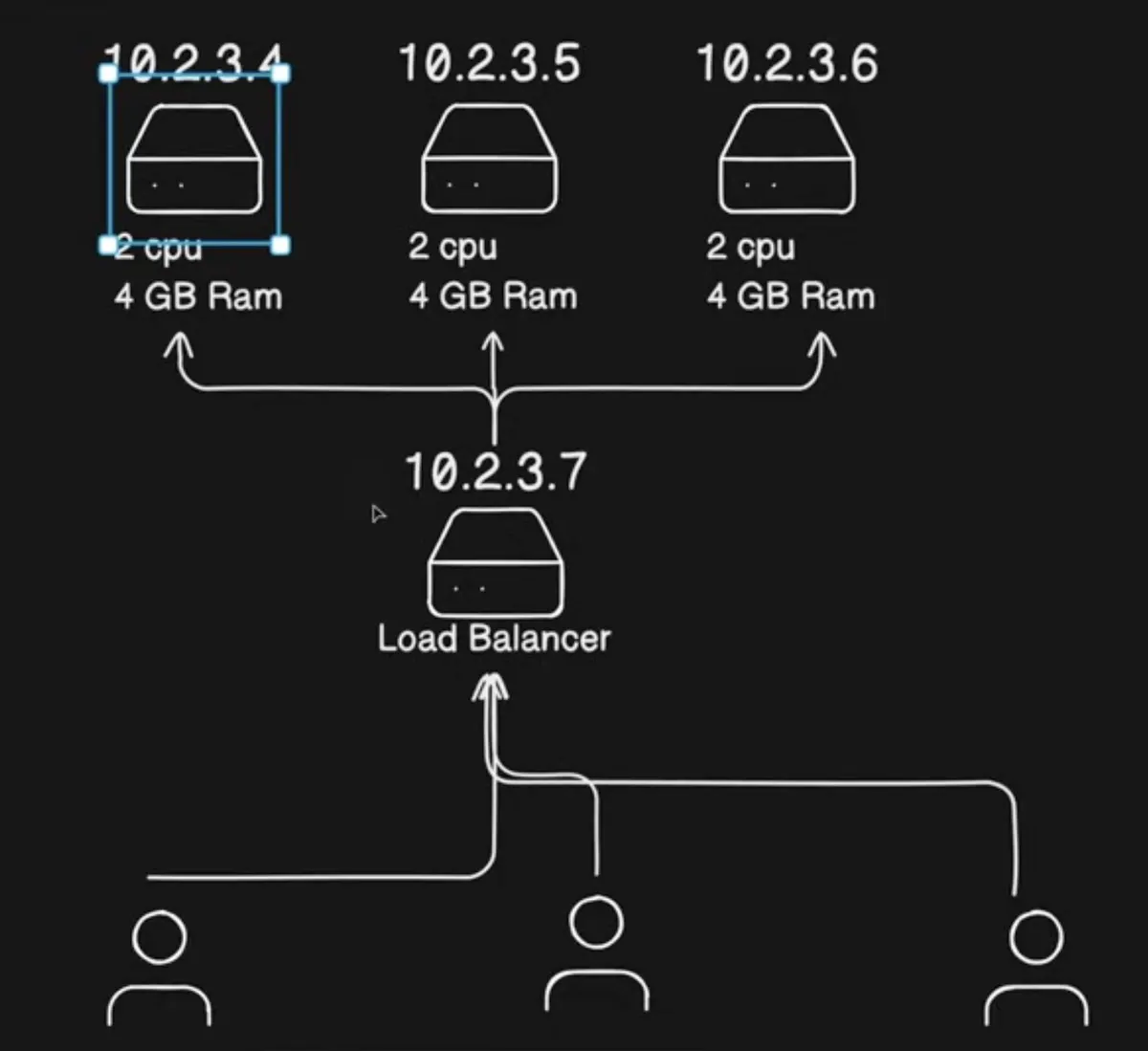
Horizontal Scaling
- Definition: Adding more servers (replicas) to distribute load.
- Pros: Zero downtime (Although there is delay/slow requests but no downtime), fault tolerance.
- Cons: Requires load balancing
- Example: Multiple EC2 instances behind a load balancer.
2. Load Balancing
- Role: DNS can map to a single IP only so we will need load balancer IP which distributes traffic evenly across servers.
- Algorithms: - Round Robin: Cycles through servers sequentially. - Least Connections: Sends requests to the least busy server.
- Tools: AWS Elastic Load Balancer (ELB)
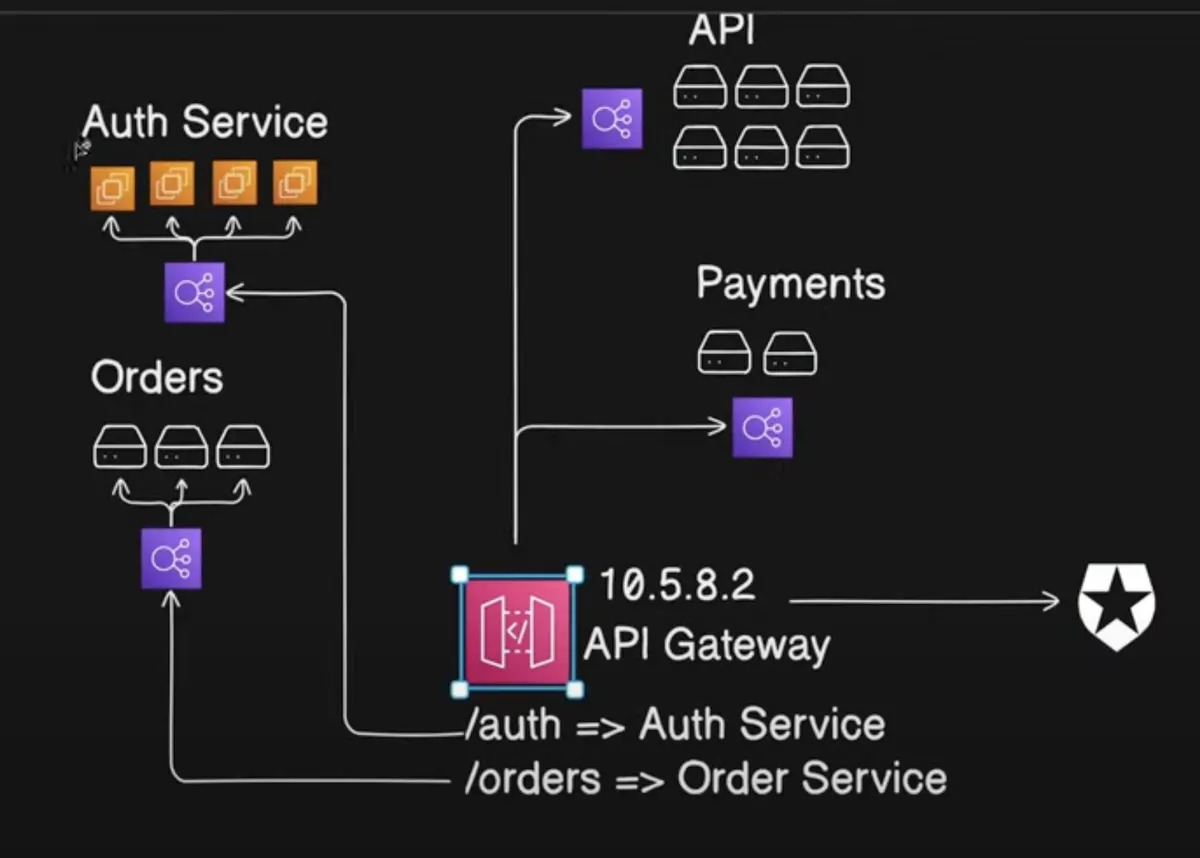
3. API Gateway
- Role: Routes requests to microservices based on paths (e.g., /auth, /orders).
- Functions: - Authentication (e.g., JWT validation). - Rate limiting. - Logging.
- Example: - /auth → Auth Service LB → Auth Servers. - /orders → Orders Service LB → Orders Servers.
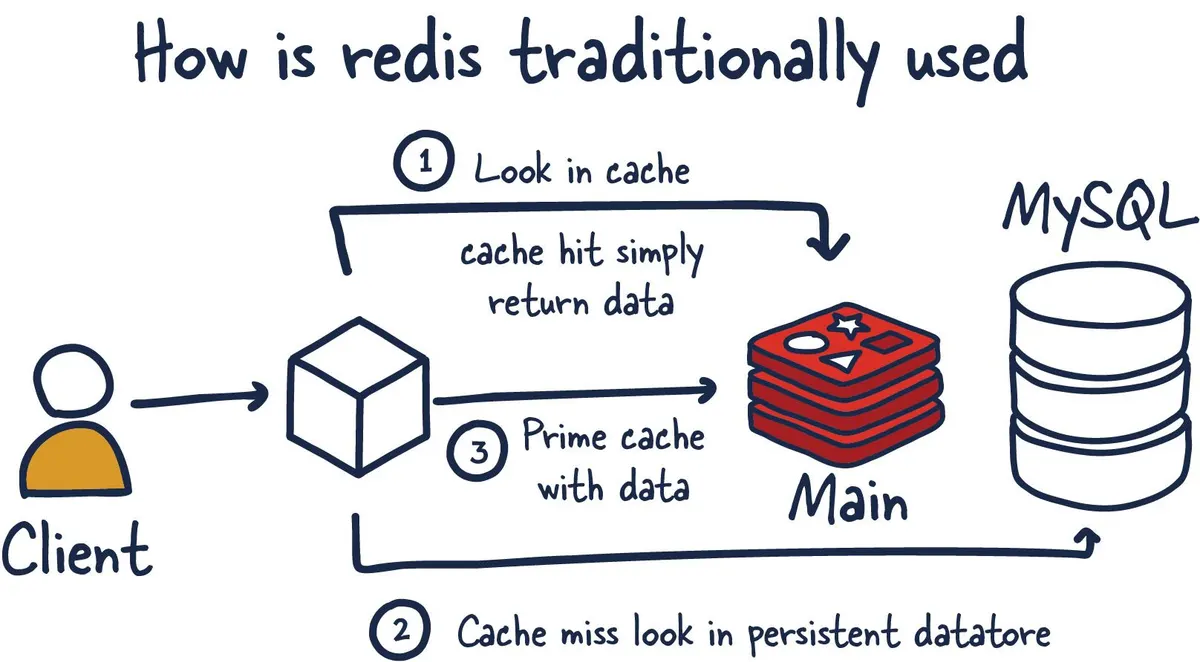
4. Caching
- Purpose: Reduce database load by storing frequent queries.
- Tools: Redis, Memcached.
- Flow: - Check cache → If miss → Query DB → Cache result.
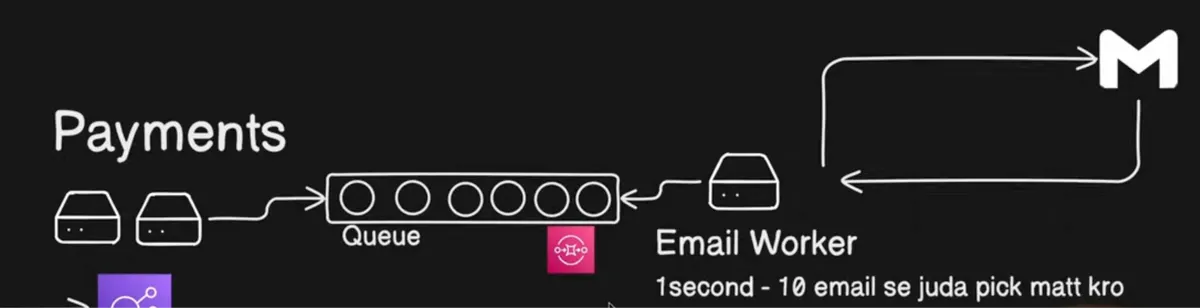
5. Asynchronous Processing
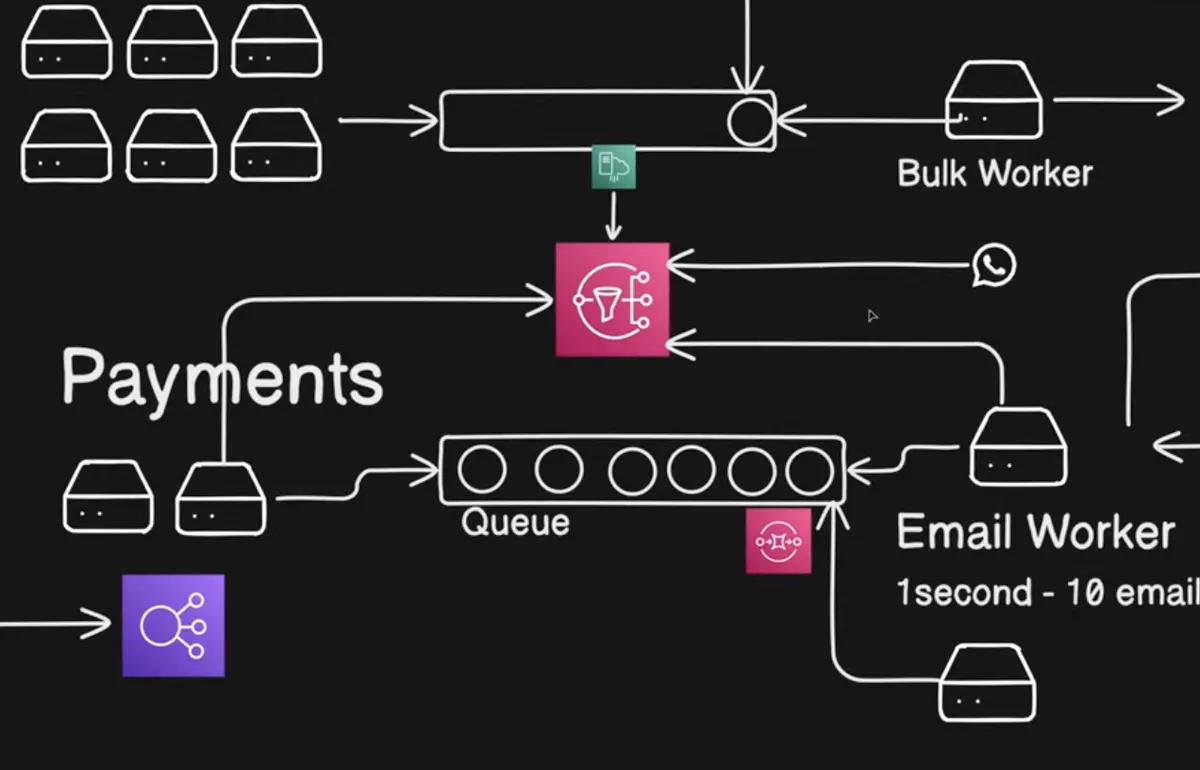
- Queue Systems (SQS): in this case, pulll mechanism works - Use Case: Decouple services (e.g., order processing → email notifications). - Workers: Process queue items in the background. - Example: - Payment Service → SQS Queue → Email Worker → Send email
- Pub-Sub (SNS): We use where we need to consume the same event but multiple consumers. Here there is no acknowledgment which could be the issue as in case of failed events there is no tracking/acknowledgment. - Use Case: Broadcast events (e.g., payment → email + SMS + analytics). - Example: - Payment Service → SNS Topic → [Email Queue, SMS Queue, Analytics Queue].
6. Fan-Out Architecture: 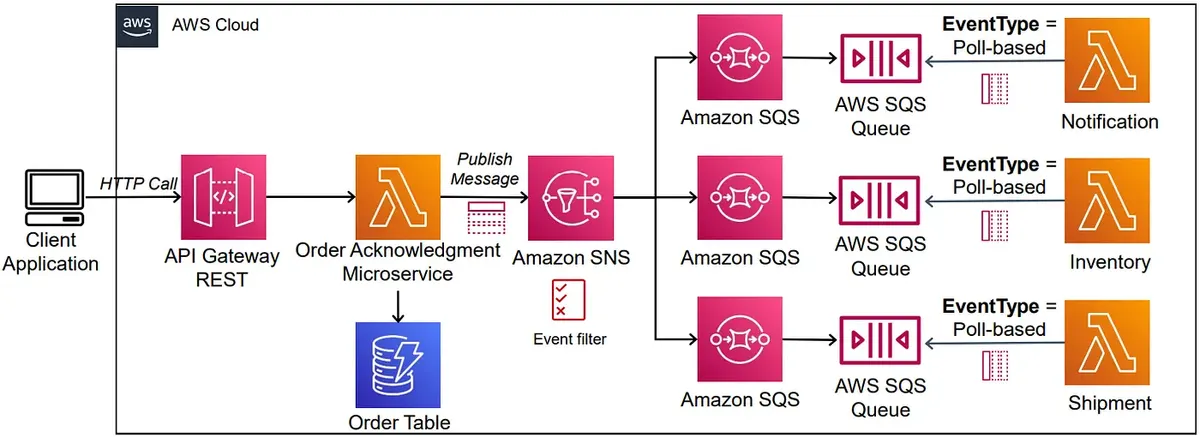
Fan-out is a messaging pattern where a piece of message is distributed or ‘fanned out’ to multiple destinations in parallel. The main idea is each destination can work and process these messages in parallel.
One way to implement this messaging pattern is to use publisher/subscriber or pub/sub model. In the pub/sub model we define a topic which is a logical access point to enabling message communication asynchronously. Basically pub/sub+ message queue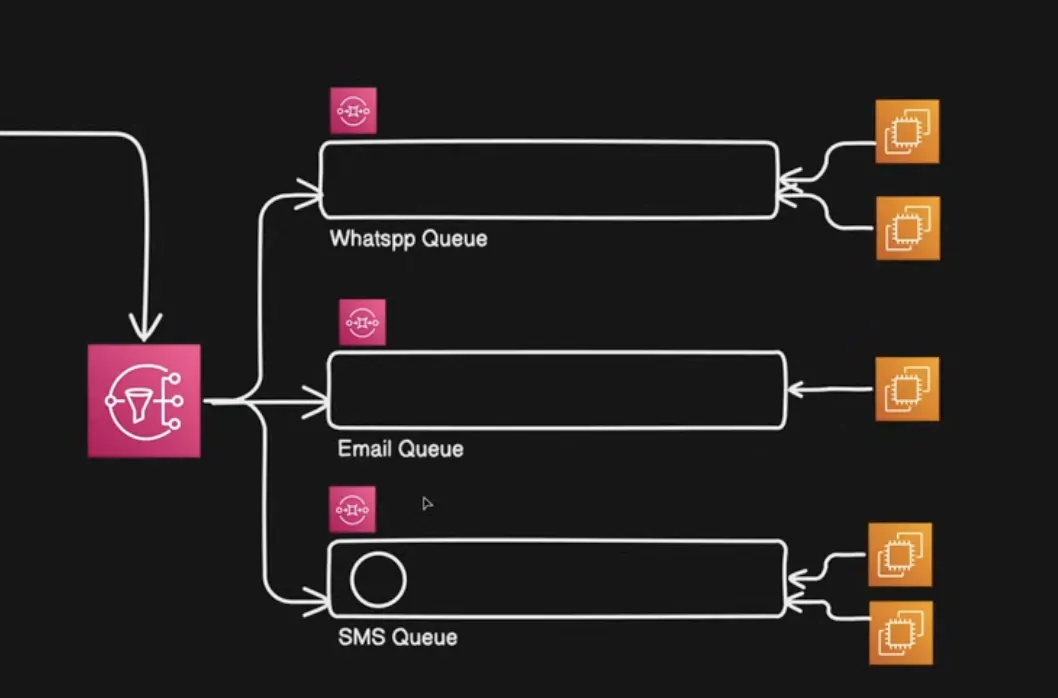
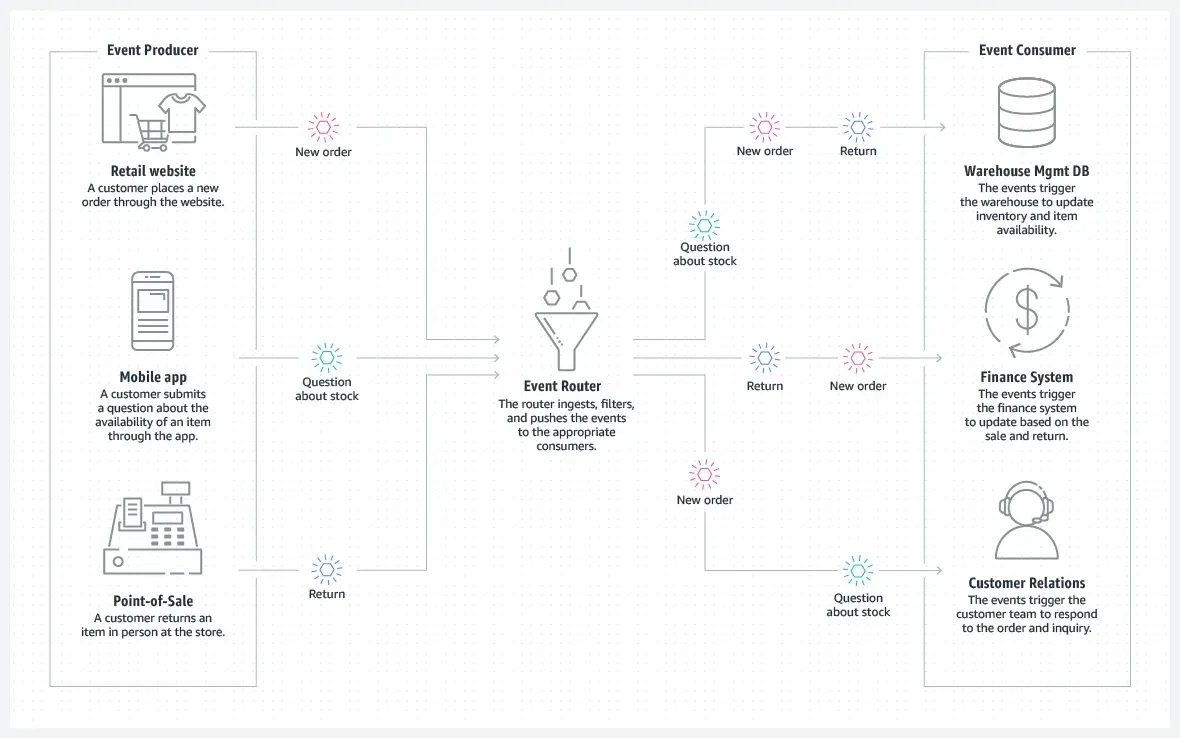
7. Event-Driven Architecture
- Components: - Producers: Emit events (e.g., “order_placed”). - Consumers: React to events (e.g., send email, update inventory).
- Tools: AWS EventBridge, Kafka.
8. CDN (Content Delivery Network)
- Purpose: Cache static content (images, videos) globally.
- Flow: - User → Nearest CDN edge → If cached, return; else fetch from origin server.
- Tools: AWS CloudFront.
- Diagram: Global Users → CDN Edges → Origin Server (Load Balancer)
9. Rate Limiting
- Strategies: - Token Bucket: Fixed token refill rate. - Leaky Bucket: Fixed output rate.
- Purpose: Prevent abuse (e.g., 5 requests/sec per user).
10. Database Scaling
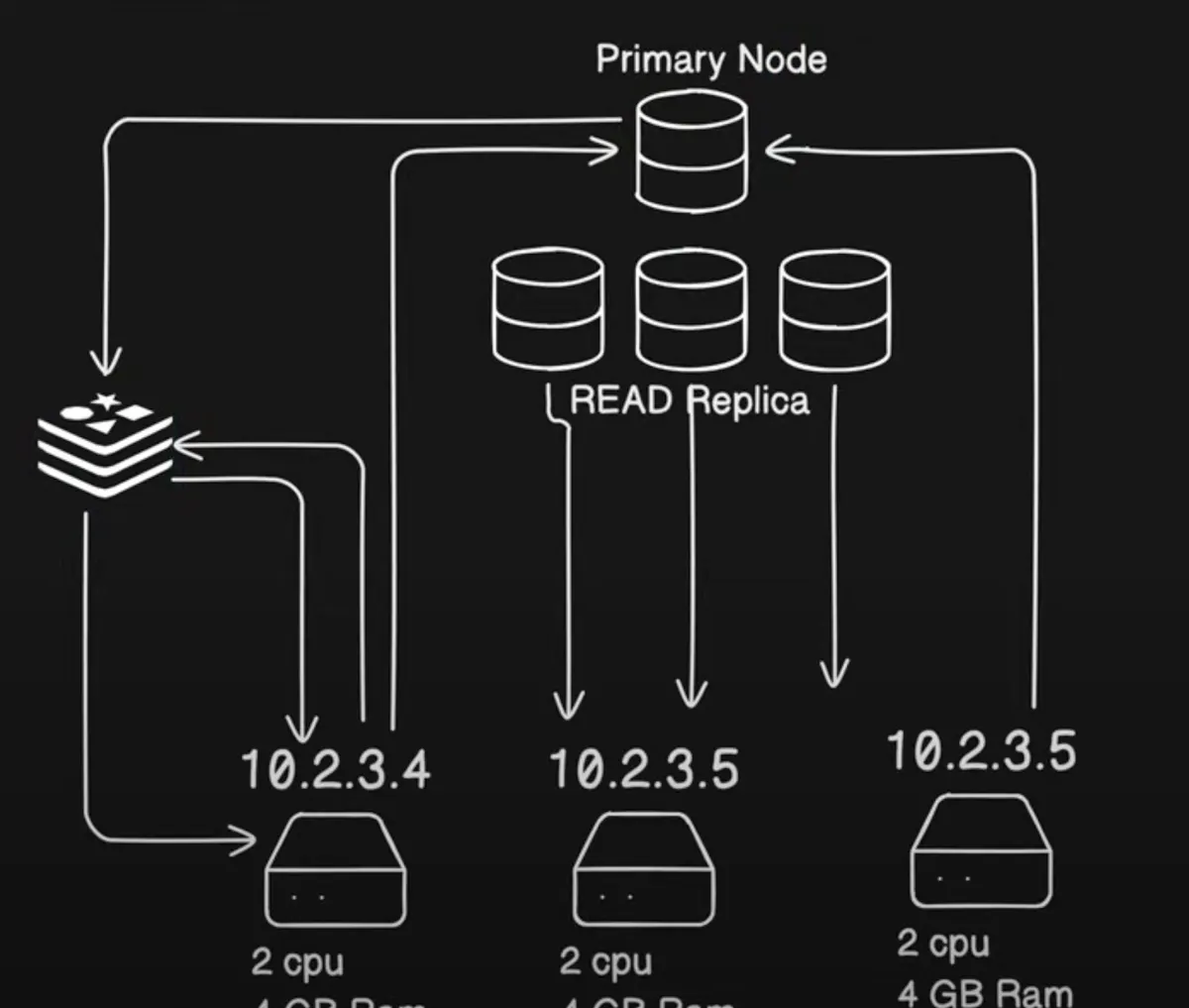
- Read Replicas: Handle read-heavy traffic (eventually consistent).
- Primary Node: Handles writes (strong consistency).
Video Transcoding Service
https://www.youtube.com/watch?v=wcdaIQjtWQI
Basically show videos in different formats e.g. 1080p. 720p,etc
When a user uploads a video on the platform, It calls the lambda function which checks whether the user has permission to upload or not. If the user has permission then it will return the signed URL for uploading the videos on AWS s3. So videos will upload on s3 bucket one by one. We can set the limit as well.
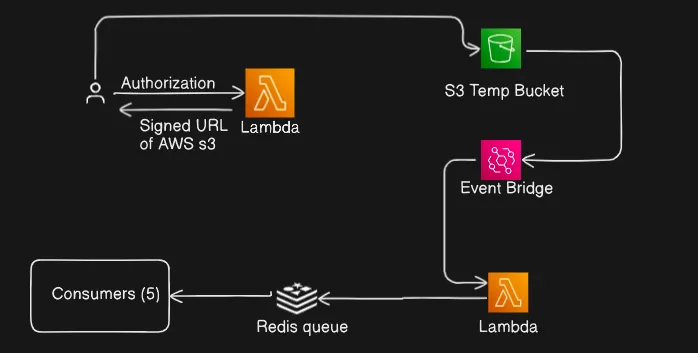
There is an eventbridge setup on s3 bucket. We can write a rule that whenever any video is received in the bucket, trigger the lambda function. The lambda function has all the details of the video like who uploaded, metadata,size of the video, etc. Now from here the lambda function pushes it to the queue. So let’s say a user uploads 10 videos, then there will be 10 jobs pushed to the queue. We can set the consumer to consume the videos concurrently. We can set concurrency also. Let’s assume 5. So it will consume 5 videos from the DB. So 5 jobs from the queue will create 5 different docker containers in AWS ecs. When it is processing we set the concurrency to 5 in redis so that we can process only 5 videos at a time.
System design Interview Questions
https://github.com/ashishps1/awesome-system-design-resources
https://github.com/ashishps1/awesome-low-level-design https://github.com/ashishps1/awesome-leetcode-resources https://github.com/ashishps1/awesome-behavioral