On this page
React 18 updates
Last reviewed 15 Sept 2026
- React 18 introduces a new root API which provides better ergonomics for managing roots. The new root API also enables the new concurrent renderer, which allows you to opt-into concurrent features.
// Before
import { render } from 'react-dom';
const container = document.getElementById('app');
render(<App tab="home" />, container);
// After
import { createRoot } from 'react-dom/client';
const container = document.getElementById('app');
const root = createRoot(container); // createRoot(container!) if you use TypeScript
root.render(<App tab="home" />);- Also, unmountComponentAtNode to root.unmount changed:
// Before
unmountComponentAtNode(container);// After
root.unmount();- Callback from render also removed, since it usually does not have the expected result when using Suspense:
// Before
const container = document.getElementById('app');
render(<App tab="home" />, container, () => {
console.log('rendered');
});
// After
function AppWithCallbackAfterRender() {
useEffect(() => {
console.log('rendered');
});
return <App tab="home" />
}
const container = document.getElementById('app');
const root = createRoot(container);
root.render(<AppWithCallbackAfterRender />);- Finally, if your app uses server-side rendering with hydration, upgrade hydrate to hydrateRoot:
// Before
import { hydrate } from 'react-dom';
const container = document.getElementById('app');
hydrate(<App tab="home" />, container);
// After
import { hydrateRoot } from 'react-dom/client';
const container = document.getElementById('app');
const root = hydrateRoot(container, <App tab="home" />);
// Unlike with createRoot, you don’t need a separate root.render() call here.
- If your project uses TypeScript, you will need to update your @types/react and @types/react-dom dependencies to the latest versions.
Automatic Batching
React 18 adds out-of-the-box performance improvements by doing more batching by default. Batching is when React groups multiple state updates into a single re-render for better performance. Before React 18, we only batched updates inside React event handlers. Updates inside of promises, setTimeout, native event handlers, or any other event were not batched in React by default:
import React, { useEffect, useState } from 'react';
export default function App(props) {
const [state, setState] = useState(0);
console.log('render', state);
useEffect(() => {
(async () => {
for (let i = 0; i < 3; i++) {
await new Promise((res) => {
setTimeout(res, 500);
})
console.log('before set state');
setState(val => val + 1);
console.log('after set state');
}
})();
}, []);
return (
{state}
);
}
Console output:
React 17
render 0
before set state
render 1
after set state
before set state
render 2
after set state
before set state
render 3
after set state
React 18
render 0
before set state
after set state
render 1
before set state
after set state
render 2
before set state
after set state
render 3
React 18 made changes to setState so that multiple can be batched into a single render. React 17 had batching too, but it could only work for synchronous code that happened in a react lifecycle event (eg, useEffect), or a dom event (eg, onClick). React 18 expanded that functionality, so now it works in your async function.
If you want to force a render to happen synchronously you can, but this is very rarely needed and i do not recommend it:
import { flushSync } from 'react-dom';// …
console.log('before set state');
flushSync(() => {
setState(val => val + 1);
})
console.log('after set state');Transitions
Transitions can be used to mark UI updates that do not need urgent resources for updating.
For example, when typing in a typeahead field, there are two things happening: a blinking cursor that shows visual feedback of your content being typed, and a search functionality in the background that searches for the data that is typed.
Showing visual feedback to the user is important and therefore urgent. Searching is not so urgent, and so can be marked as non-urgent.
These non-urgent updates are called transitions. By marking non-urgent UI updates as “transitions”, React will know which updates to prioritize. This makes it easier to optimize rendering and get rid of stale rendering.
You can mark updates as non-urgent by using startTransition. Here is an example of what a typeahead component would like when marked with transitions:
import { startTransition } from 'react';// Urgent: Show what was typed
setInputValue(input);// Mark any non-urgent state updates inside as transitions
startTransition(() => {// Transition: Show the results
setSearchQuery(input);
});
How are transitions different from debouncing or setTimeout?
startTransition executes immediately, unlike setTimeout.setTimeout has a guaranteed delay, whereas startTransition’s delay depends on the speed of the device, and other urgent renders. startTransition updates can be interrupted unlike setTimeout and won’t freeze the page. React can track the pending state for you when marked with startTransition.
Suspense on the server
React 18 introduces:
- Code splitting on the server with suspense
- Streaming rendering on the server
Client rendering vs server rendering
In a client-rendered app, you load the HTML of your page from the server along with all the JavaScript that is needed to run the page, and make it interactive.
If, however, your JavaScript bundle is huge, or you have a slow connection, this process can take a long time and the user will be waiting for the page to become interactive, or to see meaningful content.
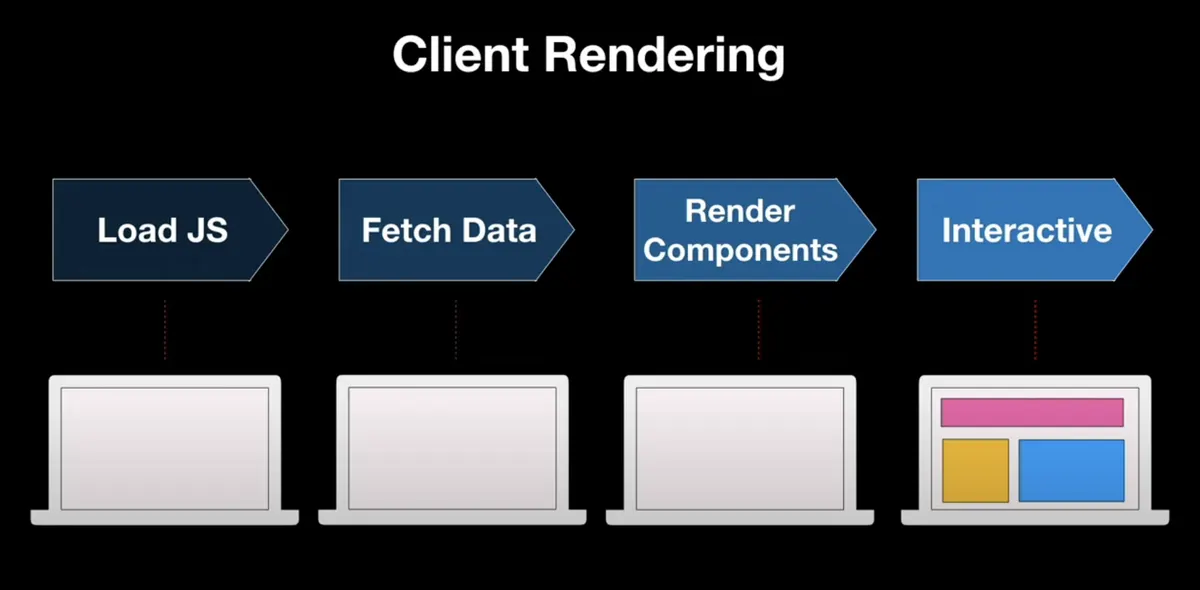
Illustration of client rendering flow. Source: React Conf 2021 Streaming Server Rendering with Suspense by Shaundai Person https://www.youtube.com/watch?v=pj5N-KhihgcIn a client rendering flow, a user has to wait a long time before the page becomes interactive. Source: React Conf 2021 Streaming Server Rendering with Suspense by Shaundai Person
For optimizing the user experience and avoiding the user having to sit on a blank screen, we can use server rendering.
Server rendering is a technique where you render the HTML output of your React components on the server and send HTML from the server. This lets the user view some UI while JS bundles are loading and before the app becomes interactive.
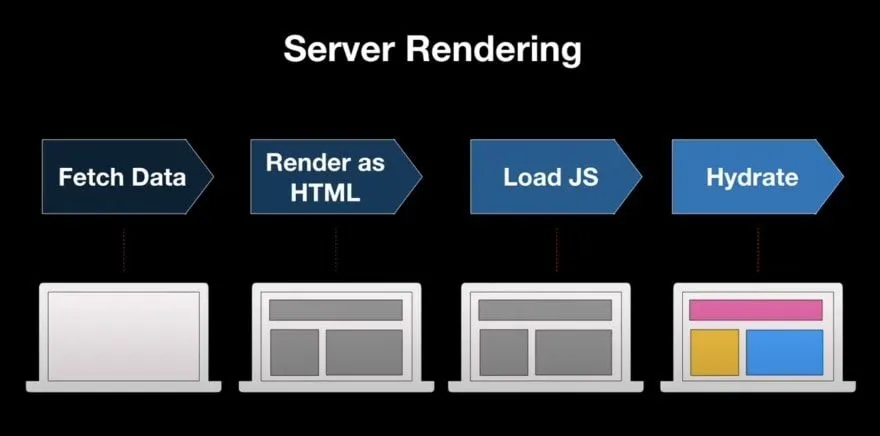
Updates to Server Rendering APIs
In this release, we’re revamping our react-dom/server APIs to fully support Suspense on the server and Streaming SSR. As part of these changes, we’re deprecating the old Node streaming API, which does not support incremental Suspense streaming on the server.
Using this API will now warn:
- renderToNodeStream: Deprecated ⛔️️ Instead, for streaming in Node environments, use:
renderToPipeableStream: New ✨
- We’re also introducing a new API to support streaming SSR with Suspense for modern edge runtime environments, such as Deno and Cloudflare workers:
renderToReadableStream: New ✨
- The following APIs will continue working, but with limited support for Suspense:
- renderToString: Limited ⚠️ and renderToStaticMarkup: Limited ⚠️
- Finally, this API will continue to work for rendering e-mails: renderToStaticNodeStream
New hooks in React 18
React 18 also added several hooks:
| Hook | Purpose |
|---|---|
useId | generate IDs that match between the server and the client (for htmlFor, aria-*) |
useTransition | mark updates as non-urgent and read isPending |
useDeferredValue | show a slightly stale value while an expensive render catches up |
useSyncExternalStore | subscribe to an external store safely with concurrent rendering |
useInsertionEffect | for CSS-in-JS libraries to inject styles before layout effects |
function Search() {  const [query, setQuery] = useState('');  const deferredQuery = useDeferredValue(query);   // the heavy list uses the deferred value  const id = useId();
  return (    <>      <label htmlFor={id}>Search</label>      <input id={id} value={query} onChange={e => setQuery(e.target.value)} />      <SlowResults query={deferredQuery} />    </>  );}
See the React Hooks chapter for details, and the React 19 chapter for what came next.
Upgrade checklist
- Update the packages:
npm install react@18 react-dom@18. - Replace
ReactDOM.renderwithcreateRoot(andhydratewithhydrateRoot). - Update
@types/reactand@types/react-domif you use TypeScript. - Check effects that assumed a single mount — Strict Mode now mounts, unmounts and remounts components in development.
- Look for code that relied on updates not being batched (rare); use
flushSyncwhere you truly need a synchronous update.