On this page
Redux (core concepts)
Last reviewed 15 Sept 2026
What is Redux?
Redux is a predictable state container for JavaScript apps. Let’s break that definition down:
- Redux is for JavaScript applications: Redux is not tied to React. You can use it with Angular, Vue or even vanilla JavaScript. It’s a library for JavaScript applications.
- Redux is a state container: Redux stores the state of your application.
- Redux is predictable: all state transitions are explicit and can be tracked, so changes to your application’s state become predictable.
React-Redux is the official Redux UI binding library for React (see the next chapter).
Why use Redux?
- Predictability of outcome — one store, one way to change it.
- Maintainability — a strict structure makes large apps easier to maintain.
- Organization: Redux is stricter about how code should be organized, which makes code more consistent and easier for a team to work with.
- Server rendering: useful especially for the initial render, giving a better user experience and SEO. Just pass the store created on the server to the client side.
- Developer tools: developers can track everything happening in the app in real time, from actions to state changes — including time-travel debugging.
- Community and ecosystem: a big plus when learning or using any library.
- Ease of testing: Redux code is mostly small, pure, isolated functions, which are easy to test.
Do you need Redux? Not always. For local UI state use useState/useReducer; for data from a server use TanStack Query or RTK Query; for a few shared values use Context. Redux shines when a lot of client-side state is shared across many components and changes in complex ways.
This chapter explains “pure” Redux (createStore, hand-written action types and reducers) to show how Redux works underneath. In real projects, use Redux Toolkit (RTK) — the official, recommended way to write Redux. createStore is deprecated in favour of configureStore. The Redux Toolkit version of everything below is at the end of this chapter.
Three core concepts
To understand the concepts, let’s take the example of a cake shop.
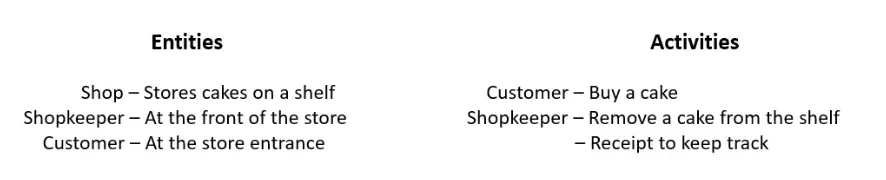
| Cake shop scenario | Redux | Purpose |
|---|---|---|
| Shop | Store | Holds the state of your application |
| Intention to buy a cake | Action | Describes what happened |
| Shopkeeper | Reducer | Ties the store and action together |
- A store is a big JavaScript object that holds the state of your application.
- An action describes a change to the state of the application.
- A reducer carries out the state transition depending on the action.
Three principles
- Single source of truth: the state of your whole application is stored in an object tree within a single store.
- State is read-only: the only way to change the state is to dispatch an action, an object describing what happened.
- Changes are made with pure functions: to specify how the state tree is transformed by actions, you write a pure reducer — a function that takes state and action as parameters and, based on
action.type, returns a new state.
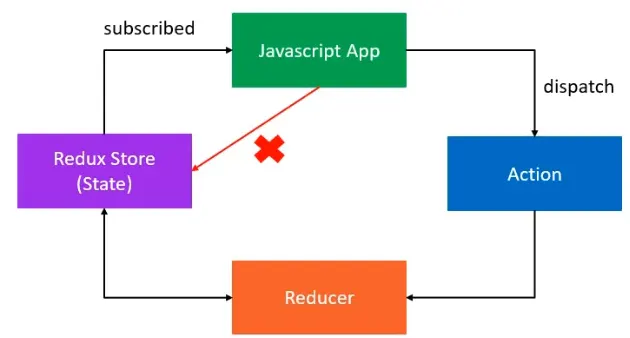
Data flow is one-way: dispatch(action) → reducer(state, action) → new state → UI updates.
Action
An action is the only way your application can interact with the store. It carries information from your app to the Redux store. Actions are plain JavaScript objects with a type property that describes the action being performed. The type is typically defined as a string constant.
An action creator is a function that returns an action object:
const BUY_CAKE = "BUY_CAKE";
function buyCake() {  return {    type: BUY_CAKE,    info: 'First redux cake'  };}
By convention, extra data goes in a payload property: { type: 'BUY_CAKE', payload: { quantity: 2 } }.
Reducer
A reducer specifies how the app’s state changes in response to actions sent to the store. It’s a function that accepts the state and an action, and returns the next state:
(previousState, action) => newStateconst BUY_CAKE = "BUY_CAKE";
function buyCake() { return { type: BUY_CAKE, info: 'First redux cake' };}
// reducersconst initialState = { numOfCakes: 10};
const reducer = (state = initialState, action) => { switch (action.type) { case BUY_CAKE: return { ...state, numOfCakes: state.numOfCakes - 1 }; default: return state; }};A reducer must be pure:
- Never mutate the state — always return a new object (
...state). - No side effects (no API calls, no
Math.random(), noDate.now()). - Always return a state for unknown actions (the
defaultcase), otherwise the state becomesundefined.
Redux store
There is one store for the entire application.
Responsibilities:
- Holds the application state
- Allows access to the state via
getState() - Allows the state to be updated via
dispatch(action) - Registers listeners via
subscribe(listener) - Handles unregistering listeners via the function returned by
subscribe(listener)
Standalone Redux (no React):
const redux = require('redux');const createStore = redux.createStore;
const BUY_CAKE = "BUY_CAKE";
function buyCake() {  return {    type: BUY_CAKE,    info: 'First redux cake'  };}
// reducersconst initialState = {  numOfCakes: 10};
const reducer = (state = initialState, action) => {  switch (action.type) {    case BUY_CAKE:      return {        ...state,        numOfCakes: state.numOfCakes - 1      };    default:      return state;  }};
// Redux Storeconst store = createStore(reducer);
console.log('Initial State', store.getState());
const unsubscribe = store.subscribe(() => console.log('Updated state:', store.getState()));
store.dispatch(buyCake());store.dispatch(buyCake());store.dispatch(buyCake());
unsubscribe();Output:
Initial State { numOfCakes: 10 }Updated state: { numOfCakes: 9 }Updated state: { numOfCakes: 8 }Updated state: { numOfCakes: 7 }After unsubscribe(), further dispatches still update the store, but the listener no longer logs them.
Benefit of using an action creator function (buyCake())
Any change to an action happens in one place. Imagine you want to add or rename a property — with a function you change it once; if you wrote the action object inline everywhere, you’d have to change every place that dispatches it.
Combine reducers
As the app grows, one reducer becomes too big. combineReducers lets each reducer manage its own slice of the state.
const redux = require('redux');const createStore = redux.createStore;const combineReducers = redux.combineReducers;
const BUY_CAKE = "BUY_CAKE";function buyCake() {  return {    type: BUY_CAKE,    info: 'First redux cake'  };}
const BUY_ICECREAM = "BUY_ICECREAM";function buyIcecream() {  return {    type: BUY_ICECREAM,    info: 'First redux icecream'  };}
const initialCakeState = {  numOfCakes: 10};
const initialIcecreamState = {  numOfIcecreams: 20};
const cakeReducer = (state = initialCakeState, action) => {  switch (action.type) {    case BUY_CAKE:      return {        ...state,        numOfCakes: state.numOfCakes - 1      };    default:      return state;  }};
const icecreamReducer = (state = initialIcecreamState, action) => {  switch (action.type) {    case BUY_ICECREAM:      return {        ...state,        numOfIcecreams: state.numOfIcecreams - 1      };    default:      return state;  }};
const rootReducer = combineReducers({  cake: cakeReducer,  icecream: icecreamReducer});
// Redux Storeconst store = createStore(rootReducer);
console.log('Initial State', store.getState());
const unsubscribe = store.subscribe(() => console.log('Updated state:', store.getState()));
store.dispatch(buyCake());store.dispatch(buyCake());store.dispatch(buyCake());store.dispatch(buyIcecream());store.dispatch(buyIcecream());
unsubscribe();
Output:
Initial State { cake: { numOfCakes: 10 }, icecream: { numOfIcecreams: 20 } }Updated state: { cake: { numOfCakes: 9 }, icecream: { numOfIcecreams: 20 } }Updated state: { cake: { numOfCakes: 8 }, icecream: { numOfIcecreams: 20 } }Updated state: { cake: { numOfCakes: 7 }, icecream: { numOfIcecreams: 20 } }Updated state: { cake: { numOfCakes: 7 }, icecream: { numOfIcecreams: 19 } }Updated state: { cake: { numOfCakes: 7 }, icecream: { numOfIcecreams: 18 } }Note: every dispatched action is sent to every reducer. Each reducer handles the types it knows and returns its state unchanged for the rest — that’s why the default case matters. (It also means one action can update several slices at once.)
Why do we need multiple reducers?
Each reducer stays small and focused on one feature (cakes, ice creams, users, cart). That’s easier to read, test and work on as a team.
Middleware
- Middleware is the suggested way to extend Redux with custom functionality.
- It provides a third-party extension point between dispatching an action and the moment it reaches the reducer.
- Use middleware for logging, crash reporting, and performing asynchronous tasks.
redux-logger
npm install redux-loggerconst redux = require('redux');const reduxLogger = require('redux-logger');
const createStore = redux.createStore;const combineReducers = redux.combineReducers;const applyMiddleware = redux.applyMiddleware;const logger = reduxLogger.createLogger();
// ...reducers as above...
const store = createStore(rootReducer, applyMiddleware(logger));
store.dispatch(buyCake());Output (from the logger):
action BUY_CAKE @ 10:45:12.345 prev state { cake: { numOfCakes: 10 }, icecream: { numOfIcecreams: 20 } } action { type: 'BUY_CAKE', info: 'First redux cake' } next state { cake: { numOfCakes: 9 }, icecream: { numOfIcecreams: 20 } }Now you can remove the manual store.subscribe(...) logging.
Redux-thunk middleware — handling async actions
Synchronous actions
- As soon as an action is dispatched, the state is immediately updated.
- If you dispatch the
BUY_CAKEaction,numOfCakesis decremented by 1 right away. - The same for the
BUY_ICECREAMaction.
Async actions
- Asynchronous API calls fetch data from an endpoint, and that data is used in your application.
- The state can’t update immediately — first we show a loading state, then either the data or an error.
Redux-thunk: middleware that lets an action creator return a function instead of an action object. That function receives dispatch (and getState), so it can do async work and dispatch several actions along the way.
Install axios and redux-thunk
npm install axios redux-thunkasyncActions.js
const redux = require("redux");const thunkMiddleware = require("redux-thunk").default;const axios = require("axios");
const createStore = redux.createStore;const applyMiddleware = redux.applyMiddleware;
const initialState = {  loading: false,  users: [],  error: "",};
const FETCH_USERS_REQUEST = "FETCH_USERS_REQUEST";const FETCH_USERS_SUCCESS = "FETCH_USERS_SUCCESS";const FETCH_USERS_FAILURE = "FETCH_USERS_FAILURE";
const fetchUsersRequest = () => {  return {    type: FETCH_USERS_REQUEST,  };};
const fetchUsersSuccess = (users) => {  return {    type: FETCH_USERS_SUCCESS,    payload: users,  };};
const fetchUsersFailure = (error) => {  return {    type: FETCH_USERS_FAILURE,    payload: error,  };};
const reducer = (state = initialState, action) => {  switch (action.type) {    case FETCH_USERS_REQUEST:      return {        ...state,        loading: true,      };    case FETCH_USERS_SUCCESS:      return {        ...state,        loading: false,        users: action.payload,        error: "",      };    case FETCH_USERS_FAILURE:      return {        ...state,        loading: false,        users: [],        error: action.payload,      };    default:      return state;  }};
// An action creator that returns a FUNCTION instead of an object — this is a "thunk"const fetchUsers = () => {  return function (dispatch) {    dispatch(fetchUsersRequest());    axios      .get("https://jsonplaceholder.typicode.com/users")      .then((response) => {        // response.data is the array of users        const users = response.data.map((user) => user.id);        dispatch(fetchUsersSuccess(users));      })      .catch((error) => {        // error.message is the error description        dispatch(fetchUsersFailure(error.message));      });  };};
const store = createStore(reducer, applyMiddleware(thunkMiddleware));
store.subscribe(() => console.log(store.getState()));store.dispatch(fetchUsers());
Output:
{ loading: true, users: [], error: '' }{ loading: false, users: [1, 2, 3, …, 10], error: '' }Note: the original notes had two case FETCH_USERS_REQUEST branches (the second should be FETCH_USERS_FAILURE) and no default case. Both are fixed above — in a switch, the second duplicate case is unreachable, so errors would never update the state, and a missing default makes the state undefined for unknown actions.
Advantages of thunk
- Keeps components simple — they just
dispatch(fetchUsers()). - All async logic lives with the Redux code, and can be tested separately.
- A thunk can read the current state with
getState()and decide whether to fetch at all.
Redux Toolkit (the modern way)
Redux Toolkit (RTK) is the official, recommended way to write Redux. It removes most of the boilerplate above: no action type constants, no hand-written action creators, no manual spreads, and no manual middleware setup.
npm install @reduxjs/toolkitThe whole cake example with RTK:
import { createSlice, configureStore } from '@reduxjs/toolkit';
const cakeSlice = createSlice({  name: 'cake',  initialState: { numOfCakes: 10 },  reducers: {    buyCake: (state) => {      state.numOfCakes--;            // "mutating" code — Immer turns it into an immutable update    },    restock: (state, action) => {      state.numOfCakes += action.payload;    }  }});
export const { buyCake, restock } = cakeSlice.actions;   // action creators are generated
const store = configureStore({  reducer: {    cake: cakeSlice.reducer,    // icecream: icecreamSlice.reducer  }});// thunk middleware and Redux DevTools are set up automatically
store.subscribe(() => console.log(store.getState()));store.dispatch(buyCake());        // { cake: { numOfCakes: 9 } }store.dispatch(restock(5));       // { cake: { numOfCakes: 14 } }
Async with createAsyncThunk:
import { createAsyncThunk, createSlice } from '@reduxjs/toolkit';import axios from 'axios';
export const fetchUsers = createAsyncThunk('users/fetch', async () => {  const response = await axios.get('https://jsonplaceholder.typicode.com/users');  return response.data.map(user => user.id);});
const userSlice = createSlice({  name: 'users',  initialState: { loading: false, users: [], error: '' },  reducers: {},  extraReducers: (builder) => {    builder      .addCase(fetchUsers.pending, (state) => { state.loading = true; })      .addCase(fetchUsers.fulfilled, (state, action) => {        state.loading = false;        state.users = action.payload;        state.error = '';      })      .addCase(fetchUsers.rejected, (state, action) => {        state.loading = false;        state.users = [];        state.error = action.error.message;      });  }});
createAsyncThunk generates the three action types (pending, fulfilled, rejected) for you.
| Pure Redux | Redux Toolkit | |
|---|---|---|
| Store | createStore(reducer, applyMiddleware(...)) (deprecated) | configureStore({ reducer }) |
| Action types | string constants you write | generated from slice names |
| Action creators | written by hand | generated (slice.actions) |
| Reducers | switch + spread operators | createSlice + Immer (“mutating” syntax) |
| Async | thunk written by hand | createAsyncThunk |
| DevTools | set up manually | on by default |
| Immutability mistakes | possible | caught by a development check |
Interview questions
// Q1: Why doesn't the UI update after this reducer runs?case ADD_ITEM: state.items.push(action.payload); return state;// Answer: the state is mutated and the same object is returned. Redux (and React-Redux)// compare by reference, so nothing looks changed. Return { ...state, items: [...state.items, action.payload] }.// Q2: What happens if a reducer has no default case?// Answer: for any action it doesn't handle (including Redux's own init action), it returns// undefined, and Redux throws "Reducer returned undefined during initialization".// Q3: You dispatch BUY_CAKE. Which reducers run?// Answer: all of them. combineReducers passes every action to every slice reducer;// each one returns its state unchanged unless it handles that type.// Q4: What does redux-thunk actually allow?// Answer: dispatching a function instead of a plain object. The middleware calls that// function with (dispatch, getState) so it can run async work and dispatch real actions later.// Q5: Is this mutation safe in Redux Toolkit?reducers: { buyCake: (state) => { state.numOfCakes--; } }// Answer: yes. createSlice wraps reducers with Immer, which records the "mutations" on a draft// and produces a new immutable state. Mutating like this OUTSIDE createSlice is still wrong.