On this page
Higher order component
Last reviewed 15 Sept 2026
What is a higher-order component?
A higher-order component (HOC) is a function that takes a component and returns a new component.
const EnhancedComponent = higherOrderComponent(WrappedComponent);A HOC doesn’t modify the input component and doesn’t use inheritance to copy its behavior. Instead, it composes the original component by wrapping it in a container component. A HOC is a pure function with no side effects.
It’s the component version of a higher-order function in JavaScript (a function that takes or returns a function).
Well-known HOCs: connect() from React-Redux, withRouter() from React Router v5, React.memo().
Why do we need HOCs?
To share common functionality (logic) between components without repeating it.
To understand this, consider the code below.
App.js
import ClickedCounter from "./components/HigherOrderComponent/ClickedCounter";
function App() {  return (    <div className="App">      <ClickedCounter />    </div>  );}
export default App;
ClickedCounter.js
import { Component } from 'react';
class ClickedCounter extends Component {  constructor(props) {    super(props);    this.state = {      count: 0    };  }
  incrementCounter = () => {    this.setState(prev => ({ count: prev.count + 1 }));  };
  render() {    const { count } = this.state;    return (      <div>        <button onClick={this.incrementCounter}>Clicked {count} times</button>      </div>    );  }}
export default ClickedCounter;
Let’s assume the client comes up with a new requirement: a similar UI, but instead of a button click, a heading that counts how many times you hover over it. Basically a click counter with the click replaced by hover.
App.js
import ClickedCounter from "./components/HigherOrderComponent/ClickedCounter";import HoveredCounter from "./components/HigherOrderComponent/HoveredCounter";
function App() {  return (    <div className="App">      <ClickedCounter />      <HoveredCounter />    </div>  );}
export default App;
HoveredCounter.js
import { Component } from 'react';
class HoveredCounter extends Component {  constructor(props) {    super(props);    this.state = {      count: 0    };  }
  incrementCounter = () => {    this.setState(prev => ({ count: prev.count + 1 }));  };
  render() {    const { count } = this.state;    return (      <div>        <h1 onMouseOver={this.incrementCounter}>Hovered {count} times</h1>      </div>    );  }}
export default HoveredCounter;
Now the client wants another similar UI, this time counting key presses.
We realize we’re duplicating the same counter logic in every component.
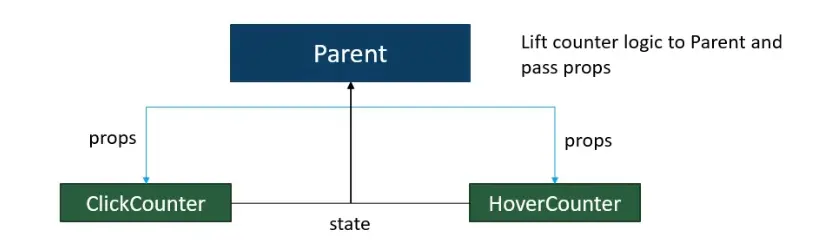
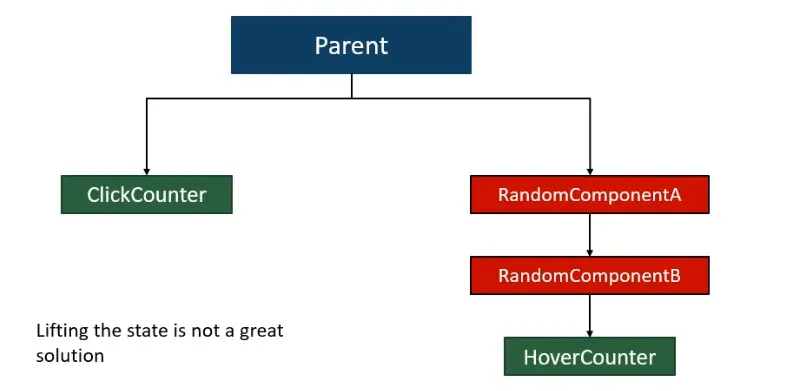
We could lift the state up (move the logic to a parent and pass it to both children). But what if the components using the logic aren’t siblings — if they’re 3–4 levels apart in the hierarchy, lifting state up is not a great solution.
Basic syntax of a HOC (imp)
const UpdatedComponent = (OriginalComponent) => {  class NewComponent extends React.Component {    render() {      return <OriginalComponent name="Rishabh" />;    }  }  return NewComponent;};
export default UpdatedComponent;
The same with a function component:
const UpdatedComponent = (OriginalComponent) => { function NewComponent(props) { return <OriginalComponent name="Rishabh" {...props} />; } return NewComponent;};Using the basic HOC in our counter example:
ClickedCounter.js
import { Component } from 'react';import UpdatedComponent from './withCounter';
class ClickedCounter extends Component {  constructor(props) {    super(props);    this.state = {      count: 0    };  }
  incrementCounter = () => {    this.setState(prev => ({ count: prev.count + 1 }));  };
  render() {    return (      <div>        <button onClick={this.incrementCounter}>          {this.props.name} Clicked {this.state.count} times        </button>      </div>    );  }}
export default UpdatedComponent(ClickedCounter);
UI output: “Rishabh Clicked 0 times” — the name prop came from the HOC.
Solution to the counter problem
Move the common counter logic into a HOC called withCounter, and pass count and incrementCounter to the wrapped component as props. (By convention, HOC names start with with.)
withCounter.js (compare it with the basic syntax above)
import React from 'react';
const withCounter = (WrappedComponent) => {  class WithCounter extends React.Component {    // Common functionality    constructor(props) {      super(props);      this.state = {        count: 0      };    }
    incrementCounter = () => {      this.setState(prev => ({ count: prev.count + 1 }));    };
    render() {      return (        <WrappedComponent          count={this.state.count}          incrementCounter={this.incrementCounter}        />      );    }  }  return WithCounter;};
export default withCounter;
ClickedCounter.js
import { Component } from 'react';import withCounter from './withCounter';
class ClickedCounter extends Component {  render() {    // Destructured props = props from the HOC    const { count, incrementCounter } = this.props;    return (      <div>        <button onClick={incrementCounter}>Clicked {count} times</button>      </div>    );  }}
export default withCounter(ClickedCounter);
HoveredCounter.js
import { Component } from 'react';import withCounter from './withCounter';
class HoveredCounter extends Component {  render() {    // Destructured props = props from the HOC    const { count, incrementCounter } = this.props;    return (      <div>        <h1 onMouseOver={incrementCounter}>Hovered {count} times</h1>      </div>    );  }}
export default withCounter(HoveredCounter);
Both components now share the logic, but each wrapped component gets its own WithCounter instance, so their counts are independent.
The same components as functions:
const ClickedCounter = ({ count, incrementCounter }) => (  <button onClick={incrementCounter}>Clicked {count} times</button>);
export default withCounter(ClickedCounter);
HOC comes with an issue!!! (imp)
Pass unrelated props through to the wrapped component
If a parent passes props to a component that’s wrapped in a HOC, those props go to the HOC’s container (WithCounter), not the wrapped component. So the wrapped component can’t see them.
<ClickedCounter name="Rishabh" />// In ClickedCounter, this.props.name is undefined — WithCounter received it and didn't pass it on.To fix this, pass the rest of the props through with {...this.props}:
withCounter.js (fixed props issue — always do this)
import React from 'react';
const withCounter = (WrappedComponent) => {  class WithCounter extends React.Component {    // Common functionality    constructor(props) {      super(props);      this.state = {        count: 0      };    }
    incrementCounter = () => {      this.setState(prev => ({ count: prev.count + 1 }));    };
    render() {      return (        <WrappedComponent          count={this.state.count}          incrementCounter={this.incrementCounter}          {...this.props}        />      );    }  }  return WithCounter;};
export default withCounter;
Order matters: props spread after the HOC’s props override them. If the parent also passes count, the parent’s value wins here. Put {...this.props} first if the HOC’s values should win.
Pass a parameter to a HOC
Suppose we need a different increment value for each counter. We pass it as an extra argument when wrapping the component.
withCounter.js
import React from 'react';
const withCounter = (WrappedComponent, incrementNumber) => {  class WithCounter extends React.Component {    // Common functionality    constructor(props) {      super(props);      this.state = {        count: 0      };    }
    incrementCounter = () => {      this.setState(prev => ({ count: prev.count + incrementNumber }));    };
    render() {      return (        <WrappedComponent          count={this.state.count}          incrementCounter={this.incrementCounter}          {...this.props}        />      );    }  }  return WithCounter;};
export default withCounter;
ClickedCounter.js
import { Component } from 'react';import withCounter from './withCounter';
class ClickedCounter extends Component {  render() {    // Destructured props = props from the HOC    const { count, incrementCounter } = this.props;    return (      <div>        <button onClick={incrementCounter}>Clicked {count} times</button>      </div>    );  }}
export default withCounter(ClickedCounter, 5);
If you don’t pass the 5, incrementNumber is undefined, and 0 + undefined is NaN, so the UI shows “Clicked NaN times”. Give the parameter a default to be safe: (WrappedComponent, incrementNumber = 1).
HoveredCounter.js
import { Component } from 'react';import withCounter from './withCounter';
class HoveredCounter extends Component {  render() {    // Destructured props = props from the HOC    const { count, incrementCounter } = this.props;    return (      <div>        <h1 onMouseOver={incrementCounter}>Hovered {count} times</h1>      </div>    );  }}
export default withCounter(HoveredCounter, 10);
Output: each click adds 5 to the first counter; each hover adds 10 to the second.
A curried form is also common: withCounter(5)(ClickedCounter) — like connect(mapState)(Component) in React-Redux.
Don’t mutate the original component (prototype) — use composition
Resist the temptation to modify a component’s prototype (or otherwise mutate it) inside a HOC.
function logProps(InputComponent) {  InputComponent.prototype.componentDidUpdate = function (prevProps) {    console.log('Current props: ', this.props);    console.log('Previous props: ', prevProps);  };  // The fact that we're returning the original input is a hint that it has been mutated.  return InputComponent;}
// EnhancedComponent will log whenever props are receivedconst EnhancedComponent = logProps(InputComponent);
There are a few problems with this:
- The input component can’t be reused separately from the enhanced component (it’s been changed permanently).
- If you apply another HOC to
EnhancedComponentthat also mutatescomponentDidUpdate, the first HOC’s functionality is overridden! - This HOC won’t work with function components, which don’t have lifecycle methods.
Mutating HOCs are a leaky abstraction — the consumer must know how they’re implemented to avoid conflicts with other HOCs.
Instead of mutation, HOCs should use composition, by wrapping the input component in a container component:
function logProps(WrappedComponent) { return class extends React.Component { componentDidUpdate(prevProps) { console.log('Current props: ', this.props); console.log('Previous props: ', prevProps); } render() { // Wraps the input component in a container, without mutating it return <WrappedComponent {...this.props} />; } };}Container components
You may notice similarities between HOCs and a pattern called container components. Container components separate responsibility between high-level and low-level concerns: containers manage things like subscriptions, data fetching and state, and pass props to components that handle rendering the UI. HOCs use containers as part of their implementation — you can think of a HOC as a parameterized container component definition.
A presentational component only renders UI from props. The container pattern is used to separate data fetching, logic, events and state from presentational components (sometimes called “dumb” components).
// Presentationalfunction UserList({ users }) {  return <ul>{users.map(u => <li key={u.id}>{u.name}</li>)}</ul>;}
// Containerfunction UserListContainer() {  const [users, setUsers] = useState([]);  useEffect(() => {    fetch('/api/users').then(r => r.json()).then(setUsers);  }, []);  return <UserList users={users} />;}
(With hooks, the logic part is often moved into a custom hook instead of a separate container component.)
Caveats and limitations (imp)
Don’t use HOCs inside the render method
import { withMyHOC } from '../with_my_component';
export default class App extends React.Component {  render() {    const Wrap = withMyHOC(MyComponent); // ❌ a NEW component type on every render    return (      <div>        {/* Other code */}        <Wrap />      </div>    );  }}
Why this is bad: every time render runs, withMyHOC(MyComponent) creates a brand-new component type. React compares element types by reference, sees a different type than last time, and unmounts the old subtree and mounts a new one instead of updating it.
The problem isn’t only performance — remounting a component loses the state of that component and all its children (input text, scroll position, fetched data), and effects run again.
Instead, apply HOCs outside the component definition, so the resulting component is created only once and its identity stays the same across renders:
const Wrap = withMyHOC(MyComponent); // ✅ created once, at module level
export default function App() {  return <Wrap />;}
The same rule applies to defining any component inside another component’s body.
Static methods must be copied over
When you apply a HOC, the original component is wrapped in a container. That means the new component doesn’t have the static methods of the original component.
// Define a static methodWrappedComponent.staticMethod = function () { /* ... */ };
// Now apply a HOCconst EnhancedComponent = enhance(WrappedComponent);
// The enhanced component has no static methodtypeof EnhancedComponent.staticMethod === 'undefined'; // true
Solutions:
1. Copy the methods onto the container before returning it:
function enhance(WrappedComponent) { class Enhance extends React.Component { /* ... */ } // Must know exactly which method(s) to copy :( Enhance.staticMethod = WrappedComponent.staticMethod; return Enhance;}2. Use the hoist-non-react-statics package to automatically copy all non-React static methods:
import hoistNonReactStatics from 'hoist-non-react-statics';
function enhance(WrappedComponent) {  class Enhance extends React.Component { /* ... */ }  hoistNonReactStatics(Enhance, WrappedComponent);  return Enhance;}
3. Export the static method separately from the component:
// Instead of...MyComponent.someFunction = someFunction;export default MyComponent;
// ...export the method separately...export { someFunction };
// ...and in the consuming module, import bothimport MyComponent, { someFunction } from './MyComponent.js';
Refs aren’t passed through
The convention is for HOCs to pass all props through to the wrapped component, but this doesn’t work for refs (before React 19). That’s because ref is not a normal prop — like key, React handles it specially. If you add a ref to a component created by a HOC, the ref points to the outermost container component, not the wrapped component.
The solution is React.forwardRef:
function withLogging(WrappedComponent) {  class WithLogging extends React.Component {    render() {      const { forwardedRef, ...rest } = this.props;      return <WrappedComponent ref={forwardedRef} {...rest} />;    }  }
  return React.forwardRef((props, ref) => <WithLogging {...props} forwardedRef={ref} />);}
const FancyInput = withLogging(Input);// <FancyInput ref={inputRef} /> → inputRef now points to Input
React 19: function components can receive ref as a normal prop, so forwardRef is no longer needed for them (it’s being deprecated). Spreading {...props} passes the ref through.
Display name for debugging
Containers created by HOCs show up in React DevTools like any other component. Set a displayName so it’s clear which component was wrapped:
function withCounter(WrappedComponent) { class WithCounter extends React.Component { /* ... */ } const name = WrappedComponent.displayName || WrappedComponent.name || 'Component'; WithCounter.displayName = `withCounter(${name})`; return WithCounter;}// DevTools shows: withCounter(ClickedCounter)Other drawbacks
- Wrapper hell: many HOCs create deeply nested component trees (
withA(withB(withC(Component)))). - Prop name collisions: two HOCs might pass a prop with the same name, and one silently overwrites the other.
- Unclear data source: it’s hard to see which HOC provided which prop.
HOCs vs custom hooks (modern approach)
Most HOC use cases are now written as custom hooks, which share logic without wrapping components.
// Custom hook — same counter logicfunction useCounter(step = 1) {  const [count, setCount] = useState(0);  const increment = () => setCount(c => c + step);  return { count, increment };}
function ClickedCounter() {  const { count, increment } = useCounter(5);  return <button onClick={increment}>Clicked {count} times</button>;}
function HoveredCounter() { const { count, increment } = useCounter(10); return <h1 onMouseOver={increment}>Hovered {count} times</h1>;}| HOC | Custom hook | |
|---|---|---|
| Shares | logic and rendering wrapper | logic (state, effects) |
| Extra components in the tree | Yes (wrapper hell) | No |
| Where data comes from | hidden props | explicit variables |
| Name collisions | possible | none — you name the returned values |
| Works with | class and function components | function components only |
| Still useful for | adding wrappers/UI around a component, class components, libraries (connect, memo) | most logic reuse today |
Interview questions
// Q1: What is shown?const withGreeting = (Component) => (props) => <Component greeting="Hello" />;const Hi = ({ greeting, name }) => <p>{greeting}, {name}</p>;const Enhanced = withGreeting(Hi);
<Enhanced name="Asha" />// Answer: "Hello, " — the HOC doesn't pass {...props}, so name is lost.
// Q2: Two components are wrapped with the same withCounter HOC. Do they share the count?// Answer: No. Each wrapped component renders its own WithCounter instance with its own state.// Q3: Why does the input lose its text every time the parent re-renders?function Parent() { const [n, setN] = useState(0); const EnhancedInput = withLabel(Input); return <><button onClick={() => setN(n + 1)}>{n}</button><EnhancedInput /></>;}// Answer: withLabel(Input) creates a new component type on every render, so React remounts it.// Call withLabel(Input) once, outside Parent.// Q4: Implement a withLoading HOC.const withLoading = (Component) => ({ isLoading, ...props }) => isLoading ? <p>Loading…</p> : <Component {...props} />;
const UserListWithLoading = withLoading(UserList);// <UserListWithLoading isLoading={true} users={[]} /> → Loading…// <UserListWithLoading isLoading={false} users={users} /> → the list