On this page
Context
Last reviewed 15 Sept 2026
What is context?
Context provides a way to pass data through the component tree without having to pass props down manually at every level. Good examples: the current user, theme, language, or auth state that many components need.
Prop drilling: say App has a username, and components A, D and F need it. For A it’s easy — pass it as a prop. For D, we must pass it to B, and B passes it to D. For F, we pass it to E, and E passes it to F. Now imagine the value is needed 10 levels down: every component in between must accept and forward a prop it doesn’t use. Prop drilling is passing data through parts of the tree that don’t need it, just to get it to the part that does.
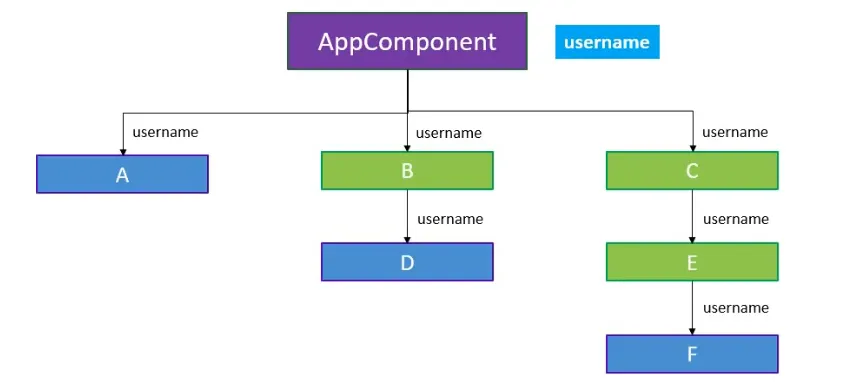
(Composition — passing components as children — and render props can reduce drilling in some cases, but context is the general solution for data many components need.)
There are 3 steps to use context:
- Create the context
- Provide a context value
- Consume the context value
Quick modern example (function components)
import { createContext, useContext, useState } from 'react';
// 1. Createconst UserContext = createContext('Guest');
function App() {  const [username] = useState('Rishabh');  return (    // 2. Provide    <UserContext.Provider value={username}>      <ComponentC />    </UserContext.Provider>  );}
function ComponentC() {  return <ComponentE />;    // doesn't need or pass username}
function ComponentE() {  return <ComponentF />;}
function ComponentF() {  // 3. Consume  const username = useContext(UserContext);  return <div>Hello {username}</div>;}// Output: Hello Rishabh
React 19: you can render the context itself as the provider: <UserContext value={username}>…</UserContext>. <UserContext.Provider> still works.
React.createContext
const MyContext = React.createContext(defaultValue);The defaultValue is used only when a component has no matching Provider above it in the tree.
- No Provider above → the consumer gets
defaultValue. - A Provider above → the consumer gets the Provider’s
value, even if that value isundefined. (Passingvalue={undefined}does not fall back todefaultValue.)
The default value is handy for testing components in isolation without wrapping them. Make its shape match what consumers expect (e.g. { user: null, login: () => {} }).
Context.Provider
<MyContext.Provider value={/* some value */}>Every context object comes with a Provider component that lets consuming components subscribe to context changes.
- The Provider accepts a
valueprop, which is passed to consuming components that are descendants of this Provider. - One Provider can serve many consumers.
- Providers can be nested to override values deeper in the tree — a consumer uses the closest Provider above it.
All consumers that are descendants of a Provider re-render whenever the Provider’s value changes. This propagation (to useContext, contextType and Consumer) isn’t blocked by shouldComponentUpdate or React.memo, so a consumer updates even when an ancestor skips rendering.
Changes are detected by comparing the new and old values with Object.is (reference equality for objects).
const ThemeContext = createContext('light');
function App() {  return (    <ThemeContext.Provider value="dark">      <Toolbar />                          {/* dark */}      <ThemeContext.Provider value="light">        <Footer />                         {/* light — nested provider overrides */}      </ThemeContext.Provider>    </ThemeContext.Provider>  );}
Ways to consume context
useContext (function components — recommended)
const value = useContext(MyContext);Returns the value of the closest Provider (or the default value). The component re-renders when that value changes.
Class.contextType (class components)
class MyClass extends React.Component {  static contextType = MyContext;
  render() {    let value = this.context;    /* render something based on the value */  }}
Assign a context object to the class’s contextType property. Then this.context gives the nearest current value of that context, in any lifecycle method, including render.
Context.Consumer
<MyContext.Consumer> {value => /* render something based on the context value */}</MyContext.Consumer>A component that subscribes to context changes. Before hooks, this was the way to read context in function components (and it works in classes too).
It requires a function as a child (a render prop). The function receives the current context value and returns React elements. The value is the value prop of the closest Provider above, or the defaultValue if there’s no Provider.
Context.displayName
A context object accepts a displayName string property. React DevTools uses it to label the context.
const MyContext = React.createContext(/* some value */);MyContext.displayName = 'MyDisplayName';
<MyContext.Provider> // "MyDisplayName.Provider" in DevTools<MyContext.Consumer> // "MyDisplayName.Consumer" in DevTools
Context in code (class components)
Create components/Context/userContext.jsx
import React from 'react';
const UserContext = React.createContext();
const UserProvider = UserContext.Provider;const UserConsumer = UserContext.Consumer;
export { UserProvider, UserConsumer };
App.js
import ComponentC from "./components/Context/ComponentC";import { UserProvider } from "./components/Context/userContext";
function App() {  return (    <div className="App">      <UserProvider value="Rishabh">        <ComponentC />      </UserProvider>    </div>  );}
export default App;
ComponentC.jsx
import { Component } from 'react';import ComponentE from './ComponentE';
class ComponentC extends Component {  render() {    return (      <div>        <ComponentE />      </div>    );  }}
export default ComponentC;
ComponentE.jsx
import { Component } from 'react';import ComponentF from './ComponentF';
class ComponentE extends Component {  render() {    return (      <div>        <ComponentF />      </div>    );  }}
export default ComponentE;
ComponentF.jsx
import { Component } from 'react';import { UserConsumer } from './userContext';
class ComponentF extends Component {  render() {    return (      <UserConsumer>        {username => {          return <div>Hello {username}</div>;        }}      </UserConsumer>    );  }}
export default ComponentF;
Output: Hello Rishabh
ComponentC and ComponentE never touch username — no prop drilling.
If a defaultValue is provided
userContext.jsx
import React from 'react';
const UserContext = React.createContext("Rishabh Sisodiya");
const UserProvider = UserContext.Provider;const UserConsumer = UserContext.Consumer;
export { UserProvider, UserConsumer };
If a default value is provided and there’s no UserProvider above, the consumer uses the default value.
App.js
import ComponentC from "./components/Context/ComponentC";
function App() {  return (    <div className="App">      {/* <UserProvider value="Rishabh"> */}      <ComponentC />      {/* </UserProvider> */}    </div>  );}
export default App;
Output: Hello Rishabh Sisodiya
Using context with contextType
userContext.jsx — also export the context object itself:
import React from 'react';
const UserContext = React.createContext("Rishabh Sisodiya");
const UserProvider = UserContext.Provider;const UserConsumer = UserContext.Consumer;
export { UserProvider, UserConsumer };export default UserContext;
contextType outside the class
ComponentE.jsx
import { Component } from 'react';import ComponentF from './ComponentF';import UserContext from './userContext';
class ComponentE extends Component {  render() {    return (      <div>        ComponentE context = {this.context}        <ComponentF />      </div>    );  }}
ComponentE.contextType = UserContext;
export default ComponentE;
contextType inside the class: static contextType
ComponentE.jsx
import { Component } from 'react';import ComponentF from './ComponentF';import UserContext from './userContext';
class ComponentE extends Component {  static contextType = UserContext;
  render() {    return (      <div>        ComponentE context {this.context}        <ComponentF />      </div>    );  }}
export default ComponentE;
Output (with the Provider value “Rishabh”): ComponentE context Rishabh followed by Hello Rishabh.
Limitations of contextType
- It works with class components only.
- A class can subscribe to only one context this way. Use
Consumerfor more (oruseContextin function components, which can read any number of contexts).
Updating context from a nested component
Context values are read-only for consumers, but you can pass a function in the context that updates state in the Provider’s component.
theme-context.jsx
import React from 'react';
export const themes = {  light: { foreground: '#000000', background: '#eeeeee' },  dark: { foreground: '#ffffff', background: '#222222' },};
// Make sure the shape of the default value passed to// createContext matches the shape that the consumers expect!export const ThemeContext = React.createContext({  theme: themes.dark,  toggleTheme: () => {},});
theme-toggler-button.jsx
import { ThemeContext } from './theme-context';
function ThemeTogglerButton() {  // The Theme Toggler Button receives not only the theme  // but also a toggleTheme function from the context  return (    <ThemeContext.Consumer>      {({ theme, toggleTheme }) => (        <button          onClick={toggleTheme}          style={{ backgroundColor: theme.background, color: theme.foreground }}        >          Toggle Theme        </button>      )}    </ThemeContext.Consumer>  );}
export default ThemeTogglerButton;
App.js
import React from 'react';import { createRoot } from 'react-dom/client';import { ThemeContext, themes } from './theme-context';import ThemeTogglerButton from './theme-toggler-button';
class App extends React.Component {  constructor(props) {    super(props);
    this.toggleTheme = () => {      this.setState(state => ({        theme: state.theme === themes.dark ? themes.light : themes.dark,      }));    };
    // State also contains the updater function so it will    // be passed down into the context provider    this.state = {      theme: themes.light,      toggleTheme: this.toggleTheme,    };  }
  render() {    // The entire state is passed to the provider    return (      <ThemeContext.Provider value={this.state}>        <Content />      </ThemeContext.Provider>    );  }}
function Content() {  return (    <div>      <ThemeTogglerButton />    </div>  );}
createRoot(document.getElementById('root')).render(<App />);
Passing this.state works well here: it’s the same object until setState creates a new one, so consumers only re-render when the theme actually changes.
The same with hooks:
function App() {  const [theme, setTheme] = useState(themes.light);
  const value = useMemo(() => ({    theme,    toggleTheme: () => setTheme(t => (t === themes.dark ? themes.light : themes.dark)),  }), [theme]);
  return (    <ThemeContext.Provider value={value}>      <Content />    </ThemeContext.Provider>  );}
function ThemeTogglerButton() {  const { theme, toggleTheme } = useContext(ThemeContext);  return (    <button onClick={toggleTheme} style={{ backgroundColor: theme.background, color: theme.foreground }}>      Toggle Theme    </button>  );}
Consuming multiple contexts
// Theme context, default to light themeconst ThemeContext = React.createContext('light');
// Signed-in user contextconst UserContext = React.createContext({  name: 'Guest',});
class App extends React.Component {  render() {    const { signedInUser, theme } = this.props;
    // App component that provides initial context values    return (      <ThemeContext.Provider value={theme}>        <UserContext.Provider value={signedInUser}>          <Layout />        </UserContext.Provider>      </ThemeContext.Provider>    );  }}
function Layout() {  return (    <div>      <Sidebar />      <Content />    </div>  );}
// A component may consume multiple contextsfunction Content() {  return (    <ThemeContext.Consumer>      {theme => (        <UserContext.Consumer>          {user => <ProfilePage user={user} theme={theme} />}        </UserContext.Consumer>      )}    </ThemeContext.Consumer>  );}
With hooks, no nesting is needed:
function Content() { const theme = useContext(ThemeContext); const user = useContext(UserContext); return <ProfilePage user={user} theme={theme} />;}A custom provider + hook pattern (recommended structure)
const AuthContext = createContext(null);
export function AuthProvider({ children }) {  const [user, setUser] = useState(null);
  const value = useMemo(() => ({    user,    login: (userData) => setUser(userData),    logout: () => setUser(null),  }), [user]);
  return <AuthContext.Provider value={value}>{children}</AuthContext.Provider>;}
export function useAuth() {  const context = useContext(AuthContext);  if (context === null) {    throw new Error('useAuth must be used inside <AuthProvider>');  }  return context;}
// Usagefunction Navbar() {  const { user, logout } = useAuth();  return user ? <button onClick={logout}>Logout {user.name}</button> : <a href="/login">Login</a>;}
Limitation: unnecessary re-renders
Context uses reference identity (Object.is) to decide when consumers re-render. That can trigger unintended renders in consumers whenever the Provider’s parent re-renders. For example, the code below re-renders all consumers every time App re-renders, because a new object is created for value each time:
class App extends React.Component { render() { return ( <MyContext.Provider value={{ something: 'something' }}> <Toolbar /> </MyContext.Provider> ); }}To get around this, lift the value into the parent’s state, so the same object is reused until it actually changes:
class App extends React.Component {  constructor(props) {    super(props);    this.state = {      value: { something: 'something' },    };  }
  render() {    return (      <MyContext.Provider value={this.state.value}>        <Toolbar />      </MyContext.Provider>    );  }}
In function components, use useMemo (and useCallback for functions):
function App() { const [user, setUser] = useState(null); const value = useMemo(() => ({ user, setUser }), [user]); return <UserContext.Provider value={value}><Toolbar /></UserContext.Provider>;}Other ways to limit re-renders:
- Split contexts by how often they change — e.g.
UserContextandThemeContextseparately, or separate state and dispatch/actions contexts. - Every consumer of a context re-renders when any part of its value changes. If a component only needs
user.name, it still re-renders whenuser.cartchanges. For frequently changing global state, a store library (Redux, Zustand) with selectors is often better.
When to use context (and when not to)
Good for: data needed by many components at different levels that changes rarely — theme, locale, current user/auth, feature flags, a design-system configuration.
Not ideal for:
- Avoiding passing props just 1–2 levels — plain props are clearer.
- Rapidly changing values used by many components (e.g. mouse position, form input on every keystroke).
- Complex global state with many updates → consider Redux Toolkit, Zustand, or server-state libraries like TanStack Query for fetched data.
Try composition first: instead of drilling a prop through layout components, pass the finished element down.
// Instead of drilling `user` through Page → Layout → Header → Avatar:function Page({ user }) { return <Layout header={<Avatar user={user} />} />;}Interview questions
// Q1: What is rendered?const Ctx = createContext('default');function Child() { return <p>{useContext(Ctx)}</p>;}function App() { return ( <> <Child /> <Ctx.Provider value={undefined}> <Child /> </Ctx.Provider> </> );}// Answer: "default" and "" (nothing). The first Child has no Provider → default value.// The second has a Provider with value undefined → undefined, not the default.// Q2: A component wrapped in React.memo reads a context with useContext.// The context value changes. Does it re-render?// Answer: Yes. Context changes bypass memo and shouldComponentUpdate.// Q3: Why do all consumers re-render when App's unrelated state changes?function App() { const [count, setCount] = useState(0); const [user, setUser] = useState({ name: 'A' }); return ( <UserContext.Provider value={{ user, setUser }}> <button onClick={() => setCount(c => c + 1)}>{count}</button> <Profile /> </UserContext.Provider> );}// Answer: { user, setUser } is a new object on every render of App. Wrap it in// useMemo(() => ({ user, setUser }), [user]).// Q4: Which value does Footer get?<ThemeContext.Provider value="dark"> <ThemeContext.Provider value="blue"> <Footer /> </ThemeContext.Provider></ThemeContext.Provider>// Answer: "blue" — the closest Provider wins.// Q5: Can a class component read two contexts with contextType?// Answer: No. contextType supports one context. Use <Context.Consumer> for the others,// or convert to a function component and call useContext twice.