On this page
React Hookshigh-yield
Last reviewed 15 Sept 2026
Introduction to React Hooks
Hooks were added in React 16.8. They let you use state and other React features without writing a class.
Why hooks?
Before hooks, you had to write a class component whenever you needed state or lifecycle methods. That brought several problems:
- You had to understand how
thisworks in JavaScript. - You had to remember to bind event handlers in class components.
- Classes don’t minify well and make hot reloading unreliable.
- There was no simple way to reuse stateful logic. HOCs and render props solved it, but they made the code harder to follow (“wrapper hell”).
- Related code wasn’t organized in one place:
- Data fetching lived in
componentDidMountandcomponentDidUpdate. - Event listeners were added in
componentDidMountand removed incomponentWillUnmount. - Meanwhile unrelated code (a subscription and a data fetch) sat together in the same lifecycle method.
- Data fetching lived in
Hooks let you split a component by what the code does, not by which lifecycle method it belongs to, and share logic through custom hooks.
Rules of Hooks (imp)
Hooks work by the order in which they’re called on each render, so two rules must be followed:
1. Only call hooks at the top level. Don’t call them inside loops, conditions, nested functions or after an early return.
// ❌ Breaks the rules — the hook order changes between rendersfunction Bad({ isLoggedIn }) {  if (isLoggedIn) {    const [name, setName] = useState('');   // sometimes called, sometimes not  }  for (const item of items) {    useEffect(() => {}, []);                // number of hooks depends on data  }  if (!user) return null;  const [count, setCount] = useState(0);    // after an early return}
// ✅ Always call hooks in the same order, then use conditions insidefunction Good({ isLoggedIn, user }) {  const [name, setName] = useState('');  const [count, setCount] = useState(0);
  useEffect(() => {    if (isLoggedIn) { /* ... */ }  }, [isLoggedIn]);
  if (!user) return null;                   // early return AFTER all hooks  return <p>{name}</p>;}
2. Only call hooks from React functions — React function components, or custom hooks. Not from plain JavaScript functions, class components or event handlers.
Why? React keeps hook state in a list per component, matched by call order. If the order changes between renders, React gives state from the wrong hook. Typical error:
Error: Rendered fewer hooks than expected. This may be caused by an accidental early return statement.The ESLint plugin eslint-plugin-react-hooks (part of the default setup in Vite/Next templates) catches both mistakes, plus missing effect dependencies.
useState
The useState hook lets you add state to function components. In classes, state is always an object. With useState, state doesn’t have to be an object — it can be a number, string, boolean, array or object.
useState returns an array with 2 elements: the current value of the state, and a setter function.
const [state, setState] = useState(initialValue);App.js
import Counter from './components/Counter';
const App = () => {  return (    <div>      <Counter />    </div>  );};
export default App;
Counter.js
import { useState } from 'react';
const Counter = () => {  const [count, setCount] = useState(0);
  return (    <div>      <button onClick={() => setCount(count + 1)}>Count {count}</button>    </div>  );};
export default Counter;
Why is it called useState and not createState? “Create” wouldn’t be accurate, because state is only created the first time the component renders. On later renders, useState gives us the current state — otherwise it wouldn’t be “state” at all. There’s also a convention that hook names always start with use.
Lazy initial state: if the initial value is expensive to compute, pass a function. React calls it only on the first render.
const [items, setItems] = useState(() => JSON.parse(localStorage.getItem('items')) ?? []);// ❌ useState(JSON.parse(...)) would run on EVERY render, and throw the result awayuseState with previous state
Compare this with the class this.setState example (see Use setState() correctly). When the new value depends on the old one, pass an updater function.
import { useState } from 'react';
const CounterTwo = () => {  const initialCount = 0;  const [count, setCount] = useState(initialCount);
  const incrementFive = () => {    for (let i = 0; i < 5; i++) {      setCount(prevCount => prevCount + 1);   // each call uses the latest value    }  };
  return (    <div>      Count: {count}      <button onClick={() => setCount(initialCount)}>Reset</button>      <button onClick={() => setCount(count + 1)}>Increment</button>      <button onClick={() => setCount(count - 1)}>Decrement</button>      <button onClick={incrementFive}>Increment 5</button>    </div>  );};
export default CounterTwo;
With setCount(count + 1) in the loop, all five calls would use the same count from this render, and the result would be 1, not 5.
useState with an object
Problem: with the code below, typing in the first input shows the first name, but typing in the second input removes the first name and keeps only the last name.
import { useState } from 'react';
const CounterThree = () => {  const [name, setName] = useState({    firstName: '',    lastName: ''  });
  return (    <div>      <input type="text" value={name.firstName} onChange={e => setName({ firstName: e.target.value })} />      <input type="text" value={name.lastName} onChange={e => setName({ lastName: e.target.value })} />      <h2>Your first name is - {name.firstName}</h2>      <h2>Your last name is - {name.lastName}</h2>    </div>  );};
export default CounterThree;
Why? Unlike class setState, the useState setter replaces the whole value — it doesn’t merge objects.
Solution: use the spread operator to keep the other fields.
import { useState } from 'react';
const CounterThree = () => {  const [name, setName] = useState({    firstName: '',    lastName: ''  });
  return (    <div>      <input        type="text"        value={name.firstName}        onChange={e => setName({ ...name, firstName: e.target.value })}      />      <input        type="text"        value={name.lastName}        onChange={e => setName({ ...name, lastName: e.target.value })}      />      <h2>Your first name is - {name.firstName}</h2>      <h2>Your last name is - {name.lastName}</h2>    </div>  );};
export default CounterThree;
Even safer (when several updates can happen quickly), use the updater form:
onChange={e => setName(prev => ({ ...prev, firstName: e.target.value }))}Nested objects must be copied at each level:
setUser(prev => ({ ...prev, address: { ...prev.address, city: 'Pune' } }));useState with an array
import { useState } from "react";
const CounterFour = () => {  const [items, setItems] = useState([]);
  const addItem = () => {    setItems([      ...items,      { id: items.length, value: Math.floor(Math.random() * 10) + 1 }    ]);  };
  return (    <div>      <button onClick={addItem}>Add a number</button>      <ul>        {items.map((item) => (          <li key={item.id}>{item.value}</li>        ))}      </ul>    </div>  );};
export default CounterFour;
Never mutate the array — always create a new one:
setItems(prev => [...prev, newItem]); // addsetItems(prev => prev.filter(item => item.id !== id)); // removesetItems(prev => prev.map(item => // update one item.id === id ? { ...item, done: true } : item));setItems(prev => [...prev].sort((a, b) => a.value - b.value)); // sort a copy(id: items.length is fine for a demo but breaks after deletions — use crypto.randomUUID() in real code.)
useEffect
The Effect hook lets you perform side effects in function components. It’s a close replacement for componentDidMount, componentDidUpdate and componentWillUnmount combined.
useEffect(setup, dependencies?)Update the web page title:
import { useState, useEffect } from 'react';
const Counter = () => {  const [count, setCount] = useState(0);
  useEffect(() => {    document.title = `You clicked ${count} times`;  });
  return (    <div>      <button onClick={() => setCount(count + 1)}>Click {count} times</button>    </div>  );};
export default Counter;
With no dependency array, the effect runs after every render (mount and every update).
The three forms:
| Dependencies | When the effect runs |
|---|---|
none — useEffect(fn) | after every render |
[] — useEffect(fn, []) | once, after the first render |
[a, b] — useEffect(fn, [a, b]) | after the first render, and whenever a or b changes |
Effects run after React has updated the DOM and the browser has painted, so they don’t block the screen update.
Conditionally run effects
The code below runs only when count changes, not when name changes:
import { useState, useEffect } from 'react';
const Counter = () => {  const [count, setCount] = useState(0);  const [name, setName] = useState('');
  useEffect(() => {    console.log('useEffect - Updating document title');    document.title = `You clicked ${count} times`;  }, [count]);
  return (    <div>      <input type="text" value={name} onChange={e => setName(e.target.value)} />      <button onClick={() => setCount(count + 1)}>Click {count} times</button>    </div>  );};
export default Counter;
Compared to a class component:
componentDidUpdate(prevProps, prevState) { if (prevState.count !== this.state.count) { console.log('Updating document title'); document.title = `You clicked ${this.state.count} times`; }}The dependency array replaces that manual comparison. React compares each dependency with Object.is.
Run an effect only once
import { useState, useEffect } from 'react';
const HookMouse = () => {  const [x, setX] = useState(0);  const [y, setY] = useState(0);
  const logMousePosition = e => {    console.log('Mouse Event');    setX(e.clientX);    setY(e.clientY);  };
  useEffect(() => {    console.log('useEffect called');    window.addEventListener('mousemove', logMousePosition);  }, []);
  return (    <div>      Hooks X - {x} Y - {y}    </div>  );};
export default HookMouse;
With [], the listener is added once — but it’s never removed, which is the bug fixed below.
useEffect with cleanup
If we don’t remove the event listener, we get a problem when the component unmounts: the handler still runs and tries to set state on a component that no longer exists. (To reproduce the error, remove the return part of useEffect.)

The function returned from an effect is the cleanup function. React calls it before the next effect run and when the component unmounts.
HookMouse.js
import { useState, useEffect } from 'react';
const HookMouse = () => {  const [x, setX] = useState(0);  const [y, setY] = useState(0);
  const logMousePosition = e => {    console.log('Mouse Event');    setX(e.clientX);    setY(e.clientY);  };
  useEffect(() => {    console.log('useEffect called');    window.addEventListener('mousemove', logMousePosition);
    return () => {      console.log('component unmounted');      window.removeEventListener('mousemove', logMousePosition);    };  }, []);
  return (    <div>      Hooks X - {x} Y - {y}    </div>  );};
export default HookMouse;
MouseContainer.js — toggles the component so we can see the cleanup:
import { useState } from "react";import HookMouse from "./HookMouse";
const MouseContainer = () => {  const [display, setDisplay] = useState(true);
  return (    <div>      <button onClick={() => setDisplay(!display)}>Toggle display</button>      {display && <HookMouse />}    </div>  );};
export default MouseContainer;
Always clean up: event listeners, timers (clearInterval), subscriptions, WebSocket connections and in-flight requests (AbortController).
useEffect with an incorrect dependency
Problem: the counter stops at 1. The effect runs only once, so tick is the version from the first render, where count is always 0 — it keeps setting the count to 0 + 1.
import { useState, useEffect } from 'react';
const IntervalHookCounter = () => {  const [count, setCount] = useState(0);
  const tick = () => {    setCount(count + 1);       // `count` is captured from the first render — a stale closure  };
  useEffect(() => {    const interval = setInterval(tick, 1000);    return () => {      clearInterval(interval);    };  }, []);
  return <div>{count}</div>;};
export default IntervalHookCounter;
Solution 1: add count as a dependency. Now the effect re-runs on every count change, clearing the old interval and starting a new one with a fresh tick.
useEffect(() => { const interval = setInterval(tick, 1000); return () => { clearInterval(interval); };}, [count]);This works, but the interval is destroyed and recreated every second, so the timing can drift.
Solution 2 (better): use the updater form. prevCount always has the latest value, so the effect doesn’t need count at all.
import { useState, useEffect } from 'react';
const IntervalHookCounter = () => {  const [count, setCount] = useState(0);
  const tick = () => {    setCount(prevCount => prevCount + 1);  };
  useEffect(() => {    const interval = setInterval(tick, 1000);    return () => {      clearInterval(interval);    };  }, []);
  return <div>{count}</div>;};
export default IntervalHookCounter;
Never lie about dependencies. Removing a dependency to “run it once” causes stale closures — the effect keeps using old values. Either include everything the effect uses, or restructure the code (updater functions, moving the function inside the effect, or useCallback).
Multiple useEffect calls
You can use as many effects as you like in one component, and React runs them in the order they’re defined. This is one of the big advantages over lifecycle methods: related code stays together instead of being split across componentDidMount and componentDidUpdate.
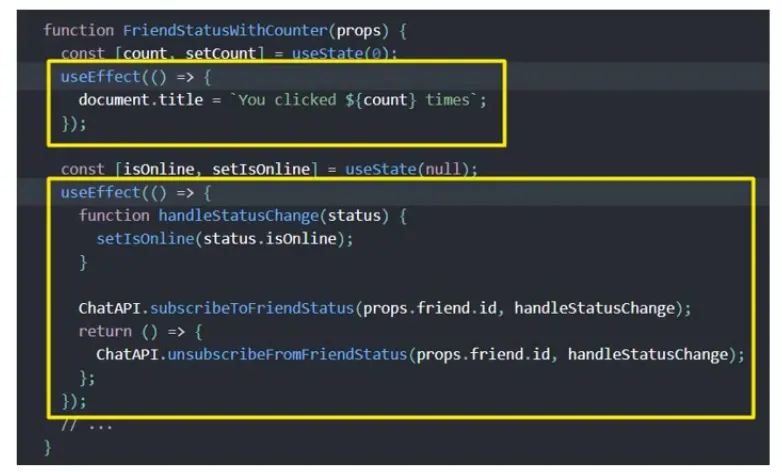
function Profile({ userId }) {  // Effect 1: page title  useEffect(() => {    document.title = `Profile ${userId}`;  }, [userId]);
  // Effect 2: subscription — unrelated to the title, kept separate  useEffect(() => {    const sub = chat.subscribe(userId);    return () => sub.unsubscribe();  }, [userId]);}
Fetching data using useEffect
Install axios: npm i axios
import { useState, useEffect } from "react";import axios from "axios";
function DataFetching() {  const [post, setPost] = useState({});  const [id, setId] = useState(1);  const [idFromButtonClick, setIdFromButtonClick] = useState(1);
  useEffect(() => {    axios      .get(`https://jsonplaceholder.typicode.com/posts/${idFromButtonClick}`)      .then((res) => {        console.log(res);        setPost(res.data);      })      .catch((err) => {        console.log(err);      });  }, [idFromButtonClick]);
  const handleClick = () => {    setIdFromButtonClick(id);  };
  return (    <div>      <input type="text" value={id} onChange={(e) => setId(e.target.value)} />      <button type="button" onClick={handleClick}>        Fetch Post      </button>      <div>{post.title}</div>    </div>  );}
export default DataFetching;
The effect depends on idFromButtonClick, so the request only runs when the button is clicked, not on every keystroke. (The original code used id inside the request but listed only idFromButtonClick as a dependency — that’s a stale-closure bug that ESLint would warn about. Use the dependency value inside the effect, as above.)
In production, prefer a data library (TanStack Query, SWR) — see React and HTTP for loading/error states, race conditions and cancellation.
useContext
Context provides a way to pass data through the component tree without passing props down manually at every level. (See the Context chapter for the full explanation.) useContext is the simplest way to read it.
const value = useContext(MyContext);App.js
import "./App.css";import ComponentC from "./components/ComponentC";import { createContext } from "react";
export const UserContext = createContext();export const ChannelContext = createContext();
function App() {  return (    <div className="App">      <UserContext.Provider value={"Vishwas"}>        <ChannelContext.Provider value={"Codevolution"}>          <ComponentC />        </ChannelContext.Provider>      </UserContext.Provider>    </div>  );}
export default App;
ComponentC.js
import ComponentE from './ComponentE';
function ComponentC() {  return <ComponentE />;}
export default ComponentC;
The old way (used with class components)
ComponentF.js
import { UserContext, ChannelContext } from "../App";
function ComponentF() {  return (    <div>      <UserContext.Consumer>        {(user) => {          return (            <ChannelContext.Consumer>              {(channel) => {                return (                  <div>                    User context value {user}, channel context value {channel}                  </div>                );              }}            </ChannelContext.Consumer>          );        }}      </UserContext.Consumer>    </div>  );}
export default ComponentF;
Two contexts already mean two levels of nesting — with four, it becomes unreadable.
The simpler way with useContext
ComponentE.js
import { useContext } from 'react';import { UserContext, ChannelContext } from '../App';
function ComponentE() {  const user = useContext(UserContext);  const channel = useContext(ChannelContext);
  return <div>User is {user} and channel is {channel}</div>;}
export default ComponentE;
Output: User is Vishwas and channel is Codevolution
Remember: a component that reads a context re-renders whenever that context’s value changes — even if it’s wrapped in React.memo.
useReducer
useReducer is a hook for state management — an alternative to useState for more complex state.
What’s the difference between useState and useReducer? → useState is built on top of useReducer.
Similarity with the reduce function in JavaScript
The reduce() method runs a reducer function on each element of an array, producing a single output value:
const array1 = [1, 2, 3, 4];const reducer = (accumulator, currentValue) => accumulator + currentValue;
// 1 + 2 + 3 + 4console.log(array1.reduce(reducer));     // 10
// 5 + 1 + 2 + 3 + 4console.log(array1.reduce(reducer, 5));  // 15
reduce in JavaScript | useReducer in React |
|---|---|
array.reduce(reducer, initialValue) | useReducer(reducer, initialState) |
singleValue = reducer(accumulator, itemValue) | newState = reducer(currentState, action) |
| returns a single value | returns a pair of values: [newState, dispatch] |
Syntax:
const [state, dispatch] = useReducer(reducer, initialArg, init);Simple counter
CounterOne.js
import { useReducer } from "react";
const initialState = 0;
const reducer = (state, action) => {  switch (action) {    case "increment":      return state + 1;    case "decrement":      return state - 1;    case "reset":      return initialState;    default:      return state;  }};
function CounterOne() {  const [count, dispatch] = useReducer(reducer, initialState);
  return (    <div>      <div>Count = {count}</div>      <button onClick={() => dispatch("increment")}>Increment</button>      <button onClick={() => dispatch("decrement")}>Decrement</button>      <button onClick={() => dispatch("reset")}>Reset</button>    </div>  );}
export default CounterOne;
App.js
import "./App.css";import CounterOne from "./components/CounterOne";
function App() {  return (    <div className="App">      <CounterOne />    </div>  );}
export default App;
The reducer must be a pure function: given the same state and action, it always returns the same new state, with no side effects (no fetching, no mutation). Return a new state object — don’t mutate the old one.
Actions as objects (the usual style)
Real reducers use action objects with a type and extra data (the payload):
const initialState = { count: 0, step: 1 };
const reducer = (state, action) => {  switch (action.type) {    case 'increment':      return { ...state, count: state.count + state.step };    case 'setStep':      return { ...state, step: action.payload };    case 'reset':      return initialState;    default:      throw new Error(`Unknown action: ${action.type}`);  }};
function Counter() {  const [state, dispatch] = useReducer(reducer, initialState);
  return (    <>      <p>Count: {state.count} (step {state.step})</p>      <button onClick={() => dispatch({ type: 'increment' })}>+{state.step}</button>      <input        type="number"        value={state.step}        onChange={e => dispatch({ type: 'setStep', payload: Number(e.target.value) })}      />    </>  );}
Use multiple reducers
You can call useReducer more than once to keep independent pieces of state, reusing the same reducer function:
import { useReducer } from "react";
const initialState = 0;
const reducer = (state, action) => {  switch (action) {    case "increment":      return state + 1;    case "decrement":      return state - 1;    case "reset":      return initialState;    default:      return state;  }};
function CounterThree() {  const [count, dispatch] = useReducer(reducer, initialState);  const [countTwo, dispatchTwo] = useReducer(reducer, initialState);
  return (    <div>      <div>Count = {count}</div>      <button onClick={() => dispatch("increment")}>Increment</button>      <button onClick={() => dispatch("decrement")}>Decrement</button>      <button onClick={() => dispatch("reset")}>Reset</button>
      <div>Count Two = {countTwo}</div>      <button onClick={() => dispatchTwo("increment")}>Increment</button>      <button onClick={() => dispatchTwo("decrement")}>Decrement</button>      <button onClick={() => dispatchTwo("reset")}>Reset</button>    </div>  );}
export default CounterThree;
The two counters are completely separate — clicking the first pair doesn’t change countTwo.
useReducer with useContext (imp)
useReduceron its own → local state management.useContext+useReducer→ share state between components = simple global state management (the pattern Redux popularized, without the library).
App.js
import { useReducer, createContext } from "react";import "./App.css";import ComponentA from "./components/ComponentA";import ComponentB from "./components/ComponentB";import ComponentC from "./components/ComponentC";
const initialState = 0;
const reducer = (state, action) => {  switch (action) {    case "increment":      return state + 1;    case "decrement":      return state - 1;    case "reset":      return initialState;    default:      return state;  }};
export const CountContext = createContext();
function App() {  const [count, dispatch] = useReducer(reducer, initialState);
  return (    <CountContext.Provider value={{ countState: count, countDispatch: dispatch }}>      <div className="App">        Count - {count}        <ComponentA />        <ComponentB />        <ComponentC />      </div>    </CountContext.Provider>  );}
export default App;
ComponentA.js (B and C are the same, with their own labels):
import { useContext } from 'react';import { CountContext } from '../App';
function ComponentA() {  const countContext = useContext(CountContext);
  return (    <div>      Component A - {countContext.countState}      <button onClick={() => countContext.countDispatch('increment')}>Increment</button>      <button onClick={() => countContext.countDispatch('decrement')}>Decrement</button>      <button onClick={() => countContext.countDispatch('reset')}>Reset</button>    </div>  );}
export default ComponentA;
Any component can now read the count and dispatch actions — no prop drilling.
Performance tip: value={{ countState, countDispatch }} creates a new object on every render, so every consumer re-renders. Split it into two contexts (state and dispatch) so components that only dispatch don’t re-render when the state changes:
export const CountStateContext = createContext();export const CountDispatchContext = createContext();
<CountStateContext.Provider value={count}> <CountDispatchContext.Provider value={dispatch}> {children} </CountDispatchContext.Provider></CountStateContext.Provider>(dispatch is stable — React guarantees the same function across renders.)
Fetching data without useReducer
DataFetchingOne.js — three separate useState calls that must be kept in sync:
import { useState, useEffect } from 'react';import axios from 'axios';
function DataFetchingOne() {  const [loading, setLoading] = useState(true);  const [error, setError] = useState('');  const [post, setPost] = useState({});
  useEffect(() => {    axios.get(`https://jsonplaceholder.typicode.com/posts/1`)      .then(response => {        setLoading(false);        setPost(response.data);        setError('');      })      .catch(error => {        setLoading(false);        setPost({});        setError('Something went wrong!');      });  }, []);
  return (    <div>      {loading ? 'Loading' : post.title}      {error ? error : null}    </div>  );}
export default DataFetchingOne;
Fetching data using useReducer
DataFetchingTwo.js — one state object, and each action sets a valid combination of fields:
import { useReducer, useEffect } from "react";import axios from "axios";
const initialState = {  loading: true,  error: "",  post: {},};
const reducer = (state, action) => {  switch (action.type) {    case "FETCH_SUCCESS":      return {        loading: false,        post: action.payload,        error: "",      };    case "FETCH_ERROR":      return {        loading: false,        post: {},        error: "Something went wrong!",      };    default:      return state;  }};
function DataFetchingTwo() {  const [state, dispatch] = useReducer(reducer, initialState);
  useEffect(() => {    axios      .get(`https://jsonplaceholder.typicode.com/posts/1`)      .then((response) => {        dispatch({ type: "FETCH_SUCCESS", payload: response.data });      })      .catch((error) => {        dispatch({ type: "FETCH_ERROR" });      });  }, []);
  return (    <div>      {state.loading ? "Loading" : state.post.title}      {state.error ? state.error : null}    </div>  );}
export default DataFetchingTwo;
Why this is better: impossible states (like loading: true and an error at the same time) can’t happen, and all the transitions live in one place.
useState vs useReducer
| Scenario | useState | useReducer |
|---|---|---|
| Type of state | number, string, boolean | object or array |
| Number of state updates | one or two | many |
| Related state transitions? | no | yes |
| Business logic | none | complex business logic |
| Local vs global | local | local, or global with context |
| Testing the update logic | harder (inside the component) | easy — the reducer is a pure function |
| Passing updates deep down | pass several callbacks | pass one stable dispatch |
useCallback
useCallback returns a memoized version of a callback function that only changes when one of its dependencies changes. It’s useful when passing a callback to a memoized child component that relies on reference equality to avoid unnecessary renders.
const memoizedCallback = useCallback(() => doSomething(a, b), [a, b]);Let’s understand why we need useCallback
ParentComponent.js
import { useState } from 'react';import Title from './Title';import Count from './Count';import Button from './Button';
function ParentComponent() {  const [age, setAge] = useState(25);  const [salary, setSalary] = useState(50000);
  const incrementAge = () => {    setAge(age + 1);  };
  const incrementSalary = () => {    setSalary(salary + 1000);  };
  return (    <div>      <Title />      <Count text="Age" count={age} />      <Button handleClick={incrementAge}>Increment Age</Button>      <Count text="Salary" count={salary} />      <Button handleClick={incrementSalary}>Increment Salary</Button>    </div>  );}
export default ParentComponent;
Button.js
import React from 'react';
function Button({ handleClick, children }) {  console.log('Rendering button - ', children);  return <button onClick={handleClick}>{children}</button>;}
export default React.memo(Button);
Count.js
import React from 'react';
function Count({ text, count }) {  console.log(`Rendering ${text}`);  return <div>{text} - {count}</div>;}
export default React.memo(Count);
Title.js
import React from 'react';
function Title() {  console.log('Rendering title');  return <h2>useCallback Hook</h2>;}
export default React.memo(Title);
When we click either Increment Age or Increment Salary, the age or salary updates — but every other component re-renders too, including simple ones like Title. With 40–50 components this becomes a performance issue. We want to re-render only the components that need it. So we wrap Button, Count and Title in React.memo().
After wrapping them, clicking Increment Age still re-renders the Increment Salary button, which isn’t needed:

Why? A new arrow function is created every time the parent re-renders, and functions are compared by reference equality. Two functions with identical bodies are not equal. So incrementAge and incrementSalary are different objects on every render, and since they’re props of Button, every Button sees changed props and re-renders.
(Title doesn’t re-render, because it has no props. Count for Salary doesn’t re-render either, because count is a number that didn’t change.)
The solution is useCallback:
import { useState, useCallback } from 'react';
function ParentComponent() {  const [age, setAge] = useState(25);  const [salary, setSalary] = useState(50000);
  const incrementAge = useCallback(() => {    setAge(a => a + 1);  }, []);                        // never changes → the same function every render
  const incrementSalary = useCallback(() => {    setSalary(s => s + 1000);  }, []);
  return (    <div>      <Title />      <Count text="Age" count={age} />      <Button handleClick={incrementAge}>Increment Age</Button>      <Count text="Salary" count={salary} />      <Button handleClick={incrementSalary}>Increment Salary</Button>    </div>  );}
Now clicking Increment Age logs only:
Rendering AgeNote: if we wrote useCallback(() => setAge(age + 1), [age]), the function would change whenever age changes — which is correct, but the Age button would still re-render. Using the updater form lets the dependency array stay empty.
useCallback is only useful when:
- the function is passed to a memoized child (
React.memo), or - it’s a dependency of another hook (
useEffect,useMemo), or - it’s passed to a custom hook that depends on it.
Otherwise it just adds overhead — React still creates the inner function on every render; useCallback only decides whether to keep the previous one.
useMemo
useMemo returns a memoized value. It runs the calculation only when its dependencies change, so expensive work isn’t repeated on every render.
const memoizedValue = useMemo(() => computeExpensiveValue(a, b), [a, b]);import { useState, useMemo } from 'react';
function Counter() { const [counterOne, setCounterOne] = useState(0); const [counterTwo, setCounterTwo] = useState(0);
const incrementOne = () => setCounterOne(c => c + 1); const incrementTwo = () => setCounterTwo(c => c + 1);
const isEven = useMemo(() => { let i = 0; while (i < 2000000000) i++; // artificially slow calculation return counterOne % 2 === 0; }, [counterOne]); // recalculated only when counterOne changes
return ( <div> <button onClick={incrementOne}>Count One - {counterOne}</button> <span>{isEven ? 'Even' : 'Odd'}</span> <button onClick={incrementTwo}>Count Two - {counterTwo}</button> </div> );}Without useMemo, clicking “Count Two” would also run the slow loop, freezing the UI. With useMemo, “Count Two” is instant.
Also use it to keep object/array references stable for memoized children, context values and effect dependencies:
const value = useMemo(() => ({ user, setUser }), [user]); // stable context valueconst filtered = useMemo(() => items.filter(i => i.active), [items]);useMemo vs useCallback
useMemo | useCallback | |
|---|---|---|
| Returns | the result of calling the function | the function itself |
| Use for | expensive calculations, stable objects/arrays | stable function references |
| Equivalent | useMemo(() => fn, deps) | useCallback(fn, deps) |
useCallback(fn, deps) === useMemo(() => fn, deps)Don’t over-use them. Both add memory and comparison cost. Measure first with the React DevTools Profiler. The React Compiler (React 19 era) can add this memoization automatically, making most manual useMemo/useCallback unnecessary.
useRef
Refs provide a way to access DOM nodes or React elements, and to store a mutable value that doesn’t trigger a re-render when it changes. (See the Refs chapter for the full picture.)
Auto-focus an input on mount:
import { useRef, useEffect } from 'react';
function FocusInput() {  const inputRef = useRef(null);
  useEffect(() => {    inputRef.current.focus();  }, []);
  return (    <div>      <input ref={inputRef} type="text" />    </div>  );}
export default FocusInput;
Timer example
ClassTimer.js — in a class, the interval ID is stored as an instance property:
import { Component } from "react";
class ClassTimer extends Component {  interval;
  constructor(props) {    super(props);    this.state = {      timer: 0,    };  }
  componentDidMount() {    this.interval = setInterval(() => {      this.setState(prev => ({ timer: prev.timer + 1 }));    }, 1000);  }
  componentWillUnmount() {    clearInterval(this.interval);  }
  render() {    return (      <div>        ClassTimer - {this.state.timer} -        <button onClick={() => clearInterval(this.interval)}>Clear Timer</button>      </div>    );  }}
export default ClassTimer;
HookTimer.js — useRef plays the role of that instance property:
import { useState, useEffect, useRef } from 'react';
function HookTimer() {  const [timer, setTimer] = useState(0);  const intervalRef = useRef();
  useEffect(() => {    intervalRef.current = setInterval(() => {      setTimer(timer => timer + 1);    }, 1000);
    return () => {      clearInterval(intervalRef.current);    };  }, []);
  return (    <div>      HookTimer - {timer} -      <button onClick={() => clearInterval(intervalRef.current)}>Clear Timer</button>    </div>  );}
export default HookTimer;
Why a ref and not a normal variable? A variable declared inside the component is recreated on every render, so the button’s clearInterval wouldn’t have the right ID. A ref keeps the same object across renders.
Storing the previous value:
function usePrevious(value) {  const ref = useRef();  useEffect(() => {    ref.current = value;      // runs after render, so during render it holds the OLD value  }, [value]);  return ref.current;}
function Counter() {  const [count, setCount] = useState(0);  const prevCount = usePrevious(count);  return <p>Now: {count}, before: {prevCount}</p>;}
useImperativeHandle
useImperativeHandle customizes the instance value that is exposed to parent components when using a ref. As always, imperative code using refs should be avoided in most cases. Before React 19, it was used together with forwardRef.
Syntax
useImperativeHandle(ref, createHandle, [dependencies]);ref— the forwarded ref from the parent component.createHandle— a function that returns the custom object to expose.dependencies— optional array.createHandleruns again when they change.
import { useRef, useImperativeHandle, forwardRef } from 'react';
function FancyInput(props, ref) {  const inputRef = useRef();
  useImperativeHandle(ref, () => ({    focus: () => {      inputRef.current.focus();    }  }));
  return <input ref={inputRef} {...props} />;}
export default forwardRef(FancyInput);
In this example, a parent that renders <FancyInput ref={inputRef} /> can call inputRef.current.focus() — but not inputRef.current.value or any other DOM property, because only focus is exposed.
React 19 (ref is a normal prop, no forwardRef):
function FancyInput({ ref, ...props }) { const inputRef = useRef(); useImperativeHandle(ref, () => ({ focus: () => inputRef.current.focus() }), []); return <input ref={inputRef} {...props} />;}useLayoutEffect
The signature is identical to useEffect, but it fires synchronously after all DOM mutations and before the browser paints. Use it to read layout from the DOM and re-render synchronously. Updates scheduled inside useLayoutEffect are flushed before the browser has a chance to paint, so the user never sees the intermediate state.
Prefer the standard useEffect when possible, to avoid blocking visual updates.
import { useLayoutEffect, useRef, useState } from 'react';
function Tooltip({ children }) {  const ref = useRef(null);  const [height, setHeight] = useState(0);
  useLayoutEffect(() => {    setHeight(ref.current.getBoundingClientRect().height); // measure before paint  }, []);
  return <div ref={ref} style={{ top: -height }}>{children}</div>;}
useEffect | useLayoutEffect | |
|---|---|---|
| Runs | after the browser paints | before the browser paints |
| Blocks painting | No | Yes |
| Use for | data fetching, subscriptions, timers, logging | measuring the DOM, preventing visual flicker |
Note: with server rendering, neither useLayoutEffect nor useEffect can run until the JavaScript is downloaded. That’s why React warns when a server-rendered component contains useLayoutEffect. To fix it, either move the logic to useEffect (if it isn’t needed for the first render), or delay showing the component until after the client renders (if the HTML looks broken until useLayoutEffect runs).
To exclude a component that needs layout effects from the server-rendered HTML, render it conditionally with showChild && <Child /> and defer it with:
const [showChild, setShowChild] = useState(false);useEffect(() => { setShowChild(true); }, []);This way the UI doesn’t look broken before hydration.
Custom hooks
A custom hook is simply a JavaScript function whose name starts with use and that can call other hooks.
Uses
- Share stateful logic between components
- An alternative to HOCs and render props (no wrapper components, no prop name collisions)
Important: custom hooks share logic, not state. Each component that calls a custom hook gets its own independent state.
Create a hooks folder and add the files below.
Update document title
Without a custom hook
DocTitleOne.js
import { useState, useEffect } from 'react';
function DocTitleOne() {  const [count, setCount] = useState(0);
  useEffect(() => {    document.title = `Count ${count}`;  }, [count]);
  return <button onClick={() => setCount(c => c + 1)}>Count - {count}</button>;}
export default DocTitleOne;
DocTitleTwo.js — exactly the same effect code, duplicated:
import { useState, useEffect } from 'react';
function DocTitleTwo() {  const [count, setCount] = useState(0);
  useEffect(() => {    document.title = `Count ${count}`;  }, [count]);
  return <button onClick={() => setCount(c => c + 1)}>Count - {count}</button>;}
export default DocTitleTwo;
Using a useDocumentTitle custom hook
hooks/useDocumentTitle.js
import { useEffect } from 'react';
function useDocumentTitle(count) {  useEffect(() => {    document.title = `Count ${count}`;  }, [count]);}
export default useDocumentTitle;
DocTitleOne.js (and DocTitleTwo.js is identical):
import { useState } from 'react';import useDocumentTitle from '../hooks/useDocumentTitle';
function DocTitleOne() {  const [count, setCount] = useState(0);
  useDocumentTitle(count);
  return <button onClick={() => setCount(c => c + 1)}>Count - {count}</button>;}
export default DocTitleOne;
Counter
Without a custom hook
CounterOne.js
import { useState } from 'react';
function CounterOne() {  const [count, setCount] = useState(0);
  const increment = () => setCount(c => c + 1);  const decrement = () => setCount(c => c - 1);  const reset = () => setCount(0);
  return (    <div>      <h2>Count = {count}</h2>      <button onClick={increment}>Increment</button>      <button onClick={decrement}>Decrement</button>      <button onClick={reset}>Reset</button>    </div>  );}
export default CounterOne;
Using a useCounter custom hook
hooks/useCounter.js
import { useState } from 'react';
function useCounter(initialCount = 0, value = 1) {  const [count, setCount] = useState(initialCount);
  const increment = () => setCount(c => c + value);  const decrement = () => setCount(c => c - value);  const reset = () => setCount(initialCount);
  return [count, increment, decrement, reset];}
export default useCounter;
CounterOne.js
import useCounter from '../hooks/useCounter';
function CounterOne() {  const [count, increment, decrement, reset] = useCounter(0, 1);
  return (    <div>      <h2>Count = {count}</h2>      <button onClick={increment}>Increment</button>      <button onClick={decrement}>Decrement</button>      <button onClick={reset}>Reset</button>    </div>  );}
export default CounterOne;
CounterTwo.js can now reuse the same logic with different values — useCounter(10, 5) — and its state is completely separate.
Input form
Without a custom hook
UserForm.js
import { useState } from 'react';
function UserForm() {  const [firstName, setFirstName] = useState('');  const [lastName, setLastName] = useState('');
  const submitHandler = e => {    e.preventDefault();    alert(`Hello ${firstName} ${lastName}`);  };
  return (    <form onSubmit={submitHandler}>      <div>        <label>First name</label>        <input type="text" value={firstName} onChange={e => setFirstName(e.target.value)} />      </div>      <div>        <label>Last name</label>        <input type="text" value={lastName} onChange={e => setLastName(e.target.value)} />      </div>      <button>Submit</button>    </form>  );}
export default UserForm;
With a useInput custom hook
hooks/useInput.js
import { useState } from 'react';
function useInput(initialValue) {  const [value, setValue] = useState(initialValue);
  const reset = () => setValue(initialValue);
  const bind = {    value,    onChange: e => setValue(e.target.value)  };
  return [value, bind, reset];}
export default useInput;
UserForm.js
import useInput from '../hooks/useInput';
function UserForm() {  const [firstName, bindFirstName, resetFirstName] = useInput('');  const [lastName, bindLastName, resetLastName] = useInput('');
  const submitHandler = e => {    e.preventDefault();    alert(`Hello ${firstName} ${lastName}`);    resetFirstName();    resetLastName();  };
  return (    <form onSubmit={submitHandler}>      <div>        <label>First name</label>        <input type="text" {...bindFirstName} />      </div>      <div>        <label>Last name</label>        <input type="text" {...bindLastName} />      </div>      <button>Submit</button>    </form>  );}
export default UserForm;
More useful custom hooks
// Persist state in localStoragefunction useLocalStorage(key, initialValue) {  const [value, setValue] = useState(() => {    try {      const stored = localStorage.getItem(key);      return stored ? JSON.parse(stored) : initialValue;    } catch {      return initialValue;    }  });
  useEffect(() => {    localStorage.setItem(key, JSON.stringify(value));  }, [key, value]);
  return [value, setValue];}
// Debounce a fast-changing value (e.g. a search box)function useDebounce(value, delay = 500) {  const [debounced, setDebounced] = useState(value);
  useEffect(() => {    const timer = setTimeout(() => setDebounced(value), delay);    return () => clearTimeout(timer);  }, [value, delay]);
  return debounced;}
// Usagefunction Search() {  const [query, setQuery] = useState('');  const debouncedQuery = useDebounce(query, 300);
  useEffect(() => {    if (debouncedQuery) search(debouncedQuery);   // one request after the user pauses  }, [debouncedQuery]);
  return <input value={query} onChange={e => setQuery(e.target.value)} />;}
// Toggle a booleanfunction useToggle(initial = false) {  const [on, setOn] = useState(initial);  const toggle = useCallback(() => setOn(o => !o), []);  return [on, toggle];}
useDebugValue
useDebugValue can be used to display a label for custom hooks in React DevTools.
For example, a useFriendStatus custom hook:
function useFriendStatus(friendID) {  const [isOnline, setIsOnline] = useState(null);
  // ...
  // Show a label in DevTools next to this Hook  // e.g. "FriendStatus: Online"  useDebugValue(isOnline ? 'Online' : 'Offline');
  return isOnline;}
Tip: don’t add debug values to every custom hook. It’s most valuable for custom hooks that are part of shared libraries.
Newer hooks (React 18 and 19)
useId — stable unique IDs
Generates an ID that is the same on the server and the client, which avoids hydration mismatches. Use it for accessibility attributes, not for list keys.
function PasswordField() { const id = useId(); return ( <> <label htmlFor={id}>Password</label> <input id={id} type="password" aria-describedby={`${id}-hint`} /> <p id={`${id}-hint`}>At least 8 characters</p> </> );}useTransition — keep the UI responsive
Marks a state update as non-urgent, so React can interrupt it to handle urgent updates like typing.
function SearchPage() {  const [query, setQuery] = useState('');  const [results, setResults] = useState([]);  const [isPending, startTransition] = useTransition();
  function handleChange(e) {    setQuery(e.target.value);              // urgent: the input updates immediately    startTransition(() => {      setResults(searchHugeList(e.target.value)); // non-urgent: can be interrupted    });  }
  return (    <>      <input value={query} onChange={handleChange} />      {isPending && <Spinner />}      <Results items={results} />    </>  );}
useDeferredValue — show a slightly stale value
Similar, but works on a value instead of wrapping the update.
function SearchPage({ query }) {  const deferredQuery = useDeferredValue(query);  const isStale = query !== deferredQuery;
  return (    <div style={{ opacity: isStale ? 0.5 : 1 }}>      <SlowResults query={deferredQuery} />    </div>  );}
useSyncExternalStore — subscribe to external stores
For reading data from outside React (a store library, localStorage, browser APIs) safely with concurrent rendering.
function useOnlineStatus() { return useSyncExternalStore( (callback) => { window.addEventListener('online', callback); window.addEventListener('offline', callback); return () => { window.removeEventListener('online', callback); window.removeEventListener('offline', callback); }; }, () => navigator.onLine, // read the value on the client () => true // value used during server rendering );}React 19 hooks
// useOptimistic — show the result immediately, before the server confirmsfunction Thread({ messages, sendMessage }) {  const [optimisticMessages, addOptimistic] = useOptimistic(    messages,    (state, newMessage) => [...state, { text: newMessage, sending: true }]  );
  async function formAction(formData) {    const text = formData.get('message');    addOptimistic(text);            // appears instantly    await sendMessage(text);        // then the real data arrives  }
  return (    <form action={formAction}>      {optimisticMessages.map((m, i) => <p key={i}>{m.text}{m.sending && ' (sending…)'}</p>)}      <input name="message" />    </form>  );}
// useActionState — form state + pending status from an actionfunction SignupForm() {  const [state, formAction, isPending] = useActionState(    async (prevState, formData) => {      const error = await signup(formData.get('email'));      return error ? { error } : { success: true };    },    null  );
  return (    <form action={formAction}>      <input name="email" />      <button disabled={isPending}>{isPending ? 'Signing up…' : 'Sign up'}</button>      {state?.error && <p>{state.error}</p>}    </form>  );}
// useFormStatus — read the parent form's status from a child componentfunction SubmitButton() {  const { pending } = useFormStatus();  return <button disabled={pending}>{pending ? 'Saving…' : 'Save'}</button>;}
// use() — read a promise or context (can be called conditionally)function Comments({ commentsPromise }) {  const comments = use(commentsPromise);   // suspends until the promise resolves  return comments.map(c => <p key={c.id}>{c.text}</p>);}
(See the React 19 chapter for details.)
Hooks summary
| Hook | Purpose |
|---|---|
useState | local state in a component |
useReducer | complex state with transitions in a reducer |
useEffect | side effects after render (fetch, subscriptions, timers) |
useLayoutEffect | side effects before paint (measuring the DOM) |
useContext | read a context value |
useRef | DOM nodes and mutable values that don’t re-render |
useImperativeHandle | customize what a parent gets through a ref |
useMemo | cache an expensive calculation or a stable object |
useCallback | cache a function reference |
useId | unique IDs that match between server and client |
useTransition / useDeferredValue | keep the UI responsive during heavy updates |
useSyncExternalStore | subscribe to an external store |
useDebugValue | label a custom hook in DevTools |
useOptimistic, useActionState, useFormStatus, use | React 19 forms, actions and promises |
Interview questions
// Q1: What is logged when the button is clicked once?function App() { const [count, setCount] = useState(0); const handleClick = () => { setCount(count + 1); console.log(count); }; return <button onClick={handleClick}>{count}</button>;}// Answer: 0. State updates are applied for the NEXT render; `count` keeps its value// for the current render.// Q2: Why does this run forever?useEffect(() => { setData({ ...data, loaded: true });});// Answer: no dependency array → runs after every render, and setData causes another render.// Add a dependency array (often []), or a condition.// Q3: What's wrong here?function List({ items }) { return items.map(item => { const [open, setOpen] = useState(false); // hook inside a callback return <Row key={item.id} open={open} />; });}// Answer: it breaks the Rules of Hooks — hooks can't be called inside loops or callbacks.// Move the state into the Row component.// Q4: The counter shows 1 and stops. Why?useEffect(() => { const id = setInterval(() => setCount(count + 1), 1000); return () => clearInterval(id);}, []);// Answer: a stale closure — `count` is 0 forever inside the effect.// Use setCount(c => c + 1), or add count to the dependencies.// Q5: Does useCallback stop the child from re-rendering?const handleClick = useCallback(() => {}, []);<Child onClick={handleClick} />// Answer: only if Child is wrapped in React.memo. Otherwise the child re-renders whenever// the parent does, no matter how stable the props are.// Q6: What's the difference?useEffect(() => { ... }); // AuseEffect(() => { ... }, []); // BuseEffect(() => { ... }, [id]); // C// Answer: A runs after every render; B runs once after mount; C runs after mount and whenever// id changes. All three run their cleanup before the next run and on unmount.// Q7: Can you call hooks conditionally in React 19?// Answer: Still no for regular hooks. The new use() API is the exception — it can be called// inside conditions and loops.