On this page
Lists and Keys
Last reviewed 15 Sept 2026
Rendering lists
Use JavaScript’s map() to turn an array of data into an array of elements.
Create PersonList.js under the components folder:
import Person from "./Person";
function PersonList() {  const persons = [    { id: 1, name: "Bruce", age: 30, skill: "React" },    { id: 2, name: "Clark", age: 25, skill: "Angular" },    { id: 3, name: "Diana", age: 28, skill: "Vue" },  ];
  const personList = persons.map((person) => (    <Person key={person.id} person={person} />  ));
  return <div>{personList}</div>;}
export default PersonList;
Person.js
const Person = ({ person }) => {  return (    <div>      <h2>        I am {person.name}. I am {person.age} and I know {person.skill}      </h2>    </div>  );};
export default Person;
Output:
I am Bruce. I am 30 and I know ReactI am Clark. I am 25 and I know AngularI am Diana. I am 28 and I know VueJSX allows embedding any expression in curly braces, so we can inline the map() result:
function PersonList() {  const persons = [ /* same as above */ ];
  return (    <div>      {persons.map((person) => (        <Person key={person.id} person={person} />      ))}    </div>  );}
Filtering before mapping:
const reactDevs = persons.filter(p => p.skill === 'React');
<ul>  {reactDevs.map(p => <li key={p.id}>{p.name}</li>)}</ul>
Keys
Keys help React identify which items have changed, been added, or been removed. Give a key to each element created inside the array, so every item has a stable identity across renders.
Without a key, React shows a warning in the console:
Warning: Each child in a list should have a unique "key" prop.Rules for keys:
- Unique among siblings — they don’t need to be globally unique; two different lists can use the same keys.
- Stable — the same item must get the same key on every render. Don’t generate keys with
Math.random()orcrypto.randomUUID()during render. - Put the key on the element returned from
map, not inside the child component.
// ❌ key inside the child — React can't see it at the list levelfunction Person({ person }) {  return <li key={person.id}>{person.name}</li>;}persons.map(person => <Person person={person} />);
// ✅ key on the element in the arraypersons.map(person => <Person key={person.id} person={person} />);keyis not passed as a prop. The child can’t readprops.key; pass the value separately if it’s needed.
<Person key={person.id} id={person.id} person={person} />- Fragments with keys need the full syntax:
{items.map(item => ( <React.Fragment key={item.id}> <dt>{item.term}</dt> <dd>{item.description}</dd> </React.Fragment>))}Where do good keys come from? Database IDs, or IDs you generate once when the item is created (e.g. crypto.randomUUID() when adding a todo, then stored with it).
Reconciliation and the diffing algorithm (imp)
Reconciliation is the process React uses to update the DOM efficiently. When a component’s state or props change, React creates a new tree of elements (the virtual DOM) and compares it with the previous tree. Then it works out the smallest set of changes needed and applies only those to the real DOM.
Comparing two trees perfectly would be very slow (O(n³)). React uses a fast O(n) heuristic based on two assumptions:
- Elements of different types produce different trees.
- Keys tell React which children are the same across renders.
The diffing algorithm
When diffing two trees, React first compares the two root elements. What happens depends on their types:
1. Different element types → rebuild. React tears down the old tree (unmounting components and losing their state) and builds the new one from scratch.
// Before<div>  <Counter /></div>
// After<span>  <Counter /></span>// <div> became <span>: the old Counter is destroyed and a new one is created (state reset).
2. Same DOM element type → update attributes. React keeps the same DOM node and only updates the changed attributes.
<div className="before" title="stuff" /><div className="after" title="stuff" />// React only changes className on the existing DOM node.3. Same component type → keep the instance. The component stays mounted (state is kept), receives new props and re-renders.
4. Children are compared — and that’s where keys matter.
List without keys
Say we have two items, Bruce and Clark, and we add a third item at the end. React iterates over both lists at the same time and makes a change wherever there’s a difference.
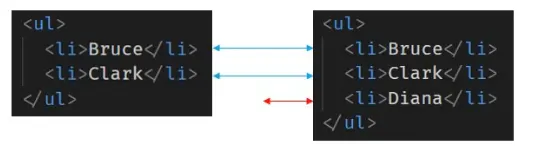
React matches the first items, sees no difference, then the second items, again no difference. At the third item it finds a new element and simply inserts it. Instead of destroying and rebuilding the list, React just adds one item.
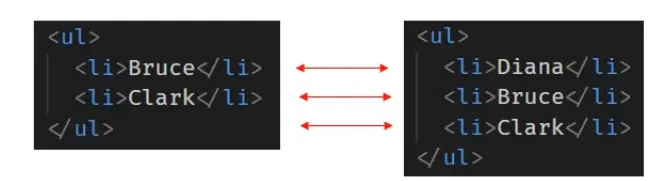
Now consider the same items, but this time we insert at the beginning. When React compares the lists position by position, every item looks different (position 0 was Bruce, now it’s the new item; position 1 was Clark, now it’s Bruce…). React ends up updating every child instead of realizing it can keep Bruce’s and Clark’s subtrees intact. This inefficiency can be a problem, and to resolve it React supports the key attribute.
List with keys
When children have keys, React uses the key to match children in the old tree with children in the new tree. Now React knows the item with key=3 is new, and the items with key=1 and key=2 just moved. So React keeps their subtrees and simply inserts the new item at the top of the list.
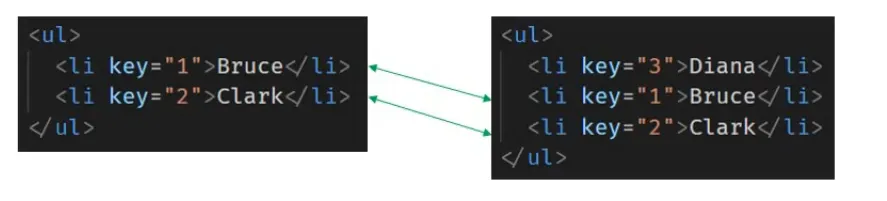
// Before<ul>  <li key="1">Bruce</li>  <li key="2">Clark</li></ul>
// After<ul>  <li key="3">Diana</li>   {/* new → inserted */}  <li key="1">Bruce</li>   {/* same key → reused, just moved */}  <li key="2">Clark</li>   {/* same key → reused, just moved */}</ul>
Keys can also reset a component
A different key tells React it’s a different component, so it unmounts the old one and mounts a new one with fresh state.
function ProfilePage({ userId }) { // When userId changes, the whole form is recreated with empty fields return <EditProfileForm key={userId} userId={userId} />;}Index as key anti-pattern
When items don’t have stable IDs, you can use the array index as a key (React also uses the index by default if you give no key):
function NumberList({ numbers }) {  const listItems = numbers.map((number, index) =>    <li key={index}>{number}</li>  );  return <ul>{listItems}</ul>;}
const numbers = [1, 2, 3, 4, 5];root.render(<NumberList numbers={numbers} />);
But index as key can cause serious bugs (imp)
The key is supposed to identify an item, but an index identifies a position. When items are added, removed or reordered, the same index points to a different item, so React reuses the wrong component and its state/DOM.
You can read more here → Index as a key is an anti-pattern
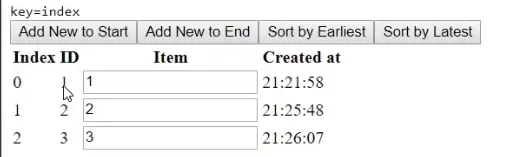
In the UI above we use the index as the key. Each row has an ID (the index + 1) and an empty text field where we can type anything. Say we type the row’s ID into each field. After clicking “Add New to End” we have 3 rows. Now we add an item at the beginning by clicking “Add New to Start”. We expect the result to be:
Expected:
| index | ID | item (typed text) |
|---|---|---|
| 0 | 4 (new) | (empty) |
| 1 | 1 | 1 |
| 2 | 2 | 2 |
| 3 | 3 | 3 |


But we get this instead:
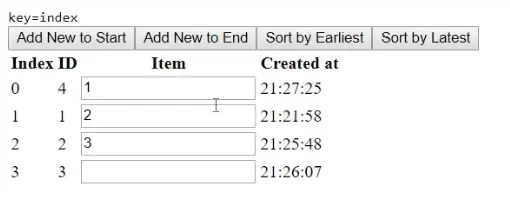
How React interprets it:
-
Initially we have 3 items, each with its index as the key:

key=0→ ID 1, input shows “1”key=1→ ID 2, input shows “2”key=2→ ID 3, input shows “3”
-
When a new item is inserted at the beginning:
- the new item gets
key=0, - every existing item’s key goes up by 1.
- the new item gets
-
During the update:
- React matches elements by key. It sees
key=0,key=1,key=2still exist, so it reuses those components and their DOM inputs (with the text typed into them), just giving them the new props. - Only
key=3looks new, so React creates a new empty input at the end.
- React matches elements by key. It sees
-
The result is misalignment:
- The ID text (from props) updates correctly, but the input values stay attached to the old positions.
- So row 0 now shows the new item’s ID with “1” typed in it, and the empty input ends up in the last row.
The same bug appears when sorting, filtering or deleting items: state (input text, checkbox, focus, animations) sticks to the wrong row.
Minimal reproduction:
function App() {  const [items, setItems] = useState([{ id: 1 }, { id: 2 }]);  const addToStart = () => setItems(prev => [{ id: Date.now() }, ...prev]);
  return (    <>      <button onClick={addToStart}>Add to start</button>      {items.map((item, index) => (        <div key={index}>            {/* ❌ try key={item.id} to fix */}          {item.id} <input />        </div>      ))}    </>  );}// Type "first" in row 1, then click "Add to start":// with key={index}: "first" stays in the top row, next to the NEW item.// with key={item.id}: "first" moves down with its item. ✅
When can you use index as key?
All of these must be true:
- The items in your list don’t have a unique id.
- The list is static — it won’t change.
- The list will never be reordered or filtered, and items won’t be added or removed (except possibly at the end).
If not, add an ID to your data (e.g. generate one with crypto.randomUUID() when the item is created, not during render).
// ❌ new key on every render → every item remounts, inputs lose focus and textitems.map(item => <Row key={Math.random()} item={item} />)
// ✅ ID generated once, stored with the itemconst addItem = (text) => setItems(prev => [...prev, { id: crypto.randomUUID(), text }]);
Interview questions
// Q1: What's wrong, and what warning appears?function List({ users }) { return <ul>{users.map(user => <UserRow user={user} />)}</ul>;}function UserRow({ user }) { return <li key={user.id}>{user.name}</li>;}// Answer: "Each child in a list should have a unique key prop". The key must be on// <UserRow key={user.id} /> inside map, not on the <li> inside UserRow.// Q2: What does the child receive?<Item key="a1" name="Pen" />function Item(props) { console.log(props.key, props.name); return null;}// Answer: undefined "Pen" — key is used by React and is not passed as a prop.// Q3: What happens with this key?{todos.map(todo => <TodoItem key={Math.random()} todo={todo} />)}// Answer: every render creates new keys, so React unmounts and remounts every item —// slow, and any state (input text, focus) is lost on each render.// Q4: How do you reset a form's state when switching users?// Answer: give it a key that changes with the user: <UserForm key={user.id} user={user} />// Q5: Changing a wrapper from <div> to <section> — what happens to child component state?// Answer: it's reset. Different element types make React destroy the old subtree// and mount a new one.