On this page
How Nodejs Works
Last reviewed 2 Sept 2026
Client makes a request to a server (nodejs). Now requests will come to our server. On the server, requests will be queued in the event queue. Now from the queue, the Event loop keeps a watch on the event queue and picks up requests in FIFO order. Now requests can be blocking (sync task) or non-blocking (async task) operations. 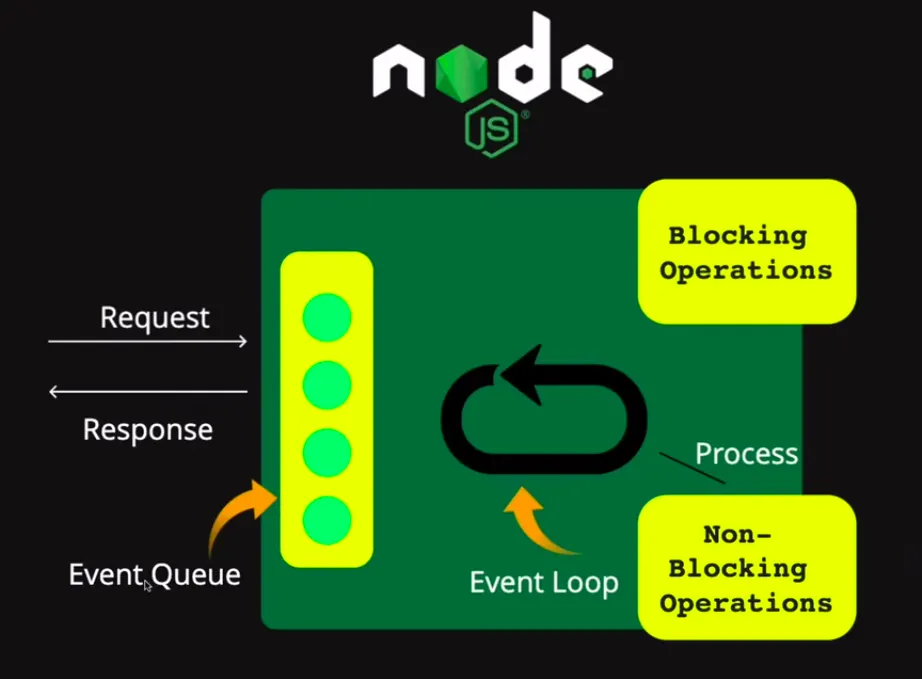
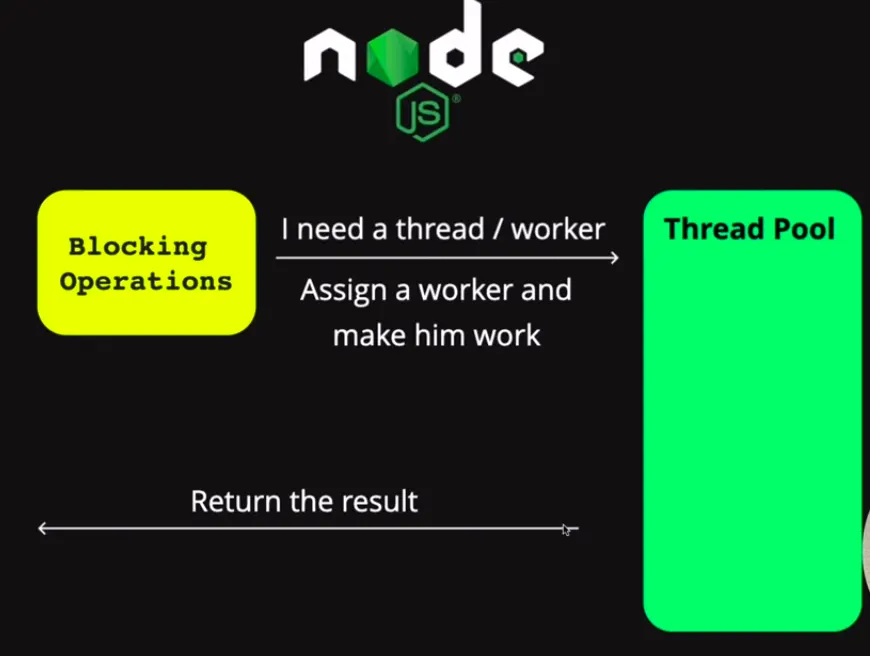
If the request is non-blocking then the event loop takes the requests, processes it and returns the responses to the user. If the request is blocking operation then the request will go to Thread pool (A pool of threads). A thread pool is a group of worker threads separate from the main event loop thread Node.js uses to execute JavaScript code and handle requests. Now here a thread/worker will be assigned to the request if available.
Asynchronous flow control
At its core, JavaScript is designed to be non-blocking on the “main” thread, this is where views are rendered. You can imagine the importance of this in the browser. When the main thread becomes blocked it results in the infamous “freezing” that end users dread, and no other events can be dispatched resulting in the loss of data acquisition. This creates some unique constraints that only a functional style of programming can cure. This is where callbacks come into the picture but due to “callback hell” where multiple nested functions with callbacks make the code more challenging to read, debug, organize, etc.
This is where functions come into great use. More complex operations are made up of many functions:
- initiator style / input
- middleware
- terminator
The “initiator style / input” is the first function in the sequence. This function will accept the original input, if any, for the operation. The operation is an executable series of functions, and the original input will primarily be:
- variables in a global environment
- direct invocation with or without arguments
- values obtained by file system or network requests
Network requests can be incoming requests initiated by a foreign network, by another application on the same network, or by the app itself on the same or foreign network
A middleware function will return another function, and a terminator function will invoke the callback
Overview of Blocking vs Non-Blocking
Blocking is when the execution of additional JavaScript in the Node.js process must wait until a non-JavaScript operation completes. This happens because the event loop is unable to continue running JavaScript while a blocking operation is occurring.
Let’s understand with the code
-
Blocking
**const fs = require('node:fs');****console.log("1");**
// blocking
const result = fs.readFileSync(“test.txt”,“utf-8”);
**console.log(result);**
**console.log("2");**
Output:
1
Rishabh: Sisodiya
2
-
Non Blocking:
**const fs = require('node:fs');****console.log("1");**
// non-blocking
**fs.readFile("test.txt","utf-8",(error, result)=>{**if (error) {
**console.log(error);**}
**console.log(result);**});
**console.log("2");**Output:
1
2
Rishabh: Sisodiya
Concurrency and Throughput
JavaScript execution in Node.js is single threaded, so concurrency refers to the event loop’s capacity to execute JavaScript callback functions after completing other work. Any code that is expected to run in a concurrent manner must allow the event loop to continue running as non-JavaScript operations, like I/O, are occurring.
How the event loop works
Let me explain the priority order of the queues. First, know that all user-written synchronous JavaScript code takes priority over async code that the runtime would like to execute. This means that only after the call stack is empty does the event loop come into play.
The following diagram shows a simplified overview of the event loop’s order of operations.
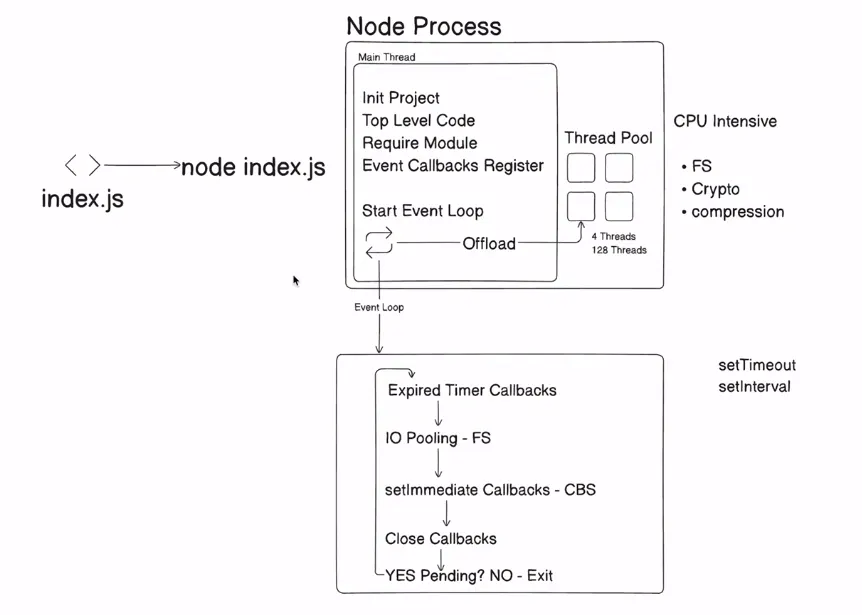
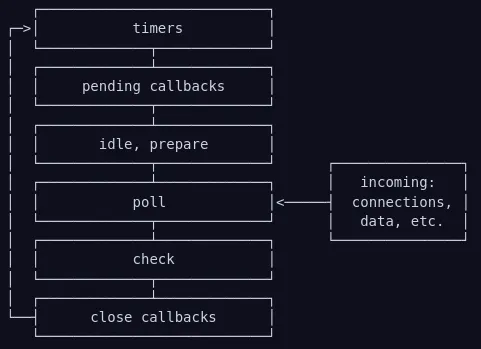
Each box will be referred to as a “phase” of the event loop.
Phases Overview **(whenever event loop transition, will check for nextTick and then promises)
- timers: this phase executes callbacks scheduled by setTimeout() and setInterval().
- pending callbacks: executes I/O callbacks deferred to the next loop iteration.
- idle, prepare: only used internally.
- poll: retrieve new I/O events; execute I/O related callbacks (almost all with the exception of close callbacks, the ones scheduled by timers, and setImmediate()); node will block here when appropriate.
- check: setImmediate() callbacks are invoked here.
- close callbacks: some close callbacks, e.g. socket.on(‘close’, …).
Normal Sequence for the code:
- Expired Timer Callbacks
- IO polling FS
- setImmediate Callbacks
- Close callbacks
- Yes Pending ? NO Exit.
Phases in Detail
timers
A timer specifies the threshold after which a provided callback may be executed rather than the exact time a person wants it to be executed. Timer callbacks will run as early as they can be scheduled after the specified amount of time has passed; however, Operating System scheduling or the running of other callbacks may delay them.
Technically, the poll phase controls when timers are executed.
To prevent the poll phase from starving the event loop, libuv (the C library that implements the Node.js event loop and all of the asynchronous behaviours of the platform) also has a hard maximum (system dependent) before it stops polling for more events.
pending callbacks
This phase executes callbacks for some system operations such as types of TCP errors. For example if a TCP socket receives ECONNREFUSED when attempting to connect, some *nix systems want to wait to report the error. This will be queued to execute in the pending callbacks phase.
poll
The poll phase has two main functions:
- Calculating how long it should block and poll for I/O, then
- Processing events in the poll queue.
When the event loop enters the poll phase and there are no timers scheduled, one of two things will happen:
- If the poll queue is not empty, the event loop will iterate through its queue of callbacks executing them synchronously until either the queue has been exhausted, or the system-dependent hard limit is reached.
- If the poll queue is empty, one of two more things will happen:
- If scripts have been scheduled by setImmediate(), the event loop will end the poll phase and continue to the check phase to execute those scheduled scripts.
- If scripts have not been scheduled by setImmediate(), the event loop will wait for callbacks to be added to the queue, then execute them immediately.
Once the poll queue is empty the event loop will check for timers whose time thresholds have been reached. If one or more timers are ready, the event loop will wrap back to the timers phase to execute those timers’ callbacks.
check
This phase allows a person to execute callbacks immediately after the poll phase has completed. If the poll phase becomes idle and scripts have been queued with setImmediate(), the event loop may continue to the check phase rather than waiting.
setImmediate() is actually a special timer that runs in a separate phase of the event loop. It uses a libuv API that schedules callbacks to execute after the poll phase has completed.
close callbacks
If a socket or handle is closed abruptly (e.g. socket.destroy()), the ‘close’ event will be emitted in this phase. Otherwise it will be emitted via process.nextTick().
setImmediate() vs setTimeout()
setImmediate() is designed to execute a script once the current poll phase completes.
setTimeout() schedules a script to be run after a minimum threshold in ms has elapsed.
The order in which the timers are executed will vary depending on the context in which they are called. If both are called from within the main module, then timing will be bound by the performance of the process (which can be impacted by other applications running on the machine).
// timeout_vs_immediate.js
setTimeout(() => {
console.log('timeout');
}, 0);
setImmediate(() => {
console.log('immediate');
});
Output:
timeout
immediate
const fs = require('node:fs');
fs.readFile("test.txt", 'utf-8',(error, result) => {
setTimeout(() => {
console.log('timeout');
}, 0);
setImmediate(() => {
console.log('immediate');
});
console.log(result);
});
Output:
Rishabh : Sisodiyaimmediate
timeout
The main advantage to using setImmediate() over setTimeout() is that setImmediate() will always be executed before any timers if scheduled within an I/O cycle, independently of how many timers are present.
Understanding process.nextTick()
You may have noticed that process.nextTick() was not displayed in the diagram, even though it’s a part of the asynchronous API. This is because process.nextTick() is not technically part of the event loop. Instead, the nextTickQueue will be processed after the current operation is completed, regardless of the current phase of the event loop
Looking back at our diagram, any time you call process.nextTick() in a given phase, all callbacks passed to process.nextTick() will be resolved before the event loop continues.
This can create some bad situations because it allows you to “starve” your I/O by making recursive process.nextTick() calls, which prevents the event loop from reaching the poll phase.
function apiCall(arg, callback) {if (typeof arg !== ‘string’)
return process.nextTick(callback,
new TypeError(‘argument should be string’)
);
}
What we’re doing is passing an error back to the user but only after we have allowed the rest of the user’s code to execute. By using process.nextTick() we guarantee that apiCall() always runs its callback after the rest of the user’s code and before the event loop is allowed to proceed. To achieve this, the JS call stack is allowed to unwind then immediately execute the provided callback which allows a person to make recursive calls to process.nextTick() without reaching a RangeError: Maximum call stack size exceeded from v8.
Here’s another real world example:
const server = net.createServer(() => {}).listen(8080);
server.on('listening', () => {});
When only a port is passed, the port is bound immediately. So, the ‘listening’ callback could be called immediately. The problem is that the .on(‘listening’) callback will not have been set by that time.
To get around this, the ‘listening’ event is queued in a nextTick() to allow the script to run to completion. This allows the user to set any event handlers they want.
process.nextTick() vs setImmediate()
- process.nextTick() fires immediately on the same phase
- setImmediate() fires on the following iteration or ‘tick’ of the event loop
Why use process.nextTick()?
There are two main reasons:
- Allow users to handle errors, cleanup any then unneeded resources, or perhaps try the request again before the event loop continues.
- At times it’s necessary to allow a callback to run after the call stack has unwound but before the event loop continues.
Generally, as the code is executed, the event loop will eventually hit the poll phase where it will wait for an incoming connection, request, etc. However, if a callback has been scheduled with setImmediate() and the poll phase becomes idle, it will end and continue to the check phase rather than waiting for poll events.
Sequence of execution in the event loop
All user-written synchronous JavaScript code takes priority over async code that the runtime would like to execute. This means that only after the call stack is empty does the event loop come into play.
Within the event loop, the sequence of execution follows certain rules. There are quite a few rules to wrap your head around, so let’s go over them one at a time:
- Any callbacks in the microtask queue are executed. First, tasks in the nextTick queue and only then tasks in the promise queue.
- All callbacks within the timer queue are executed.
- Callbacks in the microtask queue (if present) are executed after every callback in the timer queue. First, tasks in the nextTick queue, and then tasks in the promise queue.
- All callbacks within the I/O queue are executed.
- Callbacks in the microtask queues (if present) are executed, starting with nextTickQueue and then Promise queue.
- All callbacks in the check queue are executed.
- Callbacks in the microtask queues (if present) are executed after every callback in the check queue. First, tasks in the nextTick queue, and then tasks in the promise queue.
- All callbacks in the close queue are executed.
- For one final time in the same loop, the microtask queues are executed. First, tasks in the nextTick queue, and then tasks in the promise queue.
If there are more callbacks to be processed at this point, the loop is kept alive for one more run, and the same steps are repeated. On the other hand, if all callbacks are executed and there is no more code to process, the event loop exits.
Let’s understand it more with code
Remember below execution steps for now:
- Expired Timer Callbacks
- IO polling FS
- setImmediate Callbacks
- Close callbacks
- Yes Pending ? NO Exit.
-
Code with top level code and timer
const fs = require("fs");setTimeout(() => console.log("Hello from Timer 1"), 0);console.log("Hello from top level code");
Output:
Hello from top level code
Hello from Timer 1
-
Code with top level code, timer and setImmediate
const fs = require("fs");setTimeout(() => console.log("Hello from Timer 1");, 0);setImmediate( () => console.log("Hello from Immediate 1"));console.log("Hello from top level code");Output:
Hello from top level code
Hello from Timer 1
Hello from Immediate 1
-
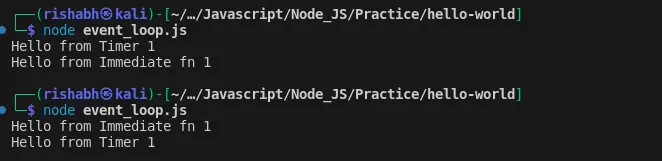
Code with only time and Immediate function
const fs = require("fs");setTimeout(() => console.log("Hello from Timer 1"), 0);setImmediate(() => console.log("Hello from Immediate fn 1"));Output: (Here output cannot be determined)
-
Code with I/O operation
const fs = require("fs");setTimeout(() => console.log("Hello from Timer 1"), 0);setImmediate(() => console.log("Hello from Immediate fn 1"));
// below code might be expensive if test.txt is large
fs.readFile("test.txt", "utf8", (err, data) => {if (err) {
console.error(err);
return;
}
console.log("IO polling finish");
});
console.log("Hello from Top level Code");Here Output depends on the file we are reading as well.
Let’s understand it.
- First top level code will work
- Then it will check expired timer callback which is here it is 0 so it will be expired
- Then IO polling but here we might take time as reading files may be expensive so the IO operation will take time to process it.
- The setImmediate callback will run as above process might not complete
- Now it will check if any pending operation is available then it will find IO polling of the reading file is still running so the event loop will restart checking it.
- After following the above process it will run the fs.readFile and print the output
Output:
Hello from Top level Code
Hello from Timer 1
Hello from Immediate fn 1
IO polling finish
-
Code with multiple timeout in IO pooling
const fs = require("fs");setTimeout(() => console.log("Hello from Timer 1"), 0);setImmediate(() => console.log("Hello from Immediate fn 1"));
// below code might be expensive if test.txt is large
fs.readFile("test.txt", "utf8", (err, data) => {if (err) {
console.error(err);
return;
}
setTimeout(() => console.log("Hello from Timer 2"), 0);
setTimeout(() => console.log("Hello from Timer 3"), 5*1000);
setImmediate(() => console.log("Hello from Immediate fn 2"));
console.log("IO polling finish");
});
console.log("Hello from Top level Code");Output:
Hello from Top level Code
Hello from Timer 1
Hello from Immediate fn 1
IO polling finish
Hello from Immediate fn 2
Hello from Timer 2
Hello from Timer 3
Explanation
Top level code: print Hello from Top level Code
- Timer: Yes we have expired timer with 0ms so our timer 1 will run and print Hello from Timer 1
- IO Polling: Yes we have FS readsync but it might take time so it will take time so move to next step
- SetImmediate CBs: Yes we have setimmediate so it will run and print Hello from Immediate fn 1
- Close CBS: continue
- Pending: Yes we have file reading task pending so event loop will start again
- Timer: Since the file reading task was not completed earlier. It will check for timer expiration which is not available now. It will skip and move to next step
- IO Polling: Here this time File reading task complete so it will enter into its code, register timeout and setimmediate and print its top level code which is IO polling finish
- SetImmediate CBs: Since in above step, we have immediate callback so it will print Hello from Immediate fn 2 and move to next step
- Close CBs: continue to next step
- Pending: Yes we have timeout CBs so event loop will start again
- Timer: Check for expired timer CB which we have so it print Hello from Timer 2 and continue the process and again it will run after 5s after checking all the steps and print Hello from Timer 3
- Pending: Exit
6. Code with process.nextTick()
const fs = require("fs");
setTimeout(() => console.log("Hello from Timer 1"), 0);
setImmediate(() => console.log("Hello from Immediate fn 1"));
process.nextTick(() => console.log("Hello from nextTick fn 1"));// below code might be expensive if test.txt is large
fs.readFile("test.txt", "utf8", (err, data) => {if (err) {
console.error(err);
return;
}
process.nextTick(() => console.log("Hello from nextTick fn 3"));
setTimeout(() => console.log("Hello from Timer 2"), 0);
setTimeout(() => console.log("Hello from Timer 3"), 5*1000);
setImmediate(() => console.log("Hello from Immediate fn 1"));
console.log("IO polling finish");
process.nextTick(() => console.log("Hello from nextTick fn 4"));
});
process.nextTick(() => console.log("Hello from nextTick fn 2"));
new Promise((resolve, reject) => {
resolve("Promise");
}).then((resolve) => {
console.log("Hello from Promise");
});
console.log("Hello from Top level Code");
Output:
Hello from Top level Code
Hello from nextTick fn 1
Hello from nextTick fn 2
Hello from Promise
Hello from Timer 1
Hello from Immediate fn 1
IO polling finish
Hello from nextTick fn 3
Hello from nextTick fn 4
Hello from Immediate fn 1
Hello from Timer 2
Hello from Timer 3
Explanation:
the nextTickQueue will be processed after the current operation is completed, regardless of the current phase of the event loop. So after each phase we need to check for nextTick function and that will print the output.
7. Promises and nextTick
**const baz = () => console.log('baz');**
**const foo = () => console.log('foo');**
**const zoo = () => console.log('zoo');**
**const start = () => {**
**console.log('start');**
setImmediate(baz);
**new Promise((resolve, reject) => {**resolve(‘bar’);
**}).then(resolve => {**
**console.log(resolve);**
process.nextTick(zoo);
});
process.nextTick(foo);
};
start();
Output:
start
foo
bar
zoo
Baz
This code will first call start(), then call foo() in process.nextTick queue. After that, it will handle promises microtask queue, which prints bar and adds zoo() in process.nextTick queue at the same time. Then it will call zoo() which has just been added. In the end, the baz() in the macrotask queue is called.
Event emitter
If you worked with JavaScript in the browser, you know how much of the interaction of the user is handled through events: mouse clicks, keyboard button presses, reacting to mouse movements, and so on.
On the backend side, Node.js offers us the option to build a similar system using the events module.
**const EventEmitter = require('node:events');**const eventEmitter = new EventEmitter();
**eventEmitter.on('start', () => {**
**console.log('started');**
});
**setTimeout(() => {**eventEmitter.emit(‘start’);
}, 0);
**console.log("End");**The EventEmitter object also exposes several other methods to interact with events, like
- once(): add a one-time listener
- removeListener() / off(): remove an event listener from an event
- removeAllListeners(): remove all listeners for an event
Worker Threads in Nodejs
Thread Pool in Node.js
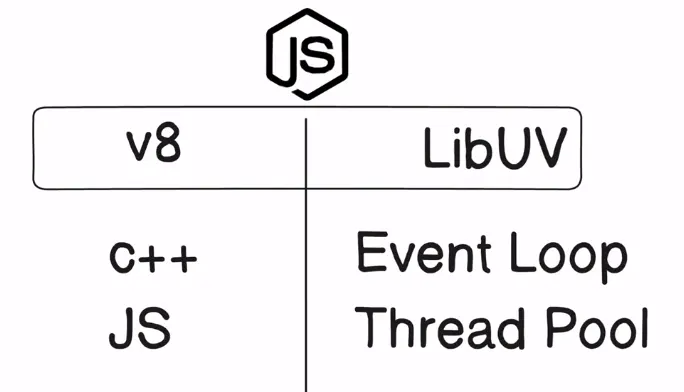
A thread pool is a group of worker threads separate from the main event loop thread Node.js uses to execute JavaScript code and handle requests. The underlying operating system manages these worker threads. They are used to perform certain types of tasks that can be slow and blocking, such as reading or writing to a file, performing cryptographic functions, etc. These tasks are known as blocking operations, and they can cause the event loop to pause execution, which can lead to poor performance. By offloading these tasks to the worker threads in the thread pool, it allows the event loop thread to continue handling other tasks without being blocked by the slow operations.
By default, libuv uses a thread pool with 4 threads, but this number can be changed by setting the UV_THREADPOOL_SIZEenvironment variable
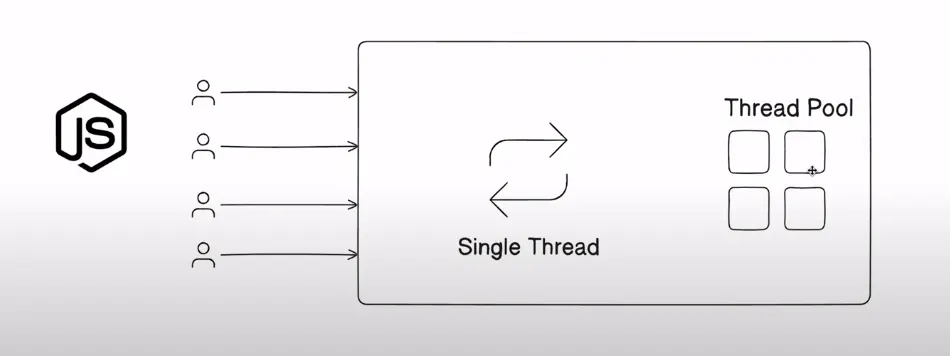
We can use the crypto module to check the working of it.